How to Use Meta Ad Library to Reverse-Engineer Competitor Ad Strategies

How to Use Meta Ad Library to Reverse-Engineer Competitor Ad Strategies

How to Use Meta Ad Library to Reverse-Engineer Competitor Ad Strategies

Lokeshwaran Magesh

Lokeshwaran Magesh

Lokeshwaran Magesh

14 Mins Read

14 Mins Read

14 Mins Read

Table of Contents

  • What You Need Before You Start

  • Step 1: Find and Filter Competitor Ads

  • Step 2: Identify Winning Ads Using Longevity Signals

  • Step 3: Analyze Ad Creative at the Element Level

  • Step 4: Map Competitor Funnel Strategy

  • Step 5: Build a Structured Competitor Swipe File

  • Step 6: Turn Research Into Testable Creative Briefs

  • Common Mistakes to Avoid

  • Tools That Make This Easier

  • Frequently Asked Questions

Table of Contents

  • What You Need Before You Start

  • Step 1: Find and Filter Competitor Ads

  • Step 2: Identify Winning Ads Using Longevity Signals

  • Step 3: Analyze Ad Creative at the Element Level

  • Step 4: Map Competitor Funnel Strategy

  • Step 5: Build a Structured Competitor Swipe File

  • Step 6: Turn Research Into Testable Creative Briefs

  • Common Mistakes to Avoid

  • Tools That Make This Easier

  • Frequently Asked Questions

Table of Contents

  • What You Need Before You Start

  • Step 1: Find and Filter Competitor Ads

  • Step 2: Identify Winning Ads Using Longevity Signals

  • Step 3: Analyze Ad Creative at the Element Level

  • Step 4: Map Competitor Funnel Strategy

  • Step 5: Build a Structured Competitor Swipe File

  • Step 6: Turn Research Into Testable Creative Briefs

  • Common Mistakes to Avoid

  • Tools That Make This Easier

  • Frequently Asked Questions

Make Every Ad a Winner

Hooks, CTAs, visuals - decode every detail.

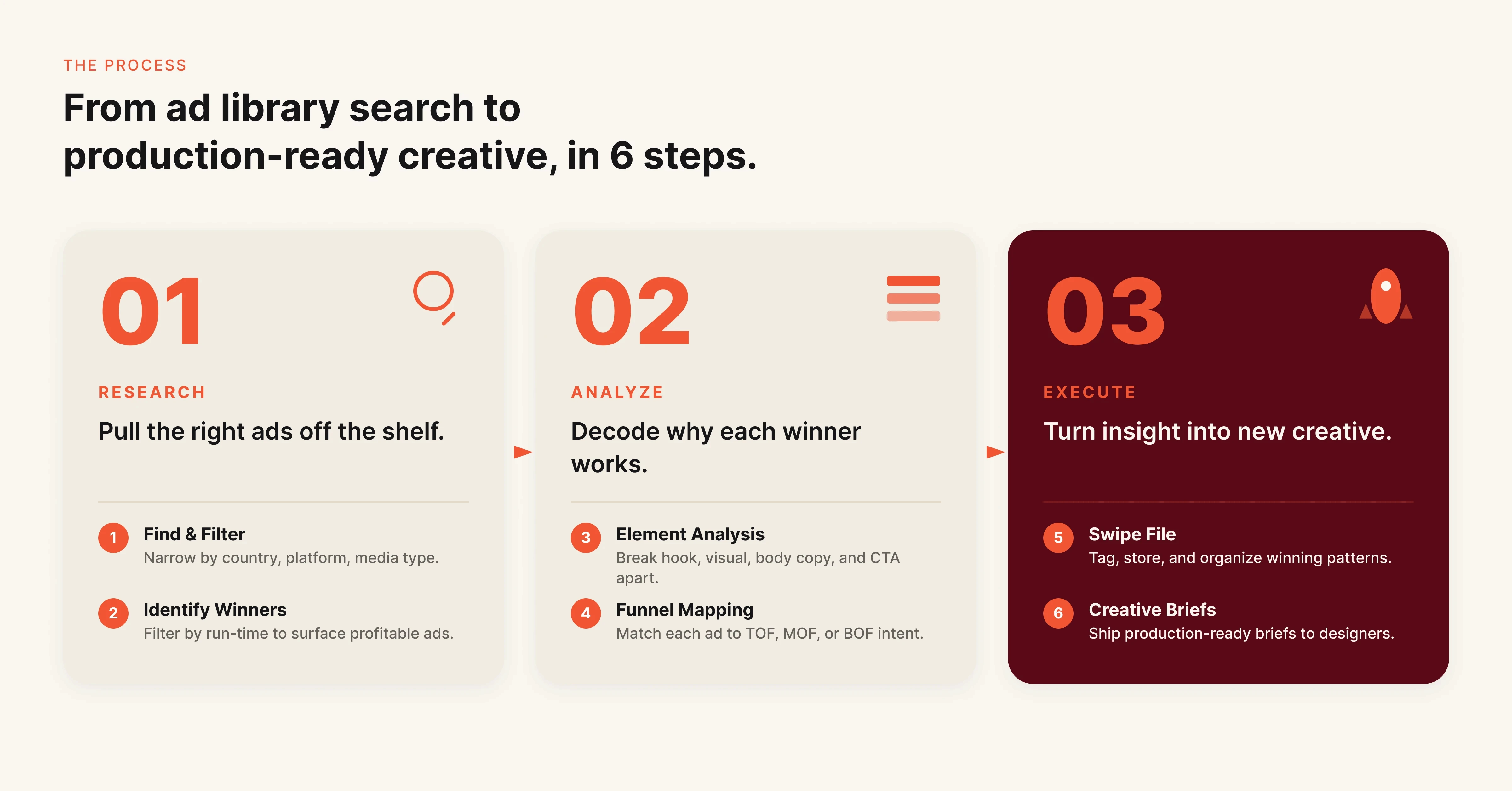
After reading this guide, you will have a repeatable 6-step process to extract competitor ad intelligence from Meta Ad Library and turn it into creative strategies you can actually test. Most marketing teams open the Ad Library, browse a few competitor pages, screenshot some ads, and call it research. That is not competitive intelligence. That is window shopping. This guide gives you the framework to move from observation to action.

What You Need Before You Start

Meta Ad Library is free and requires no login. Navigate to facebook.com/ads/library in any browser to access it. No Meta account, no ad account, no paid subscription required.

Before you start your research, prepare these three things:

A competitor list of 5-10 brands. Include direct competitors (same product category), indirect competitors (different product, same audience), and aspirational competitors (brands whose creative quality you want to match). Knowing their exact Facebook Page names will save time during search.

A tracking spreadsheet or document. You will need somewhere to log what you find. A simple spreadsheet with columns for brand name, ad format, hook text, CTA, visual style, start date, and number of variations works well. More on this in Step 5.

Clear research questions. Decide what you want to learn before you search. "What are competitors doing?" is too vague. "What hooks are my top 3 competitors using in video ads this month?" is specific enough to produce useful findings.

Step 1: Find and Filter Competitor Ads

Meta Ad Library is a public transparency database of every active ad running across Facebook, Instagram, Messenger, and Audience Network. Meta originally launched it in 2019 for political ad transparency, but it has become the go-to tool for competitive creative research. The search functionality is more powerful than most marketers realize.

6-step flowchart for reverse-engineering competitor ad strategies using Meta Ad Library

Start by searching a competitor's exact Facebook Page name. This returns every ad currently running under that Page. You will see the ad creative, primary text, headline, CTA button, and the date the ad started running.

Use these advanced search techniques to go deeper:

Technique

How to Use It

Example

Exact phrase search

Wrap phrase in quotes

"free shipping"

OR search

Use the pipe symbol between terms

nike|adidas|puma

Platform filter

Select Facebook-only or Instagram-only

Filter dropdown

Country filter

Narrow to specific markets

United States, United Kingdom

Media type filter

Filter by image, video, or meme

Filter dropdown

Date range

Filter by impression date

Last 30, 60, 90 days

Many brands run entirely different creative on Facebook versus Instagram. Filtering by platform reveals these platform-specific strategies that a combined view hides.

Pro tip: Search by keyword (not just Page name) to discover competitors you did not know existed. Searching your product category terms surfaces every advertiser using those words in their ad copy.

Step 2: Identify Winning Ads Using Longevity Signals

Meta Ad Library does not show performance metrics. No CTR, no ROAS, no conversion data, no spend figures. This is the tool's biggest limitation, and it is the reason most competitor research stays superficial.

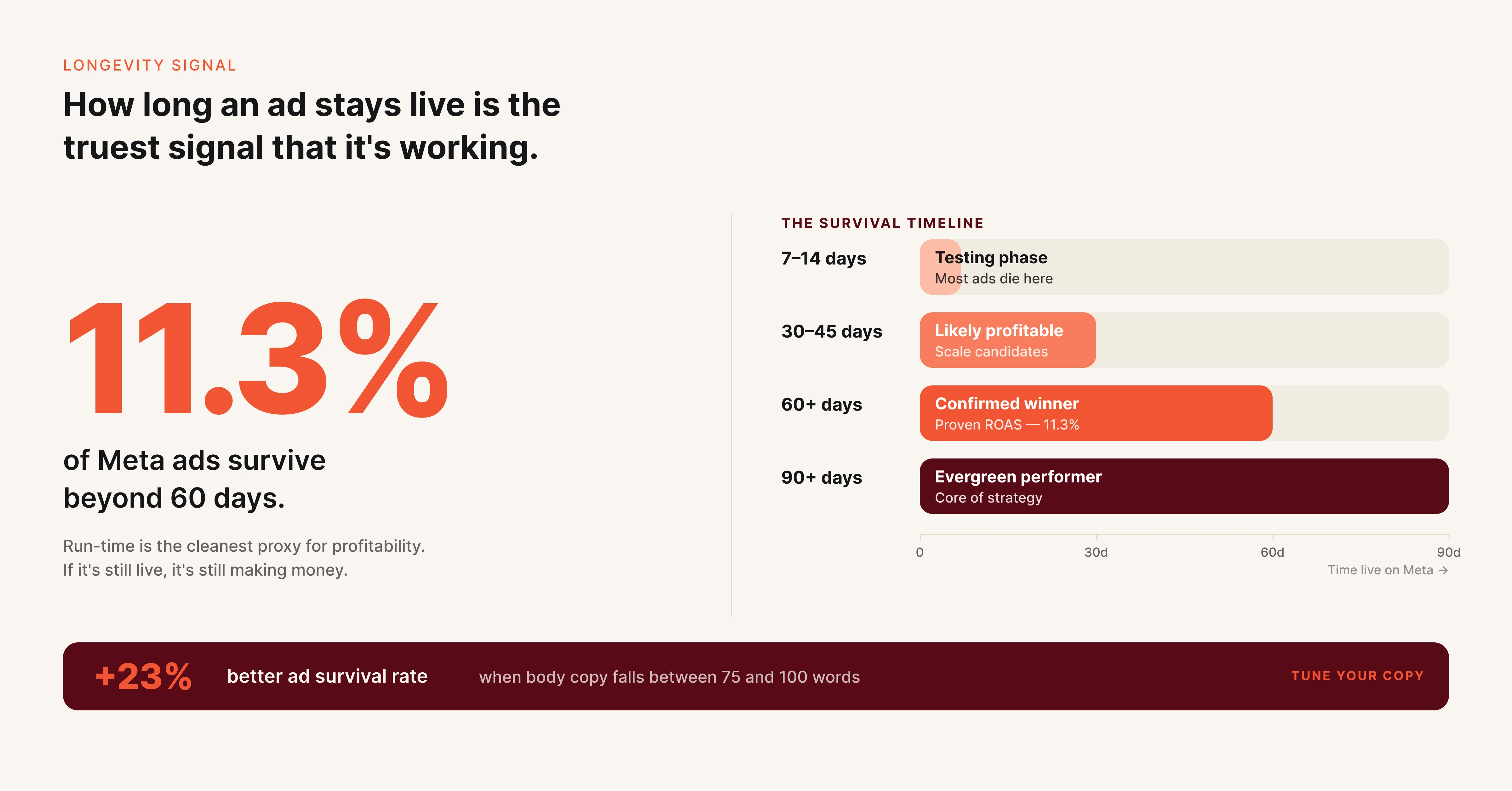
Longevity is your best available proxy for ad performance. An analysis of 47,392 ads from 1,247 brands found that only 11.3% of ads survive beyond 60 days. Any ad running for 30 days or more is almost certainly delivering positive returns, because no media buyer keeps spending on creative that loses money.

Here is how to surface those winners:

Sort by start date (oldest first). This immediately pushes long-running ads to the top. Any ad active for 60+ days deserves close attention. Ads running for 90+ days are likely top performers in that account.

Count active variations. If a competitor runs 8-12 variations of the same concept (same hook, different visuals or slight copy tweaks), they are scaling a proven winner. High variation count signals both performance and budget confidence.

Check for recurring creative concepts. If a competitor launched a specific ad angle three months ago and you see new variations of it today, that angle is working. Repetition across time is a stronger signal than any single ad.

Ad longevity benchmarks showing that only 11.3% of Meta ads survive beyond 60 days with performance tiers

Longevity

What It Signals

Action

Active 7-14 days

Testing phase

Monitor, do not copy

Active 30-45 days

Likely profitable

Analyze elements closely

Active 60+ days

Confirmed winner

Reverse-engineer the full framework

Active 90+ days

Evergreen performer

Study structure and adapt for your brand

Pro tip: Ads with 75-100 words of body copy have a 23% better survival rate past 60 days compared to shorter or longer copy. Keep that benchmark in mind when you analyze winning ads.

Step 3: Analyze Ad Creative at the Element Level

This is where most competitor research guides stop: "Look at their ads." That is not analysis. Analysis means breaking each winning ad into its component parts and understanding why each element works.

Annotated Facebook ad mockup showing four elements to analyze: hook, visual, body copy, and CTA

Every ad has four core elements. Examine each one separately:

Hook (first 1-2 lines of primary text). The hook determines whether someone stops scrolling. Categorize the hook type: question, bold claim, statistic, pain point callout, social proof, or curiosity gap. Track which hook types each competitor uses most frequently across their winning ads.

Visual format and style. Note the format (static image, carousel, video, UGC), the color palette, whether it features product shots or lifestyle imagery, text overlay presence and placement, and the overall production quality. Competitors running high volumes of UGC-style ads are signaling what their audience responds to.

Body copy structure. Beyond the hook, look at how the rest of the copy is organized. Does it follow a problem-agitation-solution framework? Does it stack benefits as bullet points? Does it tell a customer story?

Winning ads with 60+ day longevity use social proof 67.3% of the time, compared to 38.9% for ads that stop running within 30 days. That gap makes copy structure one of the most revealing elements to track.

CTA (call to action). Record the CTA button choice (Shop Now, Learn More, Sign Up, Get Offer) and the CTA language in the headline and body copy. Different CTAs signal different funnel positions. "Learn More" suggests top-of-funnel awareness. "Shop Now" signals bottom-of-funnel purchase intent.

Build a simple tally for each competitor. After reviewing 15-20 of their active ads, patterns emerge: dominant hook types, preferred visual formats, recurring CTA language, consistent copy length. These patterns reveal their creative playbook. For a deeper framework on analyzing what makes creative work, see how to find your winning creative with data.

Step 4: Map Competitor Funnel Strategy

Individual ads tell you what a competitor is saying. Ad distribution tells you what they are prioritizing.

Look at the full set of active ads for each competitor and categorize them by funnel stage:

Top of funnel (awareness): Educational content, brand storytelling, broad value propositions, "Learn More" CTAs. High volume of these ads means a competitor is investing in audience building.

Middle of funnel (consideration): Product comparisons, feature deep-dives, testimonials, case studies, "See How It Works" CTAs. Heavy spend here signals a competitor focused on conversion.

Bottom of funnel (purchase): Direct offers, discount codes, urgency language ("limited time"), retargeting-style messaging, "Shop Now" or "Buy Now" CTAs. Multiple bottom-of-funnel variations suggest aggressive scaling.

Count the ratio. If a competitor runs 40 active ads and 30 of them are bottom-of-funnel with discount offers, their strategy is discount-driven direct response. If they split evenly across funnel stages, they are running a full-funnel approach.

Also look at format distribution. A competitor running 80% video ads has clearly identified video as their winning format. A competitor with mostly carousel ads is likely in e-commerce with multiple product showcases.

This funnel mapping gives you strategic intelligence that goes beyond creative inspiration. It shows where a competitor is allocating budget and what stage of the buyer journey they are prioritizing.

Step 5: Build a Structured Competitor Swipe File

Raw screenshots saved in a random folder are not a swipe file. A useful swipe file is organized, searchable, and updated regularly.

Structure your swipe file with these fields for each saved ad:

Field

What to Record

Competitor name

Brand and Facebook Page name

Date captured

When you saved it (ads disappear when turned off)

Ad format

Static, video, carousel, UGC

Hook type

Question, stat, pain point, social proof, bold claim

Hook text

Exact first 1-2 lines

Visual description

Key visual elements and style

CTA

Button type and CTA copy

Funnel stage

TOF, MOF, BOF

Longevity

Days active at time of capture

Variation count

Number of active variations

Notes

What makes this ad interesting or effective

Set a recurring 15-20 minute block every week to update your swipe file. Many high-performing media buyers schedule this for Monday mornings: open Meta Ad Library, check your top 5 competitors, log any new ads or changes, note which previously saved ads are still running (confirming their performance).

Consistency matters more than depth here. A weekly habit captures trends that a one-time research session misses. You will notice when a competitor shifts messaging, launches a new product line, increases ad volume before a seasonal push, or stops running a previously evergreen ad.

Pro tip: Save screenshots and ad copy immediately. Once a competitor deactivates an ad, it disappears from Meta Ad Library permanently. If you did not capture it, it is gone.

Step 6: Turn Research Into Testable Creative Briefs

Research without action is trivia. The final step converts everything you have gathered into creative briefs your team can execute.

For each competitor pattern you identified, create a brief with these elements:

The insight. What did you observe? Example: "Three of our top five competitors use customer testimonial hooks in their highest-longevity ads. Our current ads use zero testimonial hooks."

The hypothesis. What do you believe will happen if you test a similar approach? Example: "Adding a customer quote as the first line of primary text will increase thumb-stop rate on our prospecting campaigns."

The test parameters. What specifically will you create and measure? Define the ad format, the hook variation, the visual style, the target audience, the success metric, and the test budget.

Do not copy competitor ads. Reverse-engineering means understanding the structural patterns behind what works and adapting those patterns to your brand, your product, and your audience. A competitor's testimonial hook works because social proof reduces skepticism, not because of the specific words they used.

Create 2-3 creative briefs per research cycle. This keeps your testing pipeline active without overwhelming your creative team. Prioritize briefs based on how many competitors use the pattern (higher frequency = higher confidence) and how different it is from your current approach (higher differentiation = higher potential upside).

Common Mistakes to Avoid

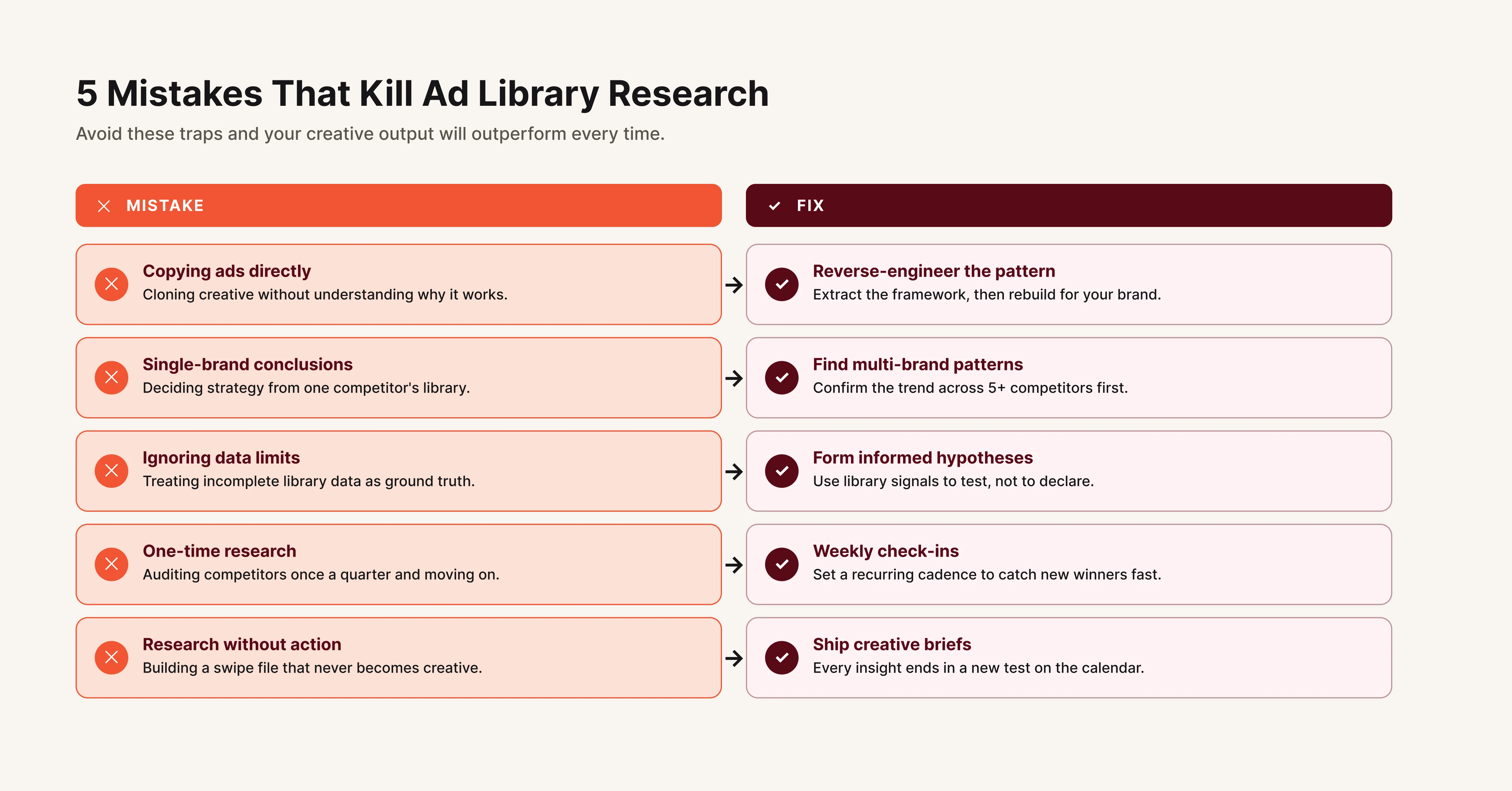
Copying ads instead of reverse-engineering patterns. Reproducing a competitor's ad teaches you nothing and may violate copyright. Extract the underlying framework (hook type, visual format, copy structure, CTA approach) and build original creative from those principles.

Five common Meta Ad Library research mistakes with corrections for better competitor analysis

Drawing conclusions from a single competitor or single ad. One ad is an anecdote. When three or more competitors use the same creative pattern, that is a signal worth testing. Base your strategy on patterns observed across multiple brands and multiple ads.

Ignoring the limitations of the data. Meta Ad Library shows what competitors run, not what works. Longevity is a proxy, not proof. An ad running for 60 days is probably profitable, but you do not know its ROAS, audience targeting, or conversion rate. Make informed hypotheses, not definitive claims.

Checking once and calling it done. Competitor strategy changes constantly. A quarterly review is already outdated by the time you finish it. Weekly 15-minute check-ins produce better intelligence than a single deep dive that never gets repeated.

Skipping the action step. The most common failure in competitor research is generating insights that never reach the creative team. If your research does not result in new creative briefs and new tests, it was a waste of time.

Tools That Make This Easier

Hawky is a creative intelligence platform built for performance marketing teams running Meta and Google Ads. Where the Ad Library gives you a raw feed of competitor ads, Hawky's Competitor Intelligence module turns that into structured, actionable analysis.

Hawky maintains a searchable Ad Repository of competitor creatives across Meta and Google, organized by brand, format, and platform, including historical ads that disappear from the Ad Library once deactivated. Weekly Competitor Alerts automatically surface hook changes, messaging shifts, new CTAs, offer updates, campaign volume changes, and funnel distribution shifts across every competitor you track.

Dynamic Filters let you slice competitor ads by ad format, creative type, and more. DPA (catalogue ads) are automatically excluded so you only see performance creatives, with the option to toggle them back in. You can build Custom Views with your own filter combinations, save them for quick access, and generate Shareable Reports your team or clients can open with a single link.

Hawky also detects Influencer Collaboration ads automatically inside Competitor Analysis. You can see which influencers a brand partners with, whether the same influencer runs ads for multiple brands, and spot partnership patterns to find new collaboration opportunities.

For teams that need the element-level breakdown covered in Step 3 of this guide (hooks, visuals, CTAs, body copy), Hawky runs that analysis automatically across both your own ads and competitor creative, with SWOT-style positioning insights and deep analysis reports.

Minea focuses on e-commerce ad intelligence with broader platform coverage including TikTok and Pinterest. Strong for product-level competitive research in dropshipping and D2C.

AdSpy and BigSpy are large ad databases that include some historical data and filtering options beyond what Meta Ad Library offers natively. Useful for one-off deep dives, though the data can feel noisy at scale.

Foreplay serves as a collaborative swipe file and creative brief tool. Useful for teams that need to share competitor research across designers, copywriters, and media buyers in a single workspace.

Frequently Asked Questions

How do I see my competitors' ads on Meta?
Go to facebook.com/ads/library and search for your competitor's Facebook Page name. The tool is free, requires no login, and shows every active ad running across Facebook, Instagram, Messenger, and Audience Network. You can filter results by country, platform, media type, and date range.

Can you see ad spend or performance data in Meta Ad Library?

No. Meta Ad Library does not show CTR, ROAS, conversion rates, impressions, or spend data for standard commercial ads. The only performance proxy available is ad longevity. Ads active for 30+ days are likely profitable. Ads active for 60+ days are almost certainly delivering positive returns based on industry analysis.

How often should you check competitor ads in Meta Ad Library?
Weekly check-ins of 15-20 minutes produce the best results. Schedule a recurring block, review your top 3-5 competitors, and log changes to your swipe file. This frequency captures strategic shifts (new messaging angles, seasonal pushes, product launches) while keeping the time investment manageable.

What can you NOT see in Meta Ad Library?

You cannot see audience targeting (interests, lookalikes, custom audiences), ad performance metrics (CTR, CPA, ROAS), exact ad spend, A/B test results, or landing page conversion data. You also cannot see inactive ads once a competitor turns them off. These gaps are why experienced teams pair the Ad Library with dedicated competitor analysis tools.

How do you tell which competitor ads are actually working?

Longevity is the strongest indicator. Research across 47,392 ads from 1,247 brands shows only 11.3% survive beyond 60 days. Ads active that long are almost certainly profitable. Other signals include high variation counts (multiple versions of the same concept), recurring creative themes across months, and the use of social proof in copy (present in 67.3% of long-running ads).

Is it legal to use Meta Ad Library for competitor research?
Yes. Meta Ad Library is a public transparency tool created by Meta specifically to provide visibility into advertising on its platforms. Viewing, analyzing, and learning from competitor ads is entirely legal. Directly copying a competitor's creative assets (images, video, exact copy) would raise copyright issues, but extracting strategic patterns and frameworks is standard competitive research practice.

Competitor research through Meta Ad Library is not about finding ads to copy. The goal is building a systematic understanding of what creative patterns work in your market and translating those patterns into original tests for your brand.

If your team spends hours manually tracking competitor ads and still struggles to turn that research into creative action, Hawky's Competitor Intelligence is built for that job. It automates the tracking, delivers element-level analysis, and surfaces the patterns that matter, so your creative team focuses on execution instead of research.

Ready to Stop Guessing and Start Winning with Creative Intelligence? Book Demo

After reading this guide, you will have a repeatable 6-step process to extract competitor ad intelligence from Meta Ad Library and turn it into creative strategies you can actually test. Most marketing teams open the Ad Library, browse a few competitor pages, screenshot some ads, and call it research. That is not competitive intelligence. That is window shopping. This guide gives you the framework to move from observation to action.

What You Need Before You Start

Meta Ad Library is free and requires no login. Navigate to facebook.com/ads/library in any browser to access it. No Meta account, no ad account, no paid subscription required.

Before you start your research, prepare these three things:

A competitor list of 5-10 brands. Include direct competitors (same product category), indirect competitors (different product, same audience), and aspirational competitors (brands whose creative quality you want to match). Knowing their exact Facebook Page names will save time during search.

A tracking spreadsheet or document. You will need somewhere to log what you find. A simple spreadsheet with columns for brand name, ad format, hook text, CTA, visual style, start date, and number of variations works well. More on this in Step 5.

Clear research questions. Decide what you want to learn before you search. "What are competitors doing?" is too vague. "What hooks are my top 3 competitors using in video ads this month?" is specific enough to produce useful findings.

Step 1: Find and Filter Competitor Ads

Meta Ad Library is a public transparency database of every active ad running across Facebook, Instagram, Messenger, and Audience Network. Meta originally launched it in 2019 for political ad transparency, but it has become the go-to tool for competitive creative research. The search functionality is more powerful than most marketers realize.

6-step flowchart for reverse-engineering competitor ad strategies using Meta Ad Library

Start by searching a competitor's exact Facebook Page name. This returns every ad currently running under that Page. You will see the ad creative, primary text, headline, CTA button, and the date the ad started running.

Use these advanced search techniques to go deeper:

Technique

How to Use It

Example

Exact phrase search

Wrap phrase in quotes

"free shipping"

OR search

Use the pipe symbol between terms

nike|adidas|puma

Platform filter

Select Facebook-only or Instagram-only

Filter dropdown

Country filter

Narrow to specific markets

United States, United Kingdom

Media type filter

Filter by image, video, or meme

Filter dropdown

Date range

Filter by impression date

Last 30, 60, 90 days

Many brands run entirely different creative on Facebook versus Instagram. Filtering by platform reveals these platform-specific strategies that a combined view hides.

Pro tip: Search by keyword (not just Page name) to discover competitors you did not know existed. Searching your product category terms surfaces every advertiser using those words in their ad copy.

Step 2: Identify Winning Ads Using Longevity Signals

Meta Ad Library does not show performance metrics. No CTR, no ROAS, no conversion data, no spend figures. This is the tool's biggest limitation, and it is the reason most competitor research stays superficial.

Longevity is your best available proxy for ad performance. An analysis of 47,392 ads from 1,247 brands found that only 11.3% of ads survive beyond 60 days. Any ad running for 30 days or more is almost certainly delivering positive returns, because no media buyer keeps spending on creative that loses money.

Here is how to surface those winners:

Sort by start date (oldest first). This immediately pushes long-running ads to the top. Any ad active for 60+ days deserves close attention. Ads running for 90+ days are likely top performers in that account.

Count active variations. If a competitor runs 8-12 variations of the same concept (same hook, different visuals or slight copy tweaks), they are scaling a proven winner. High variation count signals both performance and budget confidence.

Check for recurring creative concepts. If a competitor launched a specific ad angle three months ago and you see new variations of it today, that angle is working. Repetition across time is a stronger signal than any single ad.

Ad longevity benchmarks showing that only 11.3% of Meta ads survive beyond 60 days with performance tiers

Longevity

What It Signals

Action

Active 7-14 days

Testing phase

Monitor, do not copy

Active 30-45 days

Likely profitable

Analyze elements closely

Active 60+ days

Confirmed winner

Reverse-engineer the full framework

Active 90+ days

Evergreen performer

Study structure and adapt for your brand

Pro tip: Ads with 75-100 words of body copy have a 23% better survival rate past 60 days compared to shorter or longer copy. Keep that benchmark in mind when you analyze winning ads.

Step 3: Analyze Ad Creative at the Element Level

This is where most competitor research guides stop: "Look at their ads." That is not analysis. Analysis means breaking each winning ad into its component parts and understanding why each element works.

Annotated Facebook ad mockup showing four elements to analyze: hook, visual, body copy, and CTA

Every ad has four core elements. Examine each one separately:

Hook (first 1-2 lines of primary text). The hook determines whether someone stops scrolling. Categorize the hook type: question, bold claim, statistic, pain point callout, social proof, or curiosity gap. Track which hook types each competitor uses most frequently across their winning ads.

Visual format and style. Note the format (static image, carousel, video, UGC), the color palette, whether it features product shots or lifestyle imagery, text overlay presence and placement, and the overall production quality. Competitors running high volumes of UGC-style ads are signaling what their audience responds to.

Body copy structure. Beyond the hook, look at how the rest of the copy is organized. Does it follow a problem-agitation-solution framework? Does it stack benefits as bullet points? Does it tell a customer story?

Winning ads with 60+ day longevity use social proof 67.3% of the time, compared to 38.9% for ads that stop running within 30 days. That gap makes copy structure one of the most revealing elements to track.

CTA (call to action). Record the CTA button choice (Shop Now, Learn More, Sign Up, Get Offer) and the CTA language in the headline and body copy. Different CTAs signal different funnel positions. "Learn More" suggests top-of-funnel awareness. "Shop Now" signals bottom-of-funnel purchase intent.

Build a simple tally for each competitor. After reviewing 15-20 of their active ads, patterns emerge: dominant hook types, preferred visual formats, recurring CTA language, consistent copy length. These patterns reveal their creative playbook. For a deeper framework on analyzing what makes creative work, see how to find your winning creative with data.

Step 4: Map Competitor Funnel Strategy

Individual ads tell you what a competitor is saying. Ad distribution tells you what they are prioritizing.

Look at the full set of active ads for each competitor and categorize them by funnel stage:

Top of funnel (awareness): Educational content, brand storytelling, broad value propositions, "Learn More" CTAs. High volume of these ads means a competitor is investing in audience building.

Middle of funnel (consideration): Product comparisons, feature deep-dives, testimonials, case studies, "See How It Works" CTAs. Heavy spend here signals a competitor focused on conversion.

Bottom of funnel (purchase): Direct offers, discount codes, urgency language ("limited time"), retargeting-style messaging, "Shop Now" or "Buy Now" CTAs. Multiple bottom-of-funnel variations suggest aggressive scaling.

Count the ratio. If a competitor runs 40 active ads and 30 of them are bottom-of-funnel with discount offers, their strategy is discount-driven direct response. If they split evenly across funnel stages, they are running a full-funnel approach.

Also look at format distribution. A competitor running 80% video ads has clearly identified video as their winning format. A competitor with mostly carousel ads is likely in e-commerce with multiple product showcases.

This funnel mapping gives you strategic intelligence that goes beyond creative inspiration. It shows where a competitor is allocating budget and what stage of the buyer journey they are prioritizing.

Step 5: Build a Structured Competitor Swipe File

Raw screenshots saved in a random folder are not a swipe file. A useful swipe file is organized, searchable, and updated regularly.

Structure your swipe file with these fields for each saved ad:

Field

What to Record

Competitor name

Brand and Facebook Page name

Date captured

When you saved it (ads disappear when turned off)

Ad format

Static, video, carousel, UGC

Hook type

Question, stat, pain point, social proof, bold claim

Hook text

Exact first 1-2 lines

Visual description

Key visual elements and style

CTA

Button type and CTA copy

Funnel stage

TOF, MOF, BOF

Longevity

Days active at time of capture

Variation count

Number of active variations

Notes

What makes this ad interesting or effective

Set a recurring 15-20 minute block every week to update your swipe file. Many high-performing media buyers schedule this for Monday mornings: open Meta Ad Library, check your top 5 competitors, log any new ads or changes, note which previously saved ads are still running (confirming their performance).

Consistency matters more than depth here. A weekly habit captures trends that a one-time research session misses. You will notice when a competitor shifts messaging, launches a new product line, increases ad volume before a seasonal push, or stops running a previously evergreen ad.

Pro tip: Save screenshots and ad copy immediately. Once a competitor deactivates an ad, it disappears from Meta Ad Library permanently. If you did not capture it, it is gone.

Step 6: Turn Research Into Testable Creative Briefs

Research without action is trivia. The final step converts everything you have gathered into creative briefs your team can execute.

For each competitor pattern you identified, create a brief with these elements:

The insight. What did you observe? Example: "Three of our top five competitors use customer testimonial hooks in their highest-longevity ads. Our current ads use zero testimonial hooks."

The hypothesis. What do you believe will happen if you test a similar approach? Example: "Adding a customer quote as the first line of primary text will increase thumb-stop rate on our prospecting campaigns."

The test parameters. What specifically will you create and measure? Define the ad format, the hook variation, the visual style, the target audience, the success metric, and the test budget.

Do not copy competitor ads. Reverse-engineering means understanding the structural patterns behind what works and adapting those patterns to your brand, your product, and your audience. A competitor's testimonial hook works because social proof reduces skepticism, not because of the specific words they used.

Create 2-3 creative briefs per research cycle. This keeps your testing pipeline active without overwhelming your creative team. Prioritize briefs based on how many competitors use the pattern (higher frequency = higher confidence) and how different it is from your current approach (higher differentiation = higher potential upside).

Common Mistakes to Avoid

Copying ads instead of reverse-engineering patterns. Reproducing a competitor's ad teaches you nothing and may violate copyright. Extract the underlying framework (hook type, visual format, copy structure, CTA approach) and build original creative from those principles.

Five common Meta Ad Library research mistakes with corrections for better competitor analysis

Drawing conclusions from a single competitor or single ad. One ad is an anecdote. When three or more competitors use the same creative pattern, that is a signal worth testing. Base your strategy on patterns observed across multiple brands and multiple ads.

Ignoring the limitations of the data. Meta Ad Library shows what competitors run, not what works. Longevity is a proxy, not proof. An ad running for 60 days is probably profitable, but you do not know its ROAS, audience targeting, or conversion rate. Make informed hypotheses, not definitive claims.

Checking once and calling it done. Competitor strategy changes constantly. A quarterly review is already outdated by the time you finish it. Weekly 15-minute check-ins produce better intelligence than a single deep dive that never gets repeated.

Skipping the action step. The most common failure in competitor research is generating insights that never reach the creative team. If your research does not result in new creative briefs and new tests, it was a waste of time.

Tools That Make This Easier

Hawky is a creative intelligence platform built for performance marketing teams running Meta and Google Ads. Where the Ad Library gives you a raw feed of competitor ads, Hawky's Competitor Intelligence module turns that into structured, actionable analysis.

Hawky maintains a searchable Ad Repository of competitor creatives across Meta and Google, organized by brand, format, and platform, including historical ads that disappear from the Ad Library once deactivated. Weekly Competitor Alerts automatically surface hook changes, messaging shifts, new CTAs, offer updates, campaign volume changes, and funnel distribution shifts across every competitor you track.

Dynamic Filters let you slice competitor ads by ad format, creative type, and more. DPA (catalogue ads) are automatically excluded so you only see performance creatives, with the option to toggle them back in. You can build Custom Views with your own filter combinations, save them for quick access, and generate Shareable Reports your team or clients can open with a single link.

Hawky also detects Influencer Collaboration ads automatically inside Competitor Analysis. You can see which influencers a brand partners with, whether the same influencer runs ads for multiple brands, and spot partnership patterns to find new collaboration opportunities.

For teams that need the element-level breakdown covered in Step 3 of this guide (hooks, visuals, CTAs, body copy), Hawky runs that analysis automatically across both your own ads and competitor creative, with SWOT-style positioning insights and deep analysis reports.

Minea focuses on e-commerce ad intelligence with broader platform coverage including TikTok and Pinterest. Strong for product-level competitive research in dropshipping and D2C.

AdSpy and BigSpy are large ad databases that include some historical data and filtering options beyond what Meta Ad Library offers natively. Useful for one-off deep dives, though the data can feel noisy at scale.

Foreplay serves as a collaborative swipe file and creative brief tool. Useful for teams that need to share competitor research across designers, copywriters, and media buyers in a single workspace.

Frequently Asked Questions

How do I see my competitors' ads on Meta?

Go to facebook.com/ads/library and search for your competitor's Facebook Page name. The tool is free, requires no login, and shows every active ad running across Facebook, Instagram, Messenger, and Audience Network. You can filter results by country, platform, media type, and date range.

Can you see ad spend or performance data in Meta Ad Library?

No. Meta Ad Library does not show CTR, ROAS, conversion rates, impressions, or spend data for standard commercial ads. The only performance proxy available is ad longevity. Ads active for 30+ days are likely profitable. Ads active for 60+ days are almost certainly delivering positive returns based on industry analysis.

How often should you check competitor ads in Meta Ad Library?

Weekly check-ins of 15-20 minutes produce the best results. Schedule a recurring block, review your top 3-5 competitors, and log changes to your swipe file. This frequency captures strategic shifts (new messaging angles, seasonal pushes, product launches) while keeping the time investment manageable.

What can you NOT see in Meta Ad Library?

You cannot see audience targeting (interests, lookalikes, custom audiences), ad performance metrics (CTR, CPA, ROAS), exact ad spend, A/B test results, or landing page conversion data. You also cannot see inactive ads once a competitor turns them off. These gaps are why experienced teams pair the Ad Library with dedicated competitor analysis tools.

How do you tell which competitor ads are actually working?

Longevity is the strongest indicator. Research across 47,392 ads from 1,247 brands shows only 11.3% survive beyond 60 days. Ads active that long are almost certainly profitable. Other signals include high variation counts (multiple versions of the same concept), recurring creative themes across months, and the use of social proof in copy (present in 67.3% of long-running ads).

Is it legal to use Meta Ad Library for competitor research?

Yes. Meta Ad Library is a public transparency tool created by Meta specifically to provide visibility into advertising on its platforms. Viewing, analyzing, and learning from competitor ads is entirely legal. Directly copying a competitor's creative assets (images, video, exact copy) would raise copyright issues, but extracting strategic patterns and frameworks is standard competitive research practice.

Competitor research through Meta Ad Library is not about finding ads to copy. The goal is building a systematic understanding of what creative patterns work in your market and translating those patterns into original tests for your brand.

If your team spends hours manually tracking competitor ads and still struggles to turn that research into creative action, Hawky's Competitor Intelligence is built for that job. It automates the tracking, delivers element-level analysis, and surfaces the patterns that matter, so your creative team focuses on execution instead of research.
Ready to Stop Guessing and Start Winning with Creative Intelligence? Book Demo

After reading this guide, you will have a repeatable 6-step process to extract competitor ad intelligence from Meta Ad Library and turn it into creative strategies you can actually test. Most marketing teams open the Ad Library, browse a few competitor pages, screenshot some ads, and call it research. That is not competitive intelligence. That is window shopping. This guide gives you the framework to move from observation to action.

What You Need Before You Start

Meta Ad Library is free and requires no login. Navigate to facebook.com/ads/library in any browser to access it. No Meta account, no ad account, no paid subscription required.

Before you start your research, prepare these three things:

A competitor list of 5-10 brands. Include direct competitors (same product category), indirect competitors (different product, same audience), and aspirational competitors (brands whose creative quality you want to match). Knowing their exact Facebook Page names will save time during search.

A tracking spreadsheet or document. You will need somewhere to log what you find. A simple spreadsheet with columns for brand name, ad format, hook text, CTA, visual style, start date, and number of variations works well. More on this in Step 5.

Clear research questions. Decide what you want to learn before you search. "What are competitors doing?" is too vague. "What hooks are my top 3 competitors using in video ads this month?" is specific enough to produce useful findings.

Step 1: Find and Filter Competitor Ads

Meta Ad Library is a public transparency database of every active ad running across Facebook, Instagram, Messenger, and Audience Network. Meta originally launched it in 2019 for political ad transparency, but it has become the go-to tool for competitive creative research. The search functionality is more powerful than most marketers realize.

6-step flowchart for reverse-engineering competitor ad strategies using Meta Ad Library

Start by searching a competitor's exact Facebook Page name. This returns every ad currently running under that Page. You will see the ad creative, primary text, headline, CTA button, and the date the ad started running.

Use these advanced search techniques to go deeper:

Technique

How to Use It

Example

Exact phrase search

Wrap phrase in quotes

"free shipping"

OR search

Use the pipe symbol between terms

nike|adidas|puma

Platform filter

Select Facebook-only or Instagram-only

Filter dropdown

Country filter

Narrow to specific markets

United States, United Kingdom

Media type filter

Filter by image, video, or meme

Filter dropdown

Date range

Filter by impression date

Last 30, 60, 90 days

Many brands run entirely different creative on Facebook versus Instagram. Filtering by platform reveals these platform-specific strategies that a combined view hides.

Pro tip: Search by keyword (not just Page name) to discover competitors you did not know existed. Searching your product category terms surfaces every advertiser using those words in their ad copy.

Step 2: Identify Winning Ads Using Longevity Signals

Meta Ad Library does not show performance metrics. No CTR, no ROAS, no conversion data, no spend figures. This is the tool's biggest limitation, and it is the reason most competitor research stays superficial.

Longevity is your best available proxy for ad performance. An analysis of 47,392 ads from 1,247 brands found that only 11.3% of ads survive beyond 60 days. Any ad running for 30 days or more is almost certainly delivering positive returns, because no media buyer keeps spending on creative that loses money.

Here is how to surface those winners:

Sort by start date (oldest first). This immediately pushes long-running ads to the top. Any ad active for 60+ days deserves close attention. Ads running for 90+ days are likely top performers in that account.

Count active variations. If a competitor runs 8-12 variations of the same concept (same hook, different visuals or slight copy tweaks), they are scaling a proven winner. High variation count signals both performance and budget confidence.

Check for recurring creative concepts. If a competitor launched a specific ad angle three months ago and you see new variations of it today, that angle is working. Repetition across time is a stronger signal than any single ad.

Ad longevity benchmarks showing that only 11.3% of Meta ads survive beyond 60 days with performance tiers

Longevity

What It Signals

Action

Active 7-14 days

Testing phase

Monitor, do not copy

Active 30-45 days

Likely profitable

Analyze elements closely

Active 60+ days

Confirmed winner

Reverse-engineer the full framework

Active 90+ days

Evergreen performer

Study structure and adapt for your brand

Pro tip: Ads with 75-100 words of body copy have a 23% better survival rate past 60 days compared to shorter or longer copy. Keep that benchmark in mind when you analyze winning ads.

Step 3: Analyze Ad Creative at the Element Level

This is where most competitor research guides stop: "Look at their ads." That is not analysis. Analysis means breaking each winning ad into its component parts and understanding why each element works.

Annotated Facebook ad mockup showing four elements to analyze: hook, visual, body copy, and CTA

Every ad has four core elements. Examine each one separately:

Hook (first 1-2 lines of primary text). The hook determines whether someone stops scrolling. Categorize the hook type: question, bold claim, statistic, pain point callout, social proof, or curiosity gap. Track which hook types each competitor uses most frequently across their winning ads.

Visual format and style. Note the format (static image, carousel, video, UGC), the color palette, whether it features product shots or lifestyle imagery, text overlay presence and placement, and the overall production quality. Competitors running high volumes of UGC-style ads are signaling what their audience responds to.

Body copy structure. Beyond the hook, look at how the rest of the copy is organized. Does it follow a problem-agitation-solution framework? Does it stack benefits as bullet points? Does it tell a customer story?

Winning ads with 60+ day longevity use social proof 67.3% of the time, compared to 38.9% for ads that stop running within 30 days. That gap makes copy structure one of the most revealing elements to track.

CTA (call to action). Record the CTA button choice (Shop Now, Learn More, Sign Up, Get Offer) and the CTA language in the headline and body copy. Different CTAs signal different funnel positions. "Learn More" suggests top-of-funnel awareness. "Shop Now" signals bottom-of-funnel purchase intent.

Build a simple tally for each competitor. After reviewing 15-20 of their active ads, patterns emerge: dominant hook types, preferred visual formats, recurring CTA language, consistent copy length. These patterns reveal their creative playbook. For a deeper framework on analyzing what makes creative work, see how to find your winning creative with data.

Step 4: Map Competitor Funnel Strategy

Individual ads tell you what a competitor is saying. Ad distribution tells you what they are prioritizing.

Look at the full set of active ads for each competitor and categorize them by funnel stage:

Top of funnel (awareness): Educational content, brand storytelling, broad value propositions, "Learn More" CTAs. High volume of these ads means a competitor is investing in audience building.

Middle of funnel (consideration): Product comparisons, feature deep-dives, testimonials, case studies, "See How It Works" CTAs. Heavy spend here signals a competitor focused on conversion.

Bottom of funnel (purchase): Direct offers, discount codes, urgency language ("limited time"), retargeting-style messaging, "Shop Now" or "Buy Now" CTAs. Multiple bottom-of-funnel variations suggest aggressive scaling.

Count the ratio. If a competitor runs 40 active ads and 30 of them are bottom-of-funnel with discount offers, their strategy is discount-driven direct response. If they split evenly across funnel stages, they are running a full-funnel approach.

Also look at format distribution. A competitor running 80% video ads has clearly identified video as their winning format. A competitor with mostly carousel ads is likely in e-commerce with multiple product showcases.

This funnel mapping gives you strategic intelligence that goes beyond creative inspiration. It shows where a competitor is allocating budget and what stage of the buyer journey they are prioritizing.

Step 5: Build a Structured Competitor Swipe File

Raw screenshots saved in a random folder are not a swipe file. A useful swipe file is organized, searchable, and updated regularly.

Structure your swipe file with these fields for each saved ad:

Field

What to Record

Competitor name

Brand and Facebook Page name

Date captured

When you saved it (ads disappear when turned off)

Ad format

Static, video, carousel, UGC

Hook type

Question, stat, pain point, social proof, bold claim

Hook text

Exact first 1-2 lines

Visual description

Key visual elements and style

CTA

Button type and CTA copy

Funnel stage

TOF, MOF, BOF

Longevity

Days active at time of capture

Variation count

Number of active variations

Notes

What makes this ad interesting or effective

Set a recurring 15-20 minute block every week to update your swipe file. Many high-performing media buyers schedule this for Monday mornings: open Meta Ad Library, check your top 5 competitors, log any new ads or changes, note which previously saved ads are still running (confirming their performance).

Consistency matters more than depth here. A weekly habit captures trends that a one-time research session misses. You will notice when a competitor shifts messaging, launches a new product line, increases ad volume before a seasonal push, or stops running a previously evergreen ad.

Pro tip: Save screenshots and ad copy immediately. Once a competitor deactivates an ad, it disappears from Meta Ad Library permanently. If you did not capture it, it is gone.

Step 6: Turn Research Into Testable Creative Briefs

Research without action is trivia. The final step converts everything you have gathered into creative briefs your team can execute.

For each competitor pattern you identified, create a brief with these elements:

The insight. What did you observe? Example: "Three of our top five competitors use customer testimonial hooks in their highest-longevity ads. Our current ads use zero testimonial hooks."

The hypothesis. What do you believe will happen if you test a similar approach? Example: "Adding a customer quote as the first line of primary text will increase thumb-stop rate on our prospecting campaigns."

The test parameters. What specifically will you create and measure? Define the ad format, the hook variation, the visual style, the target audience, the success metric, and the test budget.

Do not copy competitor ads. Reverse-engineering means understanding the structural patterns behind what works and adapting those patterns to your brand, your product, and your audience. A competitor's testimonial hook works because social proof reduces skepticism, not because of the specific words they used.

Create 2-3 creative briefs per research cycle. This keeps your testing pipeline active without overwhelming your creative team. Prioritize briefs based on how many competitors use the pattern (higher frequency = higher confidence) and how different it is from your current approach (higher differentiation = higher potential upside).

Common Mistakes to Avoid

Copying ads instead of reverse-engineering patterns. Reproducing a competitor's ad teaches you nothing and may violate copyright. Extract the underlying framework (hook type, visual format, copy structure, CTA approach) and build original creative from those principles.

Five common Meta Ad Library research mistakes with corrections for better competitor analysis

Drawing conclusions from a single competitor or single ad. One ad is an anecdote. When three or more competitors use the same creative pattern, that is a signal worth testing. Base your strategy on patterns observed across multiple brands and multiple ads.

Ignoring the limitations of the data. Meta Ad Library shows what competitors run, not what works. Longevity is a proxy, not proof. An ad running for 60 days is probably profitable, but you do not know its ROAS, audience targeting, or conversion rate. Make informed hypotheses, not definitive claims.

Checking once and calling it done. Competitor strategy changes constantly. A quarterly review is already outdated by the time you finish it. Weekly 15-minute check-ins produce better intelligence than a single deep dive that never gets repeated.

Skipping the action step. The most common failure in competitor research is generating insights that never reach the creative team. If your research does not result in new creative briefs and new tests, it was a waste of time.

Tools That Make This Easier

Hawky is a creative intelligence platform built for performance marketing teams running Meta and Google Ads. Where the Ad Library gives you a raw feed of competitor ads, Hawky's Competitor Intelligence module turns that into structured, actionable analysis.

Hawky maintains a searchable Ad Repository of competitor creatives across Meta and Google, organized by brand, format, and platform, including historical ads that disappear from the Ad Library once deactivated. Weekly Competitor Alerts automatically surface hook changes, messaging shifts, new CTAs, offer updates, campaign volume changes, and funnel distribution shifts across every competitor you track.

Dynamic Filters let you slice competitor ads by ad format, creative type, and more. DPA (catalogue ads) are automatically excluded so you only see performance creatives, with the option to toggle them back in. You can build Custom Views with your own filter combinations, save them for quick access, and generate Shareable Reports your team or clients can open with a single link.

Hawky also detects Influencer Collaboration ads automatically inside Competitor Analysis. You can see which influencers a brand partners with, whether the same influencer runs ads for multiple brands, and spot partnership patterns to find new collaboration opportunities.

For teams that need the element-level breakdown covered in Step 3 of this guide (hooks, visuals, CTAs, body copy), Hawky runs that analysis automatically across both your own ads and competitor creative, with SWOT-style positioning insights and deep analysis reports.

Minea focuses on e-commerce ad intelligence with broader platform coverage including TikTok and Pinterest. Strong for product-level competitive research in dropshipping and D2C.

AdSpy and BigSpy are large ad databases that include some historical data and filtering options beyond what Meta Ad Library offers natively. Useful for one-off deep dives, though the data can feel noisy at scale.

Foreplay serves as a collaborative swipe file and creative brief tool. Useful for teams that need to share competitor research across designers, copywriters, and media buyers in a single workspace.

Frequently Asked Questions

How do I see my competitors' ads on Meta?

Go to facebook.com/ads/library and search for your competitor's Facebook Page name. The tool is free, requires no login, and shows every active ad running across Facebook, Instagram, Messenger, and Audience Network. You can filter results by country, platform, media type, and date range.

Can you see ad spend or performance data in Meta Ad Library?

No. Meta Ad Library does not show CTR, ROAS, conversion rates, impressions, or spend data for standard commercial ads. The only performance proxy available is ad longevity. Ads active for 30+ days are likely profitable. Ads active for 60+ days are almost certainly delivering positive returns based on industry analysis.

How often should you check competitor ads in Meta Ad Library?

Weekly check-ins of 15-20 minutes produce the best results. Schedule a recurring block, review your top 3-5 competitors, and log changes to your swipe file. This frequency captures strategic shifts (new messaging angles, seasonal pushes, product launches) while keeping the time investment manageable.

What can you NOT see in Meta Ad Library?

You cannot see audience targeting (interests, lookalikes, custom audiences), ad performance metrics (CTR, CPA, ROAS), exact ad spend, A/B test results, or landing page conversion data. You also cannot see inactive ads once a competitor turns them off. These gaps are why experienced teams pair the Ad Library with dedicated competitor analysis tools.

How do you tell which competitor ads are actually working?

Longevity is the strongest indicator. Research across 47,392 ads from 1,247 brands shows only 11.3% survive beyond 60 days. Ads active that long are almost certainly profitable. Other signals include high variation counts (multiple versions of the same concept), recurring creative themes across months, and the use of social proof in copy (present in 67.3% of long-running ads).

Is it legal to use Meta Ad Library for competitor research?

Yes. Meta Ad Library is a public transparency tool created by Meta specifically to provide visibility into advertising on its platforms. Viewing, analyzing, and learning from competitor ads is entirely legal. Directly copying a competitor's creative assets (images, video, exact copy) would raise copyright issues, but extracting strategic patterns and frameworks is standard competitive research practice.

Competitor research through Meta Ad Library is not about finding ads to copy. The goal is building a systematic understanding of what creative patterns work in your market and translating those patterns into original tests for your brand.

If your team spends hours manually tracking competitor ads and still struggles to turn that research into creative action, Hawky's Competitor Intelligence is built for that job. It automates the tracking, delivers element-level analysis, and surfaces the patterns that matter, so your creative team focuses on execution instead of research.

Ready to Stop Guessing and Start Winning with Creative Intelligence? Book Demo