Creative Fatigue: How to Detect and Fix It Before ROAS Drops
Creative fatigue is the decline in ad performance that happens when the same audience sees the same creative too many times, so CTR decays, CPM and frequency rise, and CPA climbs even though the offer and targeting have not changed. It is also called ad fatigue, creative burnout, and advertising fatigue, and all four names point at the same problem. You detect it by tracking those leading metrics against a rolling baseline, and you fix it by refreshing the fatigued element or shipping a new creative before ROAS drops. Hawky's Creative Agent reads fatigue signals from Feather and ships fresh on-brand creative bound to the affected ad set, approval-gated.
What is creative fatigue?
Creative fatigue is the point at which an ad stops earning attention because its audience has seen it too many times. The creative did not change and the audience did not change, but the response did. CTR slips, CPM drifts up, ad frequency rises, and conversions thin out. By the time the dashboard turns red, most teams have already lost one to two weeks of spend.
Fatigue is a creative problem, not a media-buying problem. Raising budget or shifting bids on a fatigued ad accelerates the decline because it pushes more impressions onto an audience that has already tuned out. The durable fix is a change to the creative itself, matched to the specific part that is failing.
Creative fatigue is distinct from two lookalikes that read the same on a dashboard. Audience fatigue is over-saturation of a specific segment, where the creative is fine and the audience is exhausted. Format fatigue is one placement, such as Reels or Stories or Feed, losing momentum while the creative holds up elsewhere.
Confirming which one you have is the difference between a fix that recovers performance and a rebuild that changes nothing. A third lookalike sits outside creative entirely: a broken ad, where CTR holds up but conversions collapse because tracking, the landing page, or the offer is failing. That one needs a funnel fix, and no amount of new creative will touch it.
Signs of creative burnout
Creative burnout is another name for creative fatigue, not a separate condition. Creative and brand teams tend to say burnout, media buyers tend to say ad fatigue, and both describe an ad that has exhausted its audience. Whichever label a team uses, the signs and the diagnosis are identical.
Before the cost metrics move, burnout shows up in audience behavior. Likes, comments, saves, and shares thin out while spend holds steady, and the comments that do arrive drift from product questions to indifference. On Meta, hides and "see fewer ads like this" clicks start climbing, which is the audience stating the problem directly.
Timing gives a second read. Retargeting pools and other small audiences burn out in 1 to 2 weeks, broad prospecting audiences usually hold 3 to 6 weeks, and heavy spend against a narrow audience can burn out inside a week. The tighter the audience and the higher the frequency, the sooner it arrives.
One distinction protects a lot of production time. A burned-out creative was a winner that declined as frequency rose, while a weak creative never got traction at launch. Judge the trend against the creative's own history, because an ad that never worked has no decline to diagnose.
The metrics that signal creative fatigue
Creative fatigue announces itself in leading indicators before it reaches lagging ones. Most marketers miss it because they watch ROAS and CPA, which move last. The earliest signals are CTR decay, CPM rise, frequency growth, and a falling hook rate. Track all four per creative against a 7-day rolling baseline, not a campaign average, because winning creatives prop up the numbers of fatiguing ones.
Hook rate, the share of impressions that produce a 3-second view, is the most underrated signal. When hook rate falls before CTR does, the problem is the opening of the creative, not the offer or the CTA. CPM rise is the second early warning: the auction charges more to reach an audience that engages less. Frequency and CPA confirm what the earlier signals predicted, which is why waiting for them costs 5 to 10 days.
The thresholds below are starting points for teams running $20k or more per month on Meta and Google Ads. Calibrate them to your own history once you have 30 days of creative-level reporting, and cross-check the absolute values against a published benchmark set such as WordStream's Facebook ads benchmarks, which puts median all-industry CTR at 1.71% on traffic campaigns and 2.59% on lead campaigns.
| Signal | Healthy range | Warning zone | Confirmed fatigue |
|---|---|---|---|
| CTR decay (vs. 7-day baseline) | 0% to -5% | -6% to -14% | -15% or more |
| CPM rise (vs. 7-day baseline) | 0% to +5% | +6% to +9% | +10% or more |
| Frequency (prospecting) | Under 2.5 | 2.5 to 3.4 | 3.5 or more |
| Frequency (retargeting) | Under 1.8 | 1.8 to 2.4 | 2.5 or more |
| Hook rate decline | 0% to -10% | -11% to -19% | -20% or more |
| CPA / CPL rise (vs. baseline) | 0% to +5% | +6% to +14% | +15% or more |
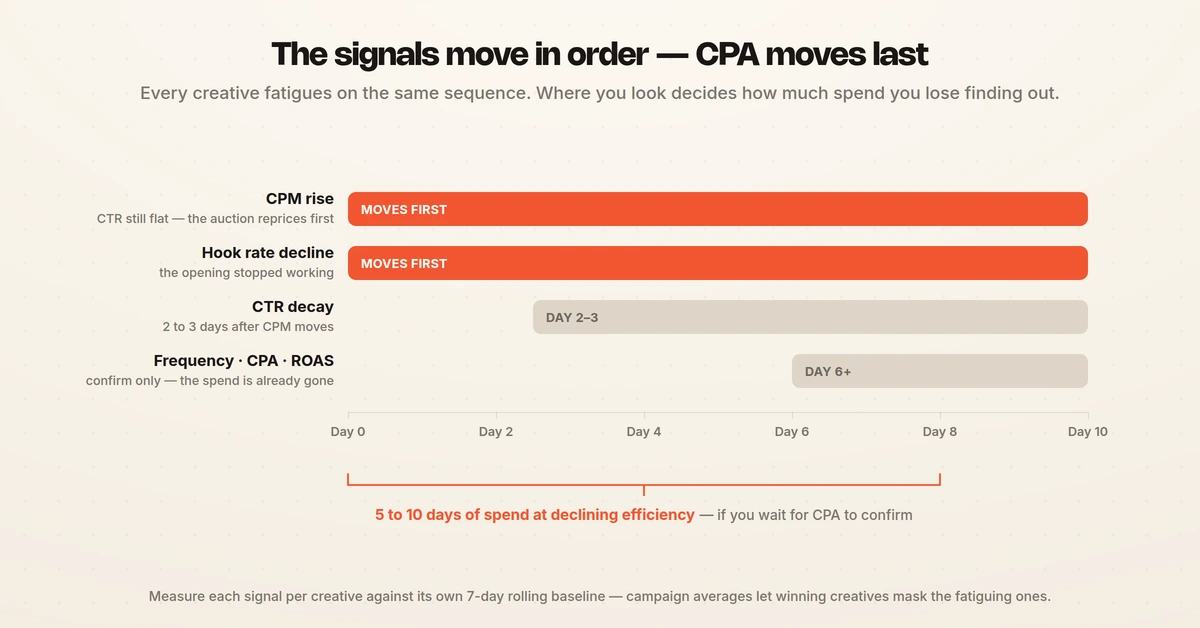
Two or more signals in the confirmed column at the same time is a clear creative fatigue case. A single signal in the warning zone is enough to start a diagnostic review. These ranges hold across most D2C, fintech, and SaaS accounts, though high-velocity verticals such as gaming and food delivery often fatigue 20 to 30% faster. For metric definitions, see the ad fatigue metrics glossary.
Velocity podcast
“As soon as your click-through rate starts to drop off or your engagement rate starts to drop off, I don't care if your frequency says one or a thousand — that's when your ads are no longer performing.”
How to detect creative fatigue
Detection starts with creative-level reporting. If your account only breaks out performance at the campaign level, fix that first, because campaign averages hide individual creatives that are already dying. Once you can see each creative, set a 7-day rolling baseline per ad and flag any creative that breaches a threshold in the table above.
A practical read of the signals: CPM rise with flat CTR is the earliest warning, and it often precedes a CTR drop by two to three days. A falling hook rate on video points to opening fatigue before clicks move. Frequency climbing past 3.5 on prospecting or 2.5 on retargeting confirms an audience has seen the creative too often, and Meta defines frequency as impressions divided by reach, so it rises whenever delivery outpaces new reach. When two of these move together, treat it as confirmed rather than waiting for ROAS.
Before assuming creative fatigue, run one confirmation test. Duplicate the fatigued ad set into a fresh, unseen audience. If performance recovers, it was audience saturation.
If it stays poor, it is creative fatigue. If only one placement is suffering while others hold up, it is format fatigue. This one test prevents the most common wasted rebuild, where a team refreshes a creative that was never the problem.
Two other causes mimic fatigue and neither is fixed by new creative. If conversions fell off a cliff across every ad at once, check the pixel and Conversions API before touching the creative. If CPM jumped account-wide, the auction shifted, usually seasonally or because a competitor moved in, and the creative may be fine.
A third false positive is self-inflicted. Editing an ad set pushes it back into the learning phase, and the volatility that follows reads exactly like a fresh decline. Let the ad set stabilize before calling it fatigue.
Detecting fatigue at scale
Manual monitoring breaks past 15 to 20 active creatives across multiple audiences and placements. At that point detection has to be automated: scheduled checks against each creative's baseline, threshold alerts, and a queue that surfaces breached creatives before a human notices the ROAS dip. Hawky's Performance Agent watches KPIs continuously and catches fatigue against your target, with every action logged and reversible. On The Man Company, this cut creative iteration cycles by 50%.
Using a creative fatigue detector
A creative fatigue detector watches frequency, CTR decline and CPM drift together, and flags the asset before performance falls off a cliff. That beats detecting creative fatigue by manually checking each campaign every week.
Product-level CTR data identifies ad creative fatigue earlier than campaign averages, because one tired asset hides inside a blended number. Meta catalog ad creatives show fatigue signs differently again, since the catalogue rotates products while the creative frame stays fixed.
How to fix creative fatigue
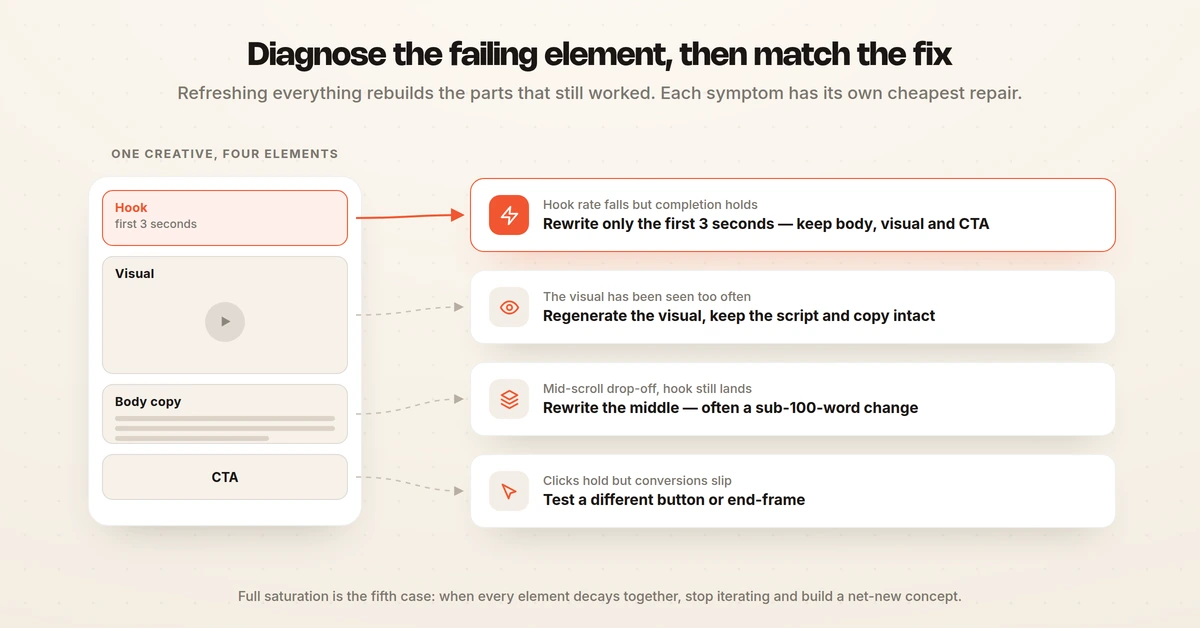
The fix depends on which element is failing. Generic advice to refresh the whole creative is why most refreshes fail, because it changes parts that were still working and wastes production time. Diagnose the failing element first, then apply the matching fix.
- Hook fatigue: keep the visual, CTA, and offer, and rewrite the first three seconds. A new hook on a proven body can recover 60 to 80% of original performance within four days.
- Body copy fatigue: keep the hook and visual, and rewrite the middle. This is often a sub-100-word change that teams over-engineer into a full rebuild.
- CTA fatigue: keep everything else and test a different button or end-frame. Smaller swap, faster recovery.
- Visual fatigue: keep the script and copy, and regenerate the visual while the winning pattern stays intact.
- Full saturation: build a net-new concept and do not iterate on the dead one.
Refresh, pause, or kill
Diagnosing the failing element tells you what to change. A second decision settles whether the creative is worth changing at all, because a fully spent concept absorbs production time that belongs to the next one.
| Move | Trigger | What you do |
|---|---|---|
| Refresh | CTR down 15 to 25%, frequency entering the warning zone, cost per result drifting up | Swap the fatiguing element and keep what still works |
| Pause | Cost per result roughly doubles, or performance drops 40% or more, with tracking verified | Stop delivery, move budget to a proven creative, diagnose before relaunch |
| Kill | A refresh fails to recover within 5 to 7 days, or every element decays together | Retire the concept and build a net-new one |
Refresh first, since it is the cheapest move and recovers the most value. Two guardrails keep the call clean. Do not judge an ad in its first 24 to 48 hours, because early volatility is not fatigue, and record why a creative worked before retiring it, because the winning pattern is the raw material for the replacement.
Worked example: a hook-only refresh
The numbers below are an illustrative example rather than a client result, included to show what a matched fix looks like in practice. Picture a D2C skincare brand running one prospecting ad set at roughly $1,500 a day against a 2.4M audience, with a single video creative live for 21 days. By day 15 three leading signals had crossed into the confirmed column while CPA was only beginning to move.
Diagnosis pointed at the opening rather than the offer: hook rate had fallen 24% against its own baseline while completion rate past 15 seconds held steady, so the viewers who stayed still converted. The team kept the body, the visual treatment, and the CTA, and rewrote only the first three seconds, shipping three hook variants against the same proven body. The table compares the last seven days of the fatigued creative with the first seven days of the refreshed one.
| Metric | Before refresh (days 15 to 21) | After refresh (days 1 to 7) | Change |
|---|---|---|---|
| Frequency (7-day) | 3.9 | 1.6 | -59% |
| CTR | 0.71% | 1.12% | +58% |
| Hook rate | 21% | 31% | +48% |
| CPM | $14.20 | $11.60 | -18% |
| CPA | $38.40 | $27.10 | -29% |
| Daily spend | $1,500 | $1,500 | flat |
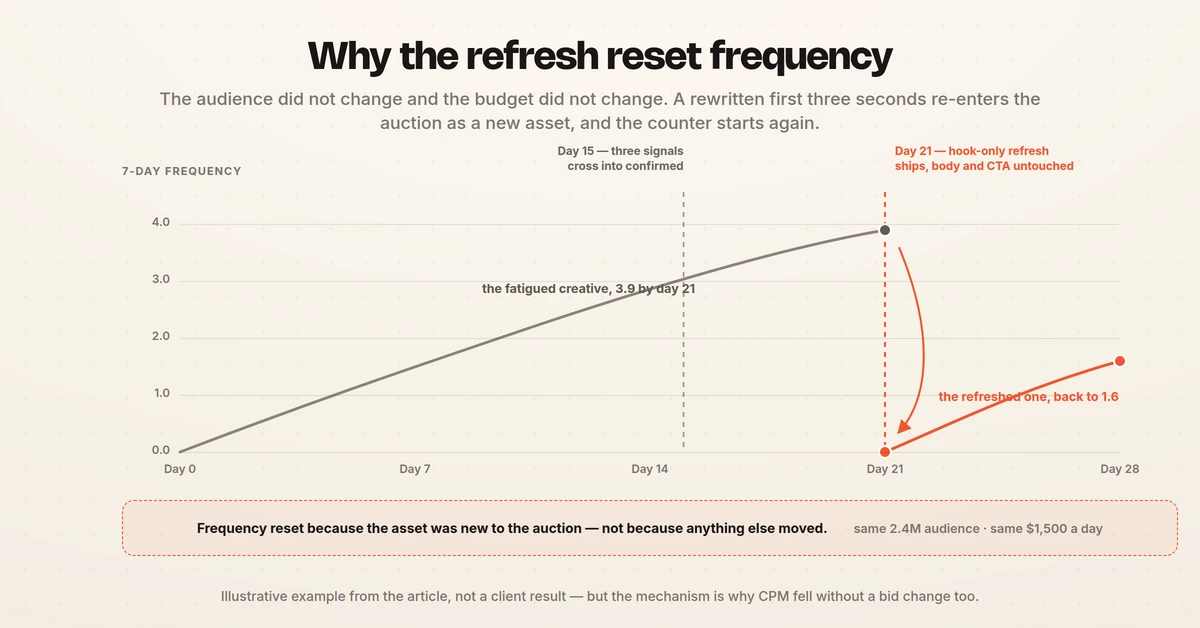
Two details matter more than the headline percentages. Frequency reset because the refreshed creative re-entered the auction as a new asset, not because the audience or the budget changed. CPM also fell without a bid change, which is the auction rewarding higher expected engagement rather than a media-buying win.
A hook-only rewrite is also the cheapest fix on the list. Three variants took under a day of production against roughly a week for a net-new concept, which is why diagnosing the failing element first pays for itself even when the recovery is only partial.
Refresh cadence and rotation
Refresh cadence should track audience size, not the calendar. Small retargeting pools under 100k fatigue fast, often within 7 to 10 days. Mid-size audiences hold 14 to 21 days.
Large prospecting audiences over 1M can run 21 to 30 days. A blanket "refresh every two weeks" rule under-rotates retargeting and over-rotates prospecting. Platform rotation settings matter here too, because Google's ad rotation setting governs how evenly ads inside an ad group serve and can starve a fresh variant of the impressions it needs to prove itself.
Rotation and pipeline are what keep fatigue from recurring. A healthy creative refresh rate is one new creative ready to launch for every three currently active, so replacements ship before decay rather than after it. Running three to five variants per ad set from day one has the same effect, because no single creative carries the campaign long enough to burn out alone.
Element-level swaps make this affordable: teams running AI creative generation trained on their winning patterns ship five to ten micro-variations from one original for the cost of a single rebuild. Platform clocks differ, and cadence should follow them. Meta prospecting on broad audiences typically fatigues in two to three weeks, TikTok in five to seven days given how fast its content cycle turns, and LinkedIn within days because the professional pools are small. For the testing loop that keeps the bench full, see ad creative testing.
Facebook and Meta ad fatigue
Facebook ad fatigue is creative fatigue under the platform's own name, and Meta is where most teams meet it first because frequency compounds fastest there. The auction mechanics are specific. As frequency rises, the unexposed share of the audience shrinks, so delivery leans harder on people who already skipped the ad, CTR falls, and Meta charges a higher CPM to keep serving it. Cost climbs while results fall, with no change to the ad itself.
Meta surfaces part of this natively. Ads Manager raises creative fatigue recommendations when it detects performance decline tied to repetition, which is useful as confirmation but rarely early, since the platform flags decay only after it has priced it in.
Meta-specific fatigue signals
Negative feedback is the signal with no real equivalent elsewhere. Rising hides, "see fewer ads like this" clicks, and reports are the audience objecting directly, and they usually climb before CPA moves. Read them per creative in the ad-level breakdown, since campaign-level feedback rates are too diluted to act on.
Frequency zones are the second Meta-specific read. Under 2.5 weekly on prospecting is healthy, 2.5 to 3.0 is the danger zone, and past 4.0 performance falls sharply. Retargeting tolerates more because those audiences expect to see the brand, but frequency should be read next to the CTR and CPM trend rather than as a fixed cap. A frequency of 3.0 against a large fresh audience is healthier than 2.0 against a small tired one.
Advantage+ and broad targeting
Advantage+ and broad targeting change where fatigue appears, not whether it happens. When Meta selects placements and audience automatically, the ad set stops being a clean unit of analysis, because one creative can fatigue in Reels while holding up in Feed inside the same ad set. Break performance out by placement before concluding the concept is spent.
Broad targeting also hides fatigue for longer, since a large pool keeps average frequency low while the responsive segment inside it saturates. The tell is CPM rising and hook rate falling while frequency still looks safe. Treat that pattern as fatigue rather than waiting for frequency to catch up, because on broad audiences it may never get there.
Meta refresh signals therefore run in a set order: hook rate first, then CTR against the 7-day baseline, then CPM, then negative feedback, with frequency and CPA confirming last. Adding a new creative to the ad set is also better than editing the existing one, since edits reset learning while an added asset re-enters the auction on its own merit. For creative that survives longer in the auction, see Facebook ad creative best practices.
Creative fatigue detection tools
Manual fatigue management works up to a point, then the volume of creatives, audiences, and placements outgrows a spreadsheet. Tooling closes the gap in two places: detection, where the job is to catch decay early at the element level, and generation, where the job is to ship the fix fast.
Tool categories differ less in what they report than in how early they catch decay and how much of the fix they close. The table below maps the main categories against what each one reliably catches and where each one leaves a gap.
| Tool category | What it catches | What it misses |
|---|---|---|
| Native platform reporting (Meta Ads Manager, Google Ads, TikTok Ads Manager) | Frequency, CTR, CPM, and cost per result per ad, plus the platform's own delivery-level fatigue flags | Cross-platform comparison, element-level diagnosis, and any warning earlier than the platform decides to raise one |
| Spreadsheet and BI reporting | Custom baselines, rolling averages, and whatever thresholds a team defines for itself | Anything not exported on schedule, so detection lags by the length of the refresh cycle |
| Creative analytics dashboards | Aggregated creative metrics across Meta, Google, and TikTok in one view, tagged by concept, format, or angle | Which element inside the creative is failing, and the production step that fixes it |
| Creative libraries and swipe tools | Competitor creative, format trends, and inspiration worth testing next | Live account performance, so they shape the next brief rather than flag the current decay |
| Enterprise production suites | Versioning, localization, and rotation at cross-market scale | Early detection, because they act on a brief a human has already written |
| Agentic performance platforms | Per-creative baselines, threshold breaches, and the generation step that ships the replacement | Little in the detection loop, though guardrails, approval rules, and brand inputs still need configuring up front |
Most teams end up running two or three of these categories at once. The gap that usually matters is the handoff, because a tool that flags a fatigued creative but cannot produce the replacement leaves the slowest step untouched. Google's own best practices for creative assets make the same point from the platform side, advising teams to add replacements before removing low-rated assets so delivery never runs short of options.
Hawky handles both through its agents. The Creative Agent reads past winners and fatigue signals from Feather, fires on a performance signal such as a fatigue flag or a CPL spike or on a schedule, and renders fresh on-brand creatives bound to a specific ad set, approval-gated before anything goes live. The Performance Agent catches fatigue and rotates creative against your KPI within guardrails, with every change logged and reversible. Teams using this detection lead catch creative fatigue 4 to 7 days earlier than manual review.
Other tools cover parts of the workflow. Reporting dashboards aggregate creative metrics across Meta and TikTok but are lighter on element-level diagnosis. Creative-library tools help with ideation and swipe files rather than live fatigue diagnosis.
Enterprise production suites handle rotation at cross-market scale. Pick for where your gap is: if diagnosis is the bottleneck, element-level detection matters most, and if production is the bottleneck, AI generation matters most. For a category-by-category comparison, see best creative testing tools.
Frequently asked questions
What is creative fatigue?
Creative fatigue is the decline in ad performance that happens when the same audience sees the same creative too many times. CTR drops, CPM and frequency rise, and CPA climbs even though the offer and targeting have not changed. It is a creative problem, so the fix is a change to the creative rather than a change to bids or budget.
What are the signs of creative fatigue?
The leading signs are CTR decay of 15% or more against a 7-day baseline, CPM rise of 10% or more in the same window, hook rate declining 20% or more, and frequency climbing past 3.5 on prospecting or 2.5 on retargeting. Two or more of these breaching together is a confirmed fatigue case. CPA and ROAS move last, so waiting for them costs 5 to 10 days of spend.
What are the signs of creative burnout?
Creative burnout is another name for creative fatigue, so the signs are the same. Engagement thins out first, with likes, comments, saves, and shares falling while spend holds steady, and on Meta hides and "see fewer ads like this" clicks start climbing. The measurable confirmation is hook rate and CTR falling against the creative's own 7-day baseline while CPM and frequency rise.
What causes Facebook and Meta ad fatigue?
Facebook and Meta ad fatigue is caused by the same audience seeing a creative too often relative to the size of that audience, which happens fastest with small audiences, a single hero creative, heavy budget on a narrow pool, and long run times. As frequency rises, delivery leans on people who already skipped the ad, so CTR falls and Meta charges a higher CPM to keep serving it. Rising hides and reports are the Meta-specific early tell, and adding a fresh creative beats editing the existing ad set, which only resets learning.
How do I detect creative fatigue without manually checking all my ads?
Set up automated detection that scores each creative against its own 7-day baseline and alerts the moment a threshold breaks. Hawky's Performance Agent watches your KPIs continuously and catches fatigue against your target, with every action logged and reversible, while the Creative Agent reads the same fatigue signals from Feather and ships a fresh on-brand replacement bound to the affected ad set for approval. That removes the manual scan across dozens of ads and catches decay 4 to 7 days earlier than a person would.
What metrics should I watch to know if my TikTok ads creative is fatigued?
Watch hook rate first, since TikTok fatigue shows up in the opening of the video before clicks move, then CTR decay and CPM rise against a 7-day baseline, and frequency last. A hook rate falling 20% or more, CTR down 15% or more, or CPM up 10% or more signals fatigue, and frequency past your prospecting threshold confirms the audience has seen the creative too often. Track these per creative rather than per campaign so a winning ad does not mask a fatiguing one.
How often should you refresh ad creatives?
Refresh cadence depends on audience size. Small retargeting audiences under 100k need refreshes every 7 to 10 days, mid-size audiences of 100k to 1M can run 14 to 21 days, and large prospecting audiences over 1M hold up 21 to 30 days. Refresh by signal, not by calendar.
Can you fix creative fatigue without making new creative?
Sometimes. If only one element is fatigued, such as the hook, body copy, or CTA, an element-level swap can recover 60 to 80% of original performance without a full rebuild. If the whole creative is saturated across every element, a new concept is needed.
Closing
Creative fatigue is a diagnostic problem before it is a production problem. The teams that protect ROAS in 2026 are not the ones with the biggest creative teams. They are the ones who read the leading metrics, confirm the fatigue type, and ship the matching fix before frequency and CPA move.
If you want fatigue caught and fresh creative shipped before ROAS drops, Hawky's Creative Agent is built for that job.
Ready to hire your first AI performance team? Book Demo