Mobile PPC Strategy in 2026: How to Optimize Campaigns for More Conversions
Mobile PPC Strategy in 2026: How to Optimize Campaigns for More Conversions

Mobile PPC Strategy in 2026: How to Optimize Campaigns for More Conversions

Lokeshwaran Magesh

Lokeshwaran Magesh

Lokeshwaran Magesh

6 Mins

6 Mins

6 Mins

Mobile PPC Strategy in 2026: How to Optimize Campaigns for More Conversions

Table of Contents

  1. What you need before you start

  2. Step 1: Audit your mobile traffic and conversion gap
  3. Step 2: Fix your mobile landing page speed and UX

  4. Step 3: Switch to mobile-first ad formats

  5. Step 4: Rebuild conversion tracking for mobile and apps

  6. Step 5: Configure Smart Bidding and AI Max with mobile signals

  7. Step 6: Build vertical-first creative with element-level intelligence

  8. Step 7: Test, learn, and iterate continuously

  9. Common mistakes to avoid

  10. Tools that make this easier

  11. Frequently asked questions

Table of Contents

  1. What you need before you start

  2. Step 1: Audit your mobile traffic and conversion gap

  3. Step 2: Fix your mobile landing page speed and UX

  4. Step 3: Switch to mobile-first ad formats

  5. Step 4: Rebuild conversion tracking for mobile and apps

  6. Step 5: Configure Smart Bidding and AI Max with mobile signals

  7. Step 6: Build vertical-first creative with element-level intelligence

  8. Step 7: Test, learn, and iterate continuously

  9. Common mistakes to avoid

  10. Tools that make this easier

  11. Frequently asked questions

Table of Contents

  1. What you need before you start

  2. Step 1: Audit your mobile traffic and conversion gap

  3. Step 2: Fix your mobile landing page speed and UX

  4. Step 3: Switch to mobile-first ad formats

  5. Step 4: Rebuild conversion tracking for mobile and apps

  6. Step 5: Configure Smart Bidding and AI Max with mobile signals

  7. Step 6: Build vertical-first creative with element-level intelligence

  8. Step 7: Test, learn, and iterate continuously

  9. Common mistakes to avoid

  10. Tools that make this easier

  11. Frequently asked questions

Make Every Ad a Winner

Hooks, CTAs, visuals - decode every detail.

By the end of this guide, you'll have a step-by-step process to audit, rebuild, and scale a mobile PPC strategy that converts in 2026 conditions.

Mobile now drives over 70% of paid search clicks across most verticals, yet most accounts still treat it as a side channel. Smart Bidding masks the problem by averaging mobile and desktop performance, AI Max strips out device controls, and creative built for desktop quietly bleeds budget on phone screens. The teams winning in 2026 stopped optimizing mobile inside a desktop strategy and started building mobile-first.

This guide walks through the exact sequence: audit, foundation, format, tracking, bidding, creative, iteration. Follow the order. Skipping steps is how mobile budgets leak.

What You Need Before You Start

Before running this playbook, gather the following:

  1. Admin access to your Google Ads, Meta Ads, and any app campaign accounts

  2. Edit access to your landing page builder or CMS

  3. Access to GA4, your CRM, and your mobile measurement partner (AppsFlyer, Adjust, Branch) if you run app campaigns

  4. At least 90 days of historical performance data to benchmark against

  5. A staging environment to test landing page changes before pushing live

If your team is missing app-level conversion data or mobile site speed scores, fix that gap first. Optimization without measurement is guessing.

Seven steps to mobile PPC that actually compounds.

Step 1: Audit Your Mobile Traffic and Conversion Gap

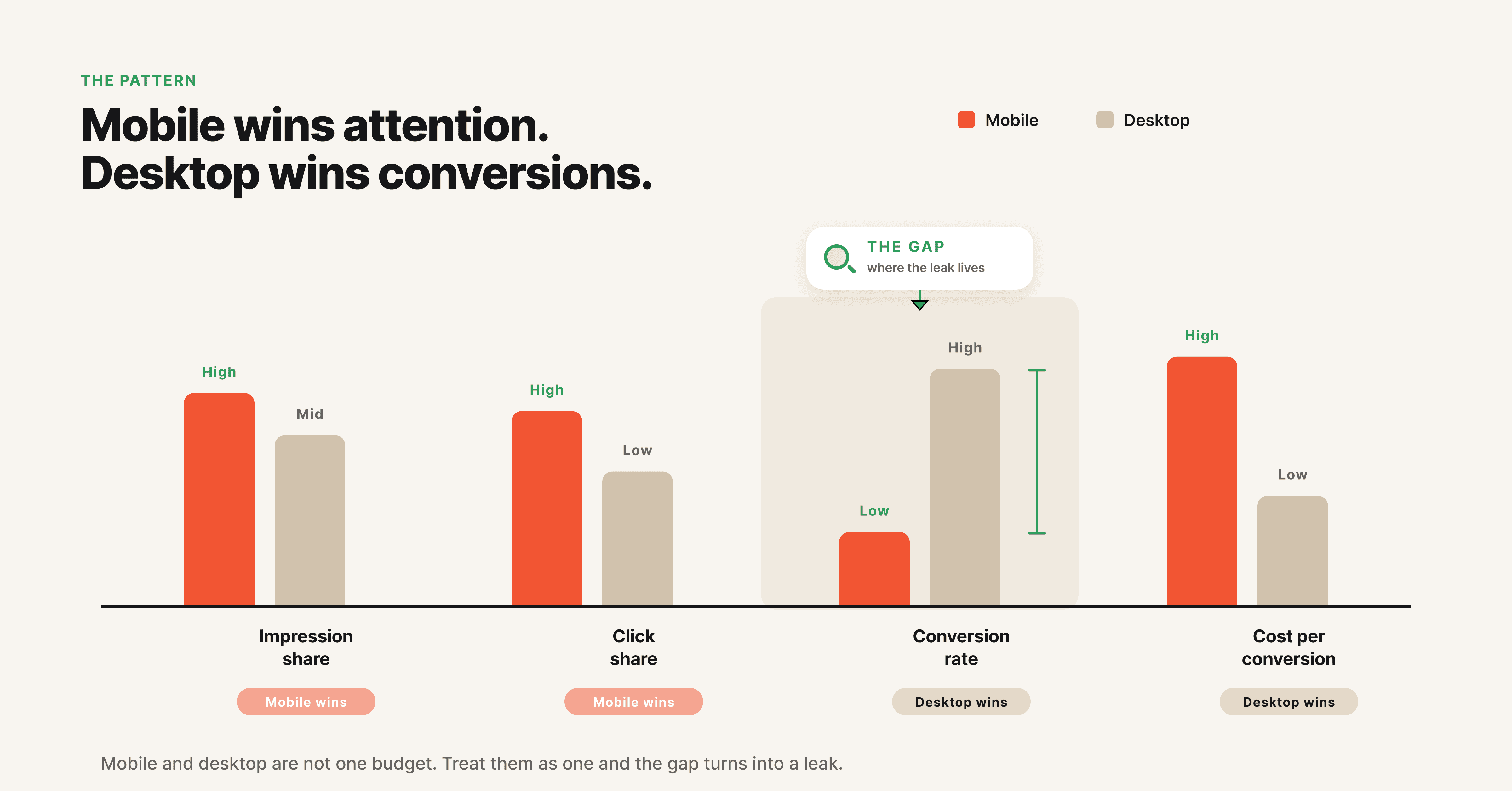
Mobile PPC optimization starts with diagnosing where the gap actually lives. Most accounts have a clear pattern: mobile drives the majority of impressions and clicks, but desktop quietly carries conversion volume. Your job is to quantify that gap before you touch anything.

Pull a 90-day report segmented by device. Compare four metrics: impression share, click share, conversion rate, and cost per conversion. The accounts that need this guide most show mobile click share above 65% and mobile conversion rate at half (or less) of desktop. That gap is the size of your opportunity.

The benchmark below shows the typical pattern most accounts will see. Use it to calibrate where you stand.

Metric

Mobile (typical)

Desktop (typical)

Action if gap is wider

Impression Share

65 to 80%

20 to 35%

Mobile is your primary channel, treat it as such

Click Share

60 to 75%

25 to 40%

Match share with mobile-first creative

Conversion Rate

1.0 to 2.5%

2.5 to 5.0%

Investigate landing page and form friction

Cost per Conversion

Often higher

Baseline

Fix creative and landing page before bidding

Then look at conversion type. Mobile traffic converts differently. A mobile user is more likely to call, fill a short lead form, or install an app. They are less likely to complete a long checkout or fill a 12-field form. If you are tracking only desktop-style conversions, your mobile data is incomplete.

Finally, check creative-level performance by device. Most accounts never do this. The same ad rarely performs equally well on mobile and desktop. Flag any creative where mobile CTR is more than 30% lower than desktop CTR. Those are the ads costing you spend.

Pro tip: Build a saved view in your reporting tool that defaults to device-level segmentation. If your team has to remember to add it manually, no one will.

Step 2: Fix Your Mobile Landing Page Speed and UX

A 2-second mobile landing page is the single biggest fix most teams ignore. Google's Core Web Vitals data continues to show that mobile bounce rate jumps roughly 32% when load time goes from one second to three. Smart Bidding feeds on conversion signals, and slow landing pages strangle the signal at the source.

Run your top 10 landing pages through PageSpeed Insights and capture three metrics: Largest Contentful Paint, Interaction to Next Paint, and Cumulative Layout Shift. These are the Core Web Vitals that Google now factors into ad rank and quality score on mobile. Anything red gets fixed first.

Beyond speed, audit the mobile experience itself. Forms that work on desktop become friction nightmares on phones. Reduce form fields to the minimum (name, phone, one qualifier). Use native mobile input types (tel, email, number) so the right keyboard pops up. Make CTA buttons thumb-sized and place them above the fold.

A mobile landing page should answer three questions in the first three seconds: What is this, why should I care, and what do I do next. If a user has to scroll to find the answer, the page is too slow even if it loads fast.

Pro tip: Build a separate mobile landing page variant for top-spending campaigns instead of relying on responsive design. The conversion lift typically pays back the design cost within two weeks.

Step 3: Switch to Mobile-First Ad Formats

The fastest mobile conversion lift in 2026 comes from format, not bidding. Vertical video, lead form extensions, click-to-call, and app campaigns convert mobile users at materially higher rates than horizontal display or text-heavy search ads.

The table below maps each mobile-first format to the right use case so you can shortlist the ones that fit your funnel.

Format

Best Use Case

Conversion Strength

Watch-Out

Vertical Video (9:16)

D2C, ecommerce, app, brand-led DR

High volume, low CPC

Needs sound-off design and 3-second hook

Lead Form Extensions

B2B, finance, education, services

High lead volume

Lead quality dips without qualifier fields

Click-to-Call

Insurance, legal, home services, healthcare

High intent, fast close

Needs sales bandwidth to handle inbound

Google App Campaigns

App-led businesses

Highest mobile conversion rate

Requires MMP and deep event tracking

Performance Max with mobile assets

Mixed-funnel ecommerce

Strong reach, automated optimization

Limited device-level visibility

Start with vertical video. Reels, Shorts, and Stories now own most of the mobile attention economy, and Google's Demand Gen and Meta's Advantage+ both prioritize vertical-first creative. Ads built in 9:16 with sound-off captions and a hook in the first three seconds outperform repurposed horizontal ads by significant margins. If you're still running horizontal video on mobile, you're paying for the same impression at a higher CPM with worse engagement.

Add lead form extensions to your search and Performance Max campaigns. Mobile users will not fill a multi-step form on a 6-inch screen. Pre-filled lead forms inside the ad unit cut friction and lift conversion volume. The trade-off is lead quality, which you address with qualifier questions and stricter offer thresholds (covered in Step 4).

Click-to-call ads still work for high-intent verticals. Insurance, legal, home services, and healthcare see better cost per qualified lead from call-only campaigns on mobile than from form-fill campaigns. If your sales process can handle inbound calls, this is free volume most accounts ignore.

For app-led businesses, Google App Campaigns and Meta App Promotion remain the format with the highest mobile conversion rates by a wide margin. The catch is that they need clean event tracking from your mobile measurement partner before they can optimize.

Step 4: Rebuild Conversion Tracking for Mobile and Apps

Smart Bidding and AI Max are only as good as the signals you feed them. In 2026, with iOS App Tracking Transparency windows tightening and Privacy Sandbox restricting third-party cookies on Android, your tracking foundation needs to be rebuilt for a privacy-first world.

Set up Enhanced Conversions in Google Ads. This sends hashed first-party data (email, phone) back to Google, which stitches conversions even when third-party cookies are blocked. Most accounts see 5 to 15% more conversions reported within two weeks of turning it on. Meta's Conversions API does the same job server-side.

For app campaigns, integrate a mobile measurement partner (AppsFlyer, Adjust, or Branch) and pass back deep funnel events. Install is not enough. Smart Bidding needs to know which installs lead to revenue events, otherwise it optimizes for cheap installs that never convert.

Map your full mobile conversion path inside GA4 with custom events for micro-conversions. Add events for "scrolled past hero," "clicked phone number," "started form," and "completed form." Smart Bidding can use these as supporting signals when primary conversion volume is too thin.

Audit attribution windows. iOS users often complete the conversion days after the click, but the default 7-day window misses some of them. Extend to 30 days where the platform allows, and confirm your attribution model (data-driven attribution is the 2026 default for most accounts).

Step 5: Configure Smart Bidding and AI Max With Mobile Signals

Smart Bidding works on mobile only if you feed it mobile-relevant signals and constraints. Out of the box, it averages mobile and desktop performance, which is exactly what you don't want.

Use Target ROAS or Target CPA bidding with a mobile-conscious target. If your mobile conversion rate is half of desktop, your blended target CPA needs to reflect that, otherwise the algorithm will overspend chasing mobile conversions at the same rate it gets desktop ones. Set a target that is realistic for mobile-heavy traffic.

Layer in audience signals that index mobile. Custom audiences built from app users, mobile site visitors, and lead form submitters give Smart Bidding a clearer picture of who converts on mobile. Avoid feeding it broad audience signals dominated by desktop converters.

For AI Max in Search and Performance Max, the new 2026 reality is that you have less device-level control. The work shifts to asset-level. Upload mobile-first assets (vertical video, square image, short headlines) and exclude desktop-first assets where possible. The algorithm will pull what it needs based on placement.

Watch for one specific failure mode. AI Max can launch underperforming asset combinations on mobile placements with no warning. Build a weekly review where you check asset-level mobile performance and pause anything more than two standard deviations below your account average.

Pro tip: Set up a separate "mobile-heavy" Performance Max campaign with assets and signals optimized for mobile, while running a "desktop-heavy" campaign in parallel. You give up some efficiency in cross-device optimization but gain visibility and control.

Step 6: Build Vertical-First Creative With Element-Level Intelligence

This is the step with the largest 2026 upside, and the one most teams skip. Mobile creative converts on different elements than desktop creative. Hook timing, visual hierarchy, sound-off design, and CTA placement all behave differently on a 6-inch portrait screen.

Start with the hook. On mobile, the first 1.5 seconds determine whether the user thumb-stops. Lead with a visual contrast (motion, color shift, face close-up) plus a text overlay that names the problem or outcome. Avoid slow-burn brand intros that work on TV-style desktop video.

Design for sound-off. The majority of mobile video plays without sound on first impression. Captions, on-screen text, and visual storytelling have to carry the message. If your ad doesn't make sense without audio, it doesn't work on mobile.

Build for portrait, not landscape. A 9:16 frame composes differently than a 16:9 frame. Faces sit higher, products sit lower, and CTA buttons go in the bottom third where the thumb naturally lands. Repurposing horizontal video by adding letterbox bars wastes screen real estate and signals lazy production.

Diversify your hooks. Element-level analysis consistently shows that mobile audiences fatigue on hook style, not just on creative. If every ad opens with a person talking to camera, your CTR will decline within two weeks regardless of how good the offer is. Rotate between problem statement hooks, social proof hooks, demonstration hooks, and pattern interrupt hooks.

Tools like Hawky automate element-level breakdowns, showing which mobile hooks, visuals, and CTAs drive conversions for your brand and which ones are quietly fatiguing. The teams running creative intelligence on mobile creative typically rotate ads 2 to 3 times faster than teams without it, and CPC stays flat instead of climbing. For a deeper look at creative fatigue and how it inflates mobile CPC, see the dedicated Hawky guide.

Step 7: Test, Learn, and Iterate Continuously

Mobile PPC is not a project, it's a system. The platforms change quarterly, creative fatigues weekly, and audiences shift in real time. Build a weekly cadence that catches problems before they become budget leaks.

Run a weekly mobile audit covering five things: device-level performance vs benchmark, top 5 mobile creatives by ROAS, bottom 5 mobile creatives by CPC inflation, landing page Core Web Vitals, and conversion tracking health. Fifteen minutes a week catches 80% of issues.

Test one variable at a time. Mobile-specific A/B tests should run on hooks, CTA placement, vertical video first frame, and lead form length. Avoid testing creative and landing page changes simultaneously, you'll never know what moved the needle.

Document winners as repeatable patterns. When a vertical video format hits 2x average ROAS on mobile, the goal isn't to ride that one ad. It's to extract the pattern (hook style, visual structure, CTA position) and build the next 5 ads from it. Hawky's Playbooks feature is built for exactly this kind of pattern capture, paired with AI creative generation that turns those patterns into new mobile-ready ads, but you can do it manually with a shared doc as long as the team actually uses it.

Plug iteration into a Command Center view that shows mobile performance in one place. Hawky's Command Center does this natively across Meta and Google. Whatever tool you use, the principle holds: visibility precedes velocity.

Common Mistakes to Avoid

Here are the five mistakes that cost teams the most mobile conversion volume in 2026:

Treating mobile as a desktop sub-segment.
  1. Treating mobile as a desktop sub-segment. Mobile users behave differently, convert differently, and respond to different creative. Strategy, creative, and tracking all need to be built mobile-first, not retrofitted.

  2. Ignoring landing page speed. Every additional second of mobile load time cuts conversion rate. Most accounts have at least 3 to 5 landing pages bleeding 20%+ of mobile conversion volume to slow load times. Fix this before you touch bidding.

  3. Untracked app and offline conversions. If users convert in your app or via phone call, and you aren't passing those events back to Smart Bidding, the algorithm optimizes against the wrong outcome. Mobile-first conversion paths need mobile-first tracking.

  4. Repurposing horizontal video for mobile. A 16:9 video letterboxed on a 9:16 screen looks lazy and performs worse. Build vertical-first or don't run video at all on mobile.

  5. Set-and-forget Smart Bidding. Smart Bidding is not autopilot, especially on mobile. Without weekly review of device-level performance and creative-level fatigue, the algorithm will quietly overpay for low-quality mobile traffic.

Tools That Make This Easier

The table below maps the work in each step to the tool that handles the heaviest lifting at that stage.

Tool

Best For

Stage in Workflow

Hawky

Element-level creative analysis, vertical-first AI creative generation, fatigue prediction, cross-platform Command Center

Steps 1, 6, 7

Google Ads Editor

Bulk mobile bid adjustments, asset uploads, audit

Steps 1, 5

PageSpeed Insights and web.dev

Core Web Vitals audits on mobile landing pages

Step 2

AppsFlyer, Adjust, Branch

App conversion tracking, deep funnel events, iOS attribution

Steps 3, 4

Triple Whale or Northbeam

Cross-channel attribution under iOS and Privacy Sandbox restrictions

Step 4

Hawky pulls in Meta and Google Ads, breaks down performance by hook, visual, and CTA, and flags fatigued mobile creatives before they spike CPC. The platform is built for performance marketers running serious mobile spend who need creative intelligence in the same place as performance reporting. For a wider list of evaluation tools beyond mobile-specific use cases, see the 9 Best Ad Creative Analysis Tools in 2026. Google Ads Editor remains faster than the web UI for managing dozens of campaigns, and PageSpeed Insights stays free, accurate, and tied directly to Google's mobile ranking signals.

Mobile measurement partners are non-negotiable for any business running app campaigns. Triple Whale and Northbeam fill the GA4 gaps when iOS and Privacy Sandbox restrictions leave blind spots on mobile attribution.

Frequently Asked Questions

What is mobile PPC?

Mobile PPC is paid advertising designed for and delivered to users on mobile devices. It covers search ads on mobile, mobile-first ad formats like vertical video and lead forms, app install campaigns, and click-to-call ads. In 2026, mobile drives the majority of paid clicks across most verticals.

How do I optimize my Google Ads for mobile?

Audit device-level performance, fix mobile landing page speed (Core Web Vitals under 2.5 seconds for LCP), use mobile-first formats like vertical video and lead form extensions, set up Enhanced Conversions, and configure Smart Bidding with mobile-relevant audience signals. Build vertical-first creative with hooks in the first 1.5 seconds.

How do I increase mobile conversions in PPC?

Start with mobile landing page speed and form friction, then switch to mobile-first ad formats (vertical video, lead forms, click-to-call), then rebuild conversion tracking with Enhanced Conversions and a mobile measurement partner. Creative-level optimization with element analysis delivers the biggest impact after foundation work is done.

Are mobile ads more expensive than desktop ads?

Mobile CPCs are typically lower than desktop CPCs but conversion rates are also lower, so cost per conversion can be similar or higher depending on the funnel. The fix is mobile-first creative and landing pages, not bidding adjustments. Higher mobile CPCs are usually a creative or landing page problem.

What's the best ad format for mobile in 2026?

Vertical video (9:16) is the highest-converting mobile format in 2026 across Demand Gen, Reels, Shorts, and Stories placements. Lead form extensions and click-to-call ads work well for direct response in service-based verticals. App campaigns dominate for app-led businesses with proper deep-event tracking.

How do I track mobile app conversions in PPC?

Connect a mobile measurement partner (AppsFlyer, Adjust, Branch) to your ad platforms and pass back install and post-install events (purchase, subscription, trial start). For Google App Campaigns, use Firebase or your MMP via the supported integrations. For Meta App Promotion, use the Meta SDK or your MMP.

If creative-level mobile optimization, fatigue prediction, and cross-platform mobile PPC oversight are the bottlenecks, Hawky is built for that job. Element-level analysis, vertical-first AI creative generation, and a Command Center that surfaces mobile performance across Meta and Google sit in one platform.

Ready to Stop Guessing and Start Winning with Creative Intelligence?

Book Demo

By the end of this guide, you'll have a step-by-step process to audit, rebuild, and scale a mobile PPC strategy that converts in 2026 conditions.

Mobile now drives over 70% of paid search clicks across most verticals, yet most accounts still treat it as a side channel. Smart Bidding masks the problem by averaging mobile and desktop performance, AI Max strips out device controls, and creative built for desktop quietly bleeds budget on phone screens. The teams winning in 2026 stopped optimizing mobile inside a desktop strategy and started building mobile-first.

This guide walks through the exact sequence: audit, foundation, format, tracking, bidding, creative, iteration. Follow the order. Skipping steps is how mobile budgets leak.

What You Need Before You Start

Before running this playbook, gather the following:

  1. Admin access to your Google Ads, Meta Ads, and any app campaign accounts

  2. Edit access to your landing page builder or CMS

  3. Access to GA4, your CRM, and your mobile measurement partner (AppsFlyer, Adjust, Branch) if you run app campaigns

  4. At least 90 days of historical performance data to benchmark against

  5. A staging environment to test landing page changes before pushing live

If your team is missing app-level conversion data or mobile site speed scores, fix that gap first. Optimization without measurement is guessing.

Seven steps to mobile PPC that actually compounds.

Step 1: Audit Your Mobile Traffic and Conversion Gap

Mobile PPC optimization starts with diagnosing where the gap actually lives. Most accounts have a clear pattern: mobile drives the majority of impressions and clicks, but desktop quietly carries conversion volume. Your job is to quantify that gap before you touch anything.

Pull a 90-day report segmented by device. Compare four metrics: impression share, click share, conversion rate, and cost per conversion. The accounts that need this guide most show mobile click share above 65% and mobile conversion rate at half (or less) of desktop. That gap is the size of your opportunity.

The benchmark below shows the typical pattern most accounts will see. Use it to calibrate where you stand.

Metric

Mobile (typical)

Desktop (typical)

Action if gap is wider

Impression Share

65 to 80%

20 to 35%

Mobile is your primary channel, treat it as such

Click Share

60 to 75%

25 to 40%

Match share with mobile-first creative

Conversion Rate

1.0 to 2.5%

2.5 to 5.0%

Investigate landing page and form friction

Cost per Conversion

Often higher

Baseline

Fix creative and landing page before bidding

Then look at conversion type. Mobile traffic converts differently. A mobile user is more likely to call, fill a short lead form, or install an app. They are less likely to complete a long checkout or fill a 12-field form. If you are tracking only desktop-style conversions, your mobile data is incomplete.

Finally, check creative-level performance by device. Most accounts never do this. The same ad rarely performs equally well on mobile and desktop. Flag any creative where mobile CTR is more than 30% lower than desktop CTR. Those are the ads costing you spend.

Pro tip: Build a saved view in your reporting tool that defaults to device-level segmentation. If your team has to remember to add it manually, no one will.

Step 2: Fix Your Mobile Landing Page Speed and UX

A 2-second mobile landing page is the single biggest fix most teams ignore. Google's Core Web Vitals data continues to show that mobile bounce rate jumps roughly 32% when load time goes from one second to three. Smart Bidding feeds on conversion signals, and slow landing pages strangle the signal at the source.

Run your top 10 landing pages through PageSpeed Insights and capture three metrics: Largest Contentful Paint, Interaction to Next Paint, and Cumulative Layout Shift. These are the Core Web Vitals that Google now factors into ad rank and quality score on mobile. Anything red gets fixed first.

Beyond speed, audit the mobile experience itself. Forms that work on desktop become friction nightmares on phones. Reduce form fields to the minimum (name, phone, one qualifier). Use native mobile input types (tel, email, number) so the right keyboard pops up. Make CTA buttons thumb-sized and place them above the fold.

A mobile landing page should answer three questions in the first three seconds: What is this, why should I care, and what do I do next. If a user has to scroll to find the answer, the page is too slow even if it loads fast.

Pro tip: Build a separate mobile landing page variant for top-spending campaigns instead of relying on responsive design. The conversion lift typically pays back the design cost within two weeks.

Step 3: Switch to Mobile-First Ad Formats

The fastest mobile conversion lift in 2026 comes from format, not bidding. Vertical video, lead form extensions, click-to-call, and app campaigns convert mobile users at materially higher rates than horizontal display or text-heavy search ads.

The table below maps each mobile-first format to the right use case so you can shortlist the ones that fit your funnel.

Format

Best Use Case

Conversion Strength

Watch-Out

Vertical Video (9:16)

D2C, ecommerce, app, brand-led DR

High volume, low CPC

Needs sound-off design and 3-second hook

Lead Form Extensions

B2B, finance, education, services

High lead volume

Lead quality dips without qualifier fields

Click-to-Call

Insurance, legal, home services, healthcare

High intent, fast close

Needs sales bandwidth to handle inbound

Google App Campaigns

App-led businesses

Highest mobile conversion rate

Requires MMP and deep event tracking

Performance Max with mobile assets

Mixed-funnel ecommerce

Strong reach, automated optimization

Limited device-level visibility

Start with vertical video. Reels, Shorts, and Stories now own most of the mobile attention economy, and Google's Demand Gen and Meta's Advantage+ both prioritize vertical-first creative. Ads built in 9:16 with sound-off captions and a hook in the first three seconds outperform repurposed horizontal ads by significant margins. If you're still running horizontal video on mobile, you're paying for the same impression at a higher CPM with worse engagement.

Add lead form extensions to your search and Performance Max campaigns. Mobile users will not fill a multi-step form on a 6-inch screen. Pre-filled lead forms inside the ad unit cut friction and lift conversion volume. The trade-off is lead quality, which you address with qualifier questions and stricter offer thresholds (covered in Step 4).

Click-to-call ads still work for high-intent verticals. Insurance, legal, home services, and healthcare see better cost per qualified lead from call-only campaigns on mobile than from form-fill campaigns. If your sales process can handle inbound calls, this is free volume most accounts ignore.

For app-led businesses, Google App Campaigns and Meta App Promotion remain the format with the highest mobile conversion rates by a wide margin. The catch is that they need clean event tracking from your mobile measurement partner before they can optimize.

Step 4: Rebuild Conversion Tracking for Mobile and Apps

Smart Bidding and AI Max are only as good as the signals you feed them. In 2026, with iOS App Tracking Transparency windows tightening and Privacy Sandbox restricting third-party cookies on Android, your tracking foundation needs to be rebuilt for a privacy-first world.

Set up Enhanced Conversions in Google Ads. This sends hashed first-party data (email, phone) back to Google, which stitches conversions even when third-party cookies are blocked. Most accounts see 5 to 15% more conversions reported within two weeks of turning it on. Meta's Conversions API does the same job server-side.

For app campaigns, integrate a mobile measurement partner (AppsFlyer, Adjust, or Branch) and pass back deep funnel events. Install is not enough. Smart Bidding needs to know which installs lead to revenue events, otherwise it optimizes for cheap installs that never convert.

Map your full mobile conversion path inside GA4 with custom events for micro-conversions. Add events for "scrolled past hero," "clicked phone number," "started form," and "completed form." Smart Bidding can use these as supporting signals when primary conversion volume is too thin.

Audit attribution windows. iOS users often complete the conversion days after the click, but the default 7-day window misses some of them. Extend to 30 days where the platform allows, and confirm your attribution model (data-driven attribution is the 2026 default for most accounts).

Step 5: Configure Smart Bidding and AI Max With Mobile Signals

Smart Bidding works on mobile only if you feed it mobile-relevant signals and constraints. Out of the box, it averages mobile and desktop performance, which is exactly what you don't want.

Use Target ROAS or Target CPA bidding with a mobile-conscious target. If your mobile conversion rate is half of desktop, your blended target CPA needs to reflect that, otherwise the algorithm will overspend chasing mobile conversions at the same rate it gets desktop ones. Set a target that is realistic for mobile-heavy traffic.

Layer in audience signals that index mobile. Custom audiences built from app users, mobile site visitors, and lead form submitters give Smart Bidding a clearer picture of who converts on mobile. Avoid feeding it broad audience signals dominated by desktop converters.

For AI Max in Search and Performance Max, the new 2026 reality is that you have less device-level control. The work shifts to asset-level. Upload mobile-first assets (vertical video, square image, short headlines) and exclude desktop-first assets where possible. The algorithm will pull what it needs based on placement.

Watch for one specific failure mode. AI Max can launch underperforming asset combinations on mobile placements with no warning. Build a weekly review where you check asset-level mobile performance and pause anything more than two standard deviations below your account average.

Pro tip: Set up a separate "mobile-heavy" Performance Max campaign with assets and signals optimized for mobile, while running a "desktop-heavy" campaign in parallel. You give up some efficiency in cross-device optimization but gain visibility and control.

Step 6: Build Vertical-First Creative With Element-Level Intelligence

This is the step with the largest 2026 upside, and the one most teams skip. Mobile creative converts on different elements than desktop creative. Hook timing, visual hierarchy, sound-off design, and CTA placement all behave differently on a 6-inch portrait screen.

Start with the hook. On mobile, the first 1.5 seconds determine whether the user thumb-stops. Lead with a visual contrast (motion, color shift, face close-up) plus a text overlay that names the problem or outcome. Avoid slow-burn brand intros that work on TV-style desktop video.

Design for sound-off. The majority of mobile video plays without sound on first impression. Captions, on-screen text, and visual storytelling have to carry the message. If your ad doesn't make sense without audio, it doesn't work on mobile.

Build for portrait, not landscape. A 9:16 frame composes differently than a 16:9 frame. Faces sit higher, products sit lower, and CTA buttons go in the bottom third where the thumb naturally lands. Repurposing horizontal video by adding letterbox bars wastes screen real estate and signals lazy production.

Diversify your hooks. Element-level analysis consistently shows that mobile audiences fatigue on hook style, not just on creative. If every ad opens with a person talking to camera, your CTR will decline within two weeks regardless of how good the offer is. Rotate between problem statement hooks, social proof hooks, demonstration hooks, and pattern interrupt hooks.

Tools like Hawky automate element-level breakdowns, showing which mobile hooks, visuals, and CTAs drive conversions for your brand and which ones are quietly fatiguing. The teams running creative intelligence on mobile creative typically rotate ads 2 to 3 times faster than teams without it, and CPC stays flat instead of climbing. For a deeper look at creative fatigue and how it inflates mobile CPC, see the dedicated Hawky guide.

Step 7: Test, Learn, and Iterate Continuously

Mobile PPC is not a project, it's a system. The platforms change quarterly, creative fatigues weekly, and audiences shift in real time. Build a weekly cadence that catches problems before they become budget leaks.

Run a weekly mobile audit covering five things: device-level performance vs benchmark, top 5 mobile creatives by ROAS, bottom 5 mobile creatives by CPC inflation, landing page Core Web Vitals, and conversion tracking health. Fifteen minutes a week catches 80% of issues.

Test one variable at a time. Mobile-specific A/B tests should run on hooks, CTA placement, vertical video first frame, and lead form length. Avoid testing creative and landing page changes simultaneously, you'll never know what moved the needle.

Document winners as repeatable patterns. When a vertical video format hits 2x average ROAS on mobile, the goal isn't to ride that one ad. It's to extract the pattern (hook style, visual structure, CTA position) and build the next 5 ads from it. Hawky's Playbooks feature is built for exactly this kind of pattern capture, paired with AI creative generation that turns those patterns into new mobile-ready ads, but you can do it manually with a shared doc as long as the team actually uses it.

Plug iteration into a Command Center view that shows mobile performance in one place. Hawky's Command Center does this natively across Meta and Google. Whatever tool you use, the principle holds: visibility precedes velocity.

Common Mistakes to Avoid

Here are the five mistakes that cost teams the most mobile conversion volume in 2026:

Treating mobile as a desktop sub-segment.
  1. Treating mobile as a desktop sub-segment. Mobile users behave differently, convert differently, and respond to different creative. Strategy, creative, and tracking all need to be built mobile-first, not retrofitted.

  2. Ignoring landing page speed. Every additional second of mobile load time cuts conversion rate. Most accounts have at least 3 to 5 landing pages bleeding 20%+ of mobile conversion volume to slow load times. Fix this before you touch bidding.

  3. Untracked app and offline conversions. If users convert in your app or via phone call, and you aren't passing those events back to Smart Bidding, the algorithm optimizes against the wrong outcome. Mobile-first conversion paths need mobile-first tracking.

  4. Repurposing horizontal video for mobile. A 16:9 video letterboxed on a 9:16 screen looks lazy and performs worse. Build vertical-first or don't run video at all on mobile.

  5. Set-and-forget Smart Bidding. Smart Bidding is not autopilot, especially on mobile. Without weekly review of device-level performance and creative-level fatigue, the algorithm will quietly overpay for low-quality mobile traffic.

Tools That Make This Easier

The table below maps the work in each step to the tool that handles the heaviest lifting at that stage.

Tool

Best For

Stage in Workflow

Hawky

Element-level creative analysis, vertical-first AI creative generation, fatigue prediction, cross-platform Command Center

Steps 1, 6, 7

Google Ads Editor

Bulk mobile bid adjustments, asset uploads, audit

Steps 1, 5

PageSpeed Insights and web.dev

Core Web Vitals audits on mobile landing pages

Step 2

AppsFlyer, Adjust, Branch

App conversion tracking, deep funnel events, iOS attribution

Steps 3, 4

Triple Whale or Northbeam

Cross-channel attribution under iOS and Privacy Sandbox restrictions

Step 4

Hawky pulls in Meta and Google Ads, breaks down performance by hook, visual, and CTA, and flags fatigued mobile creatives before they spike CPC. The platform is built for performance marketers running serious mobile spend who need creative intelligence in the same place as performance reporting. For a wider list of evaluation tools beyond mobile-specific use cases, see the 9 Best Ad Creative Analysis Tools in 2026. Google Ads Editor remains faster than the web UI for managing dozens of campaigns, and PageSpeed Insights stays free, accurate, and tied directly to Google's mobile ranking signals.

Mobile measurement partners are non-negotiable for any business running app campaigns. Triple Whale and Northbeam fill the GA4 gaps when iOS and Privacy Sandbox restrictions leave blind spots on mobile attribution.

Frequently Asked Questions

What is mobile PPC?

Mobile PPC is paid advertising designed for and delivered to users on mobile devices. It covers search ads on mobile, mobile-first ad formats like vertical video and lead forms, app install campaigns, and click-to-call ads. In 2026, mobile drives the majority of paid clicks across most verticals.

How do I optimize my Google Ads for mobile?

Audit device-level performance, fix mobile landing page speed (Core Web Vitals under 2.5 seconds for LCP), use mobile-first formats like vertical video and lead form extensions, set up Enhanced Conversions, and configure Smart Bidding with mobile-relevant audience signals. Build vertical-first creative with hooks in the first 1.5 seconds.

How do I increase mobile conversions in PPC?

Start with mobile landing page speed and form friction, then switch to mobile-first ad formats (vertical video, lead forms, click-to-call), then rebuild conversion tracking with Enhanced Conversions and a mobile measurement partner. Creative-level optimization with element analysis delivers the biggest impact after foundation work is done.

Are mobile ads more expensive than desktop ads?

Mobile CPCs are typically lower than desktop CPCs but conversion rates are also lower, so cost per conversion can be similar or higher depending on the funnel. The fix is mobile-first creative and landing pages, not bidding adjustments. Higher mobile CPCs are usually a creative or landing page problem.

What's the best ad format for mobile in 2026?

Vertical video (9:16) is the highest-converting mobile format in 2026 across Demand Gen, Reels, Shorts, and Stories placements. Lead form extensions and click-to-call ads work well for direct response in service-based verticals. App campaigns dominate for app-led businesses with proper deep-event tracking.

How do I track mobile app conversions in PPC?

Connect a mobile measurement partner (AppsFlyer, Adjust, Branch) to your ad platforms and pass back install and post-install events (purchase, subscription, trial start). For Google App Campaigns, use Firebase or your MMP via the supported integrations. For Meta App Promotion, use the Meta SDK or your MMP.

If creative-level mobile optimization, fatigue prediction, and cross-platform mobile PPC oversight are the bottlenecks, Hawky is built for that job. Element-level analysis, vertical-first AI creative generation, and a Command Center that surfaces mobile performance across Meta and Google sit in one platform.

Ready to Stop Guessing and Start Winning with Creative Intelligence?

Book Demo

By the end of this guide, you'll have a step-by-step process to audit, rebuild, and scale a mobile PPC strategy that converts in 2026 conditions.

Mobile now drives over 70% of paid search clicks across most verticals, yet most accounts still treat it as a side channel. Smart Bidding masks the problem by averaging mobile and desktop performance, AI Max strips out device controls, and creative built for desktop quietly bleeds budget on phone screens. The teams winning in 2026 stopped optimizing mobile inside a desktop strategy and started building mobile-first.

This guide walks through the exact sequence: audit, foundation, format, tracking, bidding, creative, iteration. Follow the order. Skipping steps is how mobile budgets leak.

What You Need Before You Start

Before running this playbook, gather the following:

  1. Admin access to your Google Ads, Meta Ads, and any app campaign accounts

  2. Edit access to your landing page builder or CMS

  3. Access to GA4, your CRM, and your mobile measurement partner (AppsFlyer, Adjust, Branch) if you run app campaigns

  4. At least 90 days of historical performance data to benchmark against

  5. A staging environment to test landing page changes before pushing live

If your team is missing app-level conversion data or mobile site speed scores, fix that gap first. Optimization without measurement is guessing.

Seven steps to mobile PPC that actually compounds.

Step 1: Audit Your Mobile Traffic and Conversion Gap

Mobile PPC optimization starts with diagnosing where the gap actually lives. Most accounts have a clear pattern: mobile drives the majority of impressions and clicks, but desktop quietly carries conversion volume. Your job is to quantify that gap before you touch anything.

Pull a 90-day report segmented by device. Compare four metrics: impression share, click share, conversion rate, and cost per conversion. The accounts that need this guide most show mobile click share above 65% and mobile conversion rate at half (or less) of desktop. That gap is the size of your opportunity.

The benchmark below shows the typical pattern most accounts will see. Use it to calibrate where you stand.

Metric

Mobile (typical)

Desktop (typical)

Action if gap is wider

Impression Share

65 to 80%

20 to 35%

Mobile is your primary channel, treat it as such

Click Share

60 to 75%

25 to 40%

Match share with mobile-first creative

Conversion Rate

1.0 to 2.5%

2.5 to 5.0%

Investigate landing page and form friction

Cost per Conversion

Often higher

Baseline

Fix creative and landing page before bidding

Then look at conversion type. Mobile traffic converts differently. A mobile user is more likely to call, fill a short lead form, or install an app. They are less likely to complete a long checkout or fill a 12-field form. If you are tracking only desktop-style conversions, your mobile data is incomplete.

Finally, check creative-level performance by device. Most accounts never do this. The same ad rarely performs equally well on mobile and desktop. Flag any creative where mobile CTR is more than 30% lower than desktop CTR. Those are the ads costing you spend.

Pro tip: Build a saved view in your reporting tool that defaults to device-level segmentation. If your team has to remember to add it manually, no one will.

Step 2: Fix Your Mobile Landing Page Speed and UX

A 2-second mobile landing page is the single biggest fix most teams ignore. Google's Core Web Vitals data continues to show that mobile bounce rate jumps roughly 32% when load time goes from one second to three. Smart Bidding feeds on conversion signals, and slow landing pages strangle the signal at the source.

Run your top 10 landing pages through PageSpeed Insights and capture three metrics: Largest Contentful Paint, Interaction to Next Paint, and Cumulative Layout Shift. These are the Core Web Vitals that Google now factors into ad rank and quality score on mobile. Anything red gets fixed first.

Beyond speed, audit the mobile experience itself. Forms that work on desktop become friction nightmares on phones. Reduce form fields to the minimum (name, phone, one qualifier). Use native mobile input types (tel, email, number) so the right keyboard pops up. Make CTA buttons thumb-sized and place them above the fold.

A mobile landing page should answer three questions in the first three seconds: What is this, why should I care, and what do I do next. If a user has to scroll to find the answer, the page is too slow even if it loads fast.

Pro tip: Build a separate mobile landing page variant for top-spending campaigns instead of relying on responsive design. The conversion lift typically pays back the design cost within two weeks.

Step 3: Switch to Mobile-First Ad Formats

The fastest mobile conversion lift in 2026 comes from format, not bidding. Vertical video, lead form extensions, click-to-call, and app campaigns convert mobile users at materially higher rates than horizontal display or text-heavy search ads.

The table below maps each mobile-first format to the right use case so you can shortlist the ones that fit your funnel.

Format

Best Use Case

Conversion Strength

Watch-Out

Vertical Video (9:16)

D2C, ecommerce, app, brand-led DR

High volume, low CPC

Needs sound-off design and 3-second hook

Lead Form Extensions

B2B, finance, education, services

High lead volume

Lead quality dips without qualifier fields

Click-to-Call

Insurance, legal, home services, healthcare

High intent, fast close

Needs sales bandwidth to handle inbound

Google App Campaigns

App-led businesses

Highest mobile conversion rate

Requires MMP and deep event tracking

Performance Max with mobile assets

Mixed-funnel ecommerce

Strong reach, automated optimization

Limited device-level visibility

Start with vertical video. Reels, Shorts, and Stories now own most of the mobile attention economy, and Google's Demand Gen and Meta's Advantage+ both prioritize vertical-first creative. Ads built in 9:16 with sound-off captions and a hook in the first three seconds outperform repurposed horizontal ads by significant margins. If you're still running horizontal video on mobile, you're paying for the same impression at a higher CPM with worse engagement.

Add lead form extensions to your search and Performance Max campaigns. Mobile users will not fill a multi-step form on a 6-inch screen. Pre-filled lead forms inside the ad unit cut friction and lift conversion volume. The trade-off is lead quality, which you address with qualifier questions and stricter offer thresholds (covered in Step 4).

Click-to-call ads still work for high-intent verticals. Insurance, legal, home services, and healthcare see better cost per qualified lead from call-only campaigns on mobile than from form-fill campaigns. If your sales process can handle inbound calls, this is free volume most accounts ignore.

For app-led businesses, Google App Campaigns and Meta App Promotion remain the format with the highest mobile conversion rates by a wide margin. The catch is that they need clean event tracking from your mobile measurement partner before they can optimize.

Step 4: Rebuild Conversion Tracking for Mobile and Apps

Smart Bidding and AI Max are only as good as the signals you feed them. In 2026, with iOS App Tracking Transparency windows tightening and Privacy Sandbox restricting third-party cookies on Android, your tracking foundation needs to be rebuilt for a privacy-first world.

Set up Enhanced Conversions in Google Ads. This sends hashed first-party data (email, phone) back to Google, which stitches conversions even when third-party cookies are blocked. Most accounts see 5 to 15% more conversions reported within two weeks of turning it on. Meta's Conversions API does the same job server-side.

For app campaigns, integrate a mobile measurement partner (AppsFlyer, Adjust, or Branch) and pass back deep funnel events. Install is not enough. Smart Bidding needs to know which installs lead to revenue events, otherwise it optimizes for cheap installs that never convert.

Map your full mobile conversion path inside GA4 with custom events for micro-conversions. Add events for "scrolled past hero," "clicked phone number," "started form," and "completed form." Smart Bidding can use these as supporting signals when primary conversion volume is too thin.

Audit attribution windows. iOS users often complete the conversion days after the click, but the default 7-day window misses some of them. Extend to 30 days where the platform allows, and confirm your attribution model (data-driven attribution is the 2026 default for most accounts).

Step 5: Configure Smart Bidding and AI Max With Mobile Signals

Smart Bidding works on mobile only if you feed it mobile-relevant signals and constraints. Out of the box, it averages mobile and desktop performance, which is exactly what you don't want.

Use Target ROAS or Target CPA bidding with a mobile-conscious target. If your mobile conversion rate is half of desktop, your blended target CPA needs to reflect that, otherwise the algorithm will overspend chasing mobile conversions at the same rate it gets desktop ones. Set a target that is realistic for mobile-heavy traffic.

Layer in audience signals that index mobile. Custom audiences built from app users, mobile site visitors, and lead form submitters give Smart Bidding a clearer picture of who converts on mobile. Avoid feeding it broad audience signals dominated by desktop converters.

For AI Max in Search and Performance Max, the new 2026 reality is that you have less device-level control. The work shifts to asset-level. Upload mobile-first assets (vertical video, square image, short headlines) and exclude desktop-first assets where possible. The algorithm will pull what it needs based on placement.

Watch for one specific failure mode. AI Max can launch underperforming asset combinations on mobile placements with no warning. Build a weekly review where you check asset-level mobile performance and pause anything more than two standard deviations below your account average.

Pro tip: Set up a separate "mobile-heavy" Performance Max campaign with assets and signals optimized for mobile, while running a "desktop-heavy" campaign in parallel. You give up some efficiency in cross-device optimization but gain visibility and control.

Step 6: Build Vertical-First Creative With Element-Level Intelligence

This is the step with the largest 2026 upside, and the one most teams skip. Mobile creative converts on different elements than desktop creative. Hook timing, visual hierarchy, sound-off design, and CTA placement all behave differently on a 6-inch portrait screen.

Start with the hook. On mobile, the first 1.5 seconds determine whether the user thumb-stops. Lead with a visual contrast (motion, color shift, face close-up) plus a text overlay that names the problem or outcome. Avoid slow-burn brand intros that work on TV-style desktop video.

Design for sound-off. The majority of mobile video plays without sound on first impression. Captions, on-screen text, and visual storytelling have to carry the message. If your ad doesn't make sense without audio, it doesn't work on mobile.

Build for portrait, not landscape. A 9:16 frame composes differently than a 16:9 frame. Faces sit higher, products sit lower, and CTA buttons go in the bottom third where the thumb naturally lands. Repurposing horizontal video by adding letterbox bars wastes screen real estate and signals lazy production.

Diversify your hooks. Element-level analysis consistently shows that mobile audiences fatigue on hook style, not just on creative. If every ad opens with a person talking to camera, your CTR will decline within two weeks regardless of how good the offer is. Rotate between problem statement hooks, social proof hooks, demonstration hooks, and pattern interrupt hooks.

Tools like Hawky automate element-level breakdowns, showing which mobile hooks, visuals, and CTAs drive conversions for your brand and which ones are quietly fatiguing. The teams running creative intelligence on mobile creative typically rotate ads 2 to 3 times faster than teams without it, and CPC stays flat instead of climbing. For a deeper look at creative fatigue and how it inflates mobile CPC, see the dedicated Hawky guide.

Step 7: Test, Learn, and Iterate Continuously

Mobile PPC is not a project, it's a system. The platforms change quarterly, creative fatigues weekly, and audiences shift in real time. Build a weekly cadence that catches problems before they become budget leaks.

Run a weekly mobile audit covering five things: device-level performance vs benchmark, top 5 mobile creatives by ROAS, bottom 5 mobile creatives by CPC inflation, landing page Core Web Vitals, and conversion tracking health. Fifteen minutes a week catches 80% of issues.

Test one variable at a time. Mobile-specific A/B tests should run on hooks, CTA placement, vertical video first frame, and lead form length. Avoid testing creative and landing page changes simultaneously, you'll never know what moved the needle.

Document winners as repeatable patterns. When a vertical video format hits 2x average ROAS on mobile, the goal isn't to ride that one ad. It's to extract the pattern (hook style, visual structure, CTA position) and build the next 5 ads from it. Hawky's Playbooks feature is built for exactly this kind of pattern capture, paired with AI creative generation that turns those patterns into new mobile-ready ads, but you can do it manually with a shared doc as long as the team actually uses it.

Plug iteration into a Command Center view that shows mobile performance in one place. Hawky's Command Center does this natively across Meta and Google. Whatever tool you use, the principle holds: visibility precedes velocity.

Common Mistakes to Avoid

Here are the five mistakes that cost teams the most mobile conversion volume in 2026:

Treating mobile as a desktop sub-segment.
  1. Treating mobile as a desktop sub-segment. Mobile users behave differently, convert differently, and respond to different creative. Strategy, creative, and tracking all need to be built mobile-first, not retrofitted.

  2. Ignoring landing page speed. Every additional second of mobile load time cuts conversion rate. Most accounts have at least 3 to 5 landing pages bleeding 20%+ of mobile conversion volume to slow load times. Fix this before you touch bidding.

  3. Untracked app and offline conversions. If users convert in your app or via phone call, and you aren't passing those events back to Smart Bidding, the algorithm optimizes against the wrong outcome. Mobile-first conversion paths need mobile-first tracking.

  4. Repurposing horizontal video for mobile. A 16:9 video letterboxed on a 9:16 screen looks lazy and performs worse. Build vertical-first or don't run video at all on mobile.

  5. Set-and-forget Smart Bidding. Smart Bidding is not autopilot, especially on mobile. Without weekly review of device-level performance and creative-level fatigue, the algorithm will quietly overpay for low-quality mobile traffic.

Tools That Make This Easier

The table below maps the work in each step to the tool that handles the heaviest lifting at that stage.

Tool

Best For

Stage in Workflow

Hawky

Element-level creative analysis, vertical-first AI creative generation, fatigue prediction, cross-platform Command Center

Steps 1, 6, 7

Google Ads Editor

Bulk mobile bid adjustments, asset uploads, audit

Steps 1, 5

PageSpeed Insights and web.dev

Core Web Vitals audits on mobile landing pages

Step 2

AppsFlyer, Adjust, Branch

App conversion tracking, deep funnel events, iOS attribution

Steps 3, 4

Triple Whale or Northbeam

Cross-channel attribution under iOS and Privacy Sandbox restrictions

Step 4

Hawky pulls in Meta and Google Ads, breaks down performance by hook, visual, and CTA, and flags fatigued mobile creatives before they spike CPC. The platform is built for performance marketers running serious mobile spend who need creative intelligence in the same place as performance reporting. For a wider list of evaluation tools beyond mobile-specific use cases, see the 9 Best Ad Creative Analysis Tools in 2026. Google Ads Editor remains faster than the web UI for managing dozens of campaigns, and PageSpeed Insights stays free, accurate, and tied directly to Google's mobile ranking signals.

Mobile measurement partners are non-negotiable for any business running app campaigns. Triple Whale and Northbeam fill the GA4 gaps when iOS and Privacy Sandbox restrictions leave blind spots on mobile attribution.

Frequently Asked Questions

What is mobile PPC?

Mobile PPC is paid advertising designed for and delivered to users on mobile devices. It covers search ads on mobile, mobile-first ad formats like vertical video and lead forms, app install campaigns, and click-to-call ads. In 2026, mobile drives the majority of paid clicks across most verticals.

How do I optimize my Google Ads for mobile?

Audit device-level performance, fix mobile landing page speed (Core Web Vitals under 2.5 seconds for LCP), use mobile-first formats like vertical video and lead form extensions, set up Enhanced Conversions, and configure Smart Bidding with mobile-relevant audience signals. Build vertical-first creative with hooks in the first 1.5 seconds.

How do I increase mobile conversions in PPC?

Start with mobile landing page speed and form friction, then switch to mobile-first ad formats (vertical video, lead forms, click-to-call), then rebuild conversion tracking with Enhanced Conversions and a mobile measurement partner. Creative-level optimization with element analysis delivers the biggest impact after foundation work is done.

Are mobile ads more expensive than desktop ads?

Mobile CPCs are typically lower than desktop CPCs but conversion rates are also lower, so cost per conversion can be similar or higher depending on the funnel. The fix is mobile-first creative and landing pages, not bidding adjustments. Higher mobile CPCs are usually a creative or landing page problem.

What's the best ad format for mobile in 2026?

Vertical video (9:16) is the highest-converting mobile format in 2026 across Demand Gen, Reels, Shorts, and Stories placements. Lead form extensions and click-to-call ads work well for direct response in service-based verticals. App campaigns dominate for app-led businesses with proper deep-event tracking.

How do I track mobile app conversions in PPC?

Connect a mobile measurement partner (AppsFlyer, Adjust, Branch) to your ad platforms and pass back install and post-install events (purchase, subscription, trial start). For Google App Campaigns, use Firebase or your MMP via the supported integrations. For Meta App Promotion, use the Meta SDK or your MMP.

If creative-level mobile optimization, fatigue prediction, and cross-platform mobile PPC oversight are the bottlenecks, Hawky is built for that job. Element-level analysis, vertical-first AI creative generation, and a Command Center that surfaces mobile performance across Meta and Google sit in one platform.

Ready to Stop Guessing and Start Winning with Creative Intelligence?

Book Demo