Performance Max Creative Specs: Sizes, Formats, and Best Practices (2026)

Performance Max Creative Specs: Sizes, Formats, and Best Practices (2026)

Performance Max Creative Specs: Sizes, Formats, and Best Practices (2026)

Sudarshan Baskar

Sudarshan Baskar

Sudarshan Baskar

14 Mins Read

14 Mins Read

14 Mins Read

Banner Image of Performance Max Creative Specs: Sizes, Formats, and Best Practices
  • What You Need Before You Start

  • Step 1: Performance Max Text Asset Specs

  • Step 2: Prepare Image Assets That Actually Convert

  • Step 3: Performance Max Video Specs and Creative Best Practices

  • Step 4: Structure Your Asset Groups Strategically

  • Step 5: Set Brand Guidelines and Final URL Expansion

  • Step 6: Launch, Monitor, and Refresh Performance Max Creative

  • Common Mistakes to Avoid

  • Tools That Make This Easier

  • Frequently Asked Questions

  • What You Need Before You Start

  • Step 1: Performance Max Text Asset Specs

  • Step 2: Prepare Image Assets That Actually Convert

  • Step 3: Performance Max Video Specs and Creative Best Practices

  • Step 4: Structure Your Asset Groups Strategically

  • Step 5: Set Brand Guidelines and Final URL Expansion

  • Step 6: Launch, Monitor, and Refresh Performance Max Creative

  • Common Mistakes to Avoid

  • Tools That Make This Easier

  • Frequently Asked Questions

  • What You Need Before You Start

  • Step 1: Performance Max Text Asset Specs

  • Step 2: Prepare Image Assets That Actually Convert

  • Step 3: Performance Max Video Specs and Creative Best Practices

  • Step 4: Structure Your Asset Groups Strategically

  • Step 5: Set Brand Guidelines and Final URL Expansion

  • Step 6: Launch, Monitor, and Refresh Performance Max Creative

  • Common Mistakes to Avoid

  • Tools That Make This Easier

  • Frequently Asked Questions

Make Every Ad a Winner

Hooks, CTAs, visuals - decode every detail.

Performance Max campaigns live or die on creative assets. After reading this guide, you will know the exact specs for every PMax asset type, how to structure asset groups for maximum algorithmic advantage, and when to refresh creative to avoid fatigue. Most teams treat PMax creative as a checkbox exercise. This guide treats it as the strategic lever it actually is.

Performance Max creative assets flowing into Google ad placements including YouTube Search Display and Gmail

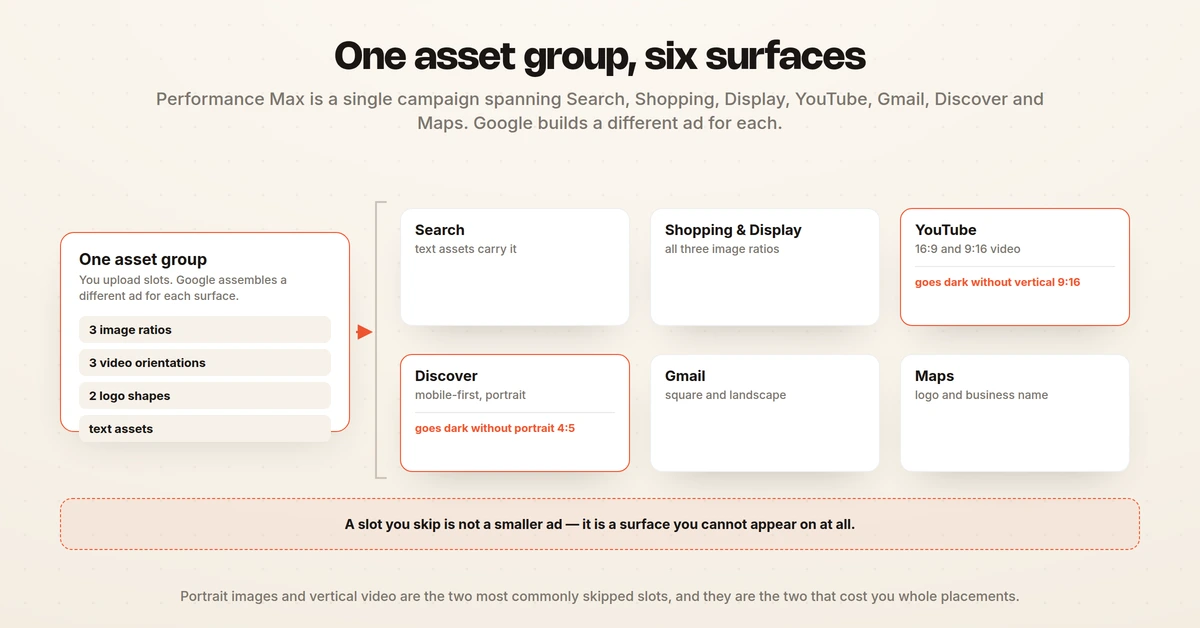
Google's Performance Max runs across Search, Display, YouTube, Gmail, Discover, and Maps simultaneously. The algorithm assembles your text, images, and videos into ads on the fly. If you feed it weak inputs, you get weak outputs. No amount of bidding strategy fixes bad creative.

What You Need Before You Start

Before uploading a single asset, make sure you have these prerequisites in place. Skipping any of them leads to wasted spend and misleading performance data.

Conversion tracking must be accurate. Performance Max optimizes toward the conversion actions you define. If your tracking double-counts purchases or misses key events, the algorithm optimizes for the wrong signal. Verify your Google Tag or GA4 setup before launching.

A product feed (for ecommerce). If you run Shopping placements, your Merchant Center feed is the backbone. Incomplete titles, missing GTINs, or low-quality product images in the feed will drag down performance regardless of how strong your uploaded creative is.

Raw creative materials. Gather your brand logo (square and landscape versions), 15-20 high-resolution product and lifestyle images, 2-5 videos (even simple 15-second clips), and your top-performing ad copy from other channels. Repurposing proven copy that already drives strong CTR and low CPL gives PMax a head start.

Clear audience signals. While PMax ultimately finds its own audiences, your initial audience signals (custom segments, remarketing lists, customer match lists) tell the algorithm where to start testing. Pair this with dedicated asset groups per audience theme.

Step 1: Performance Max Text Asset Specs

Text assets are the foundation of every Performance Max ad combination. Google mixes and matches your headlines and descriptions across placements, so each piece must work independently and in combination with others.

Headlines

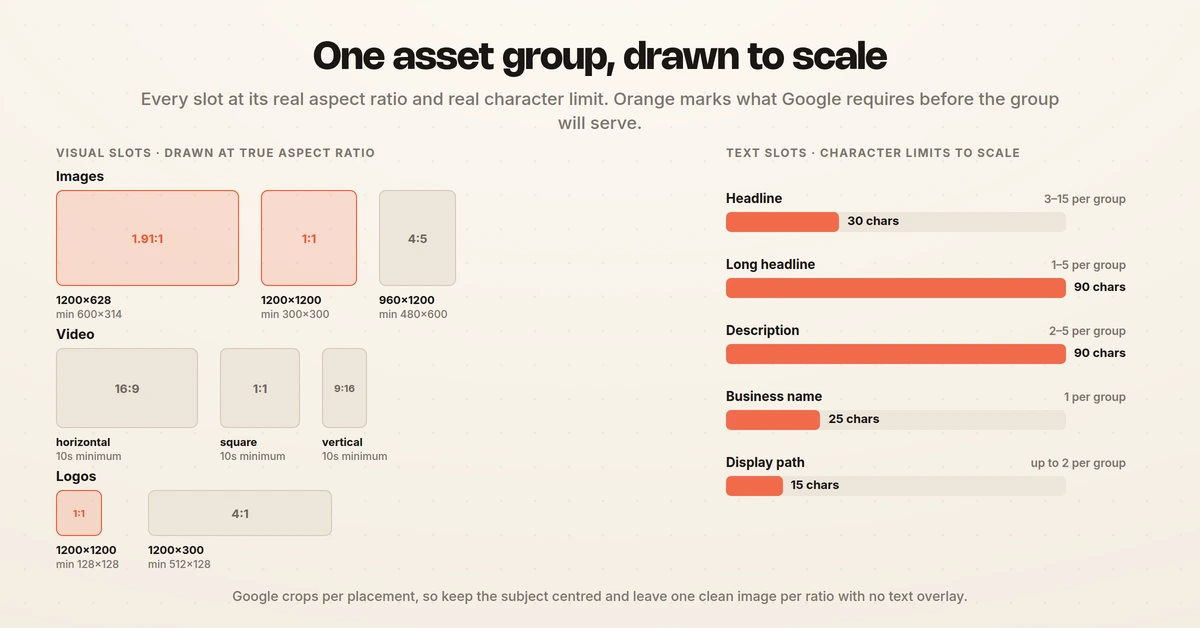
Performance Max accepts 3 to 15 headlines, each with a maximum of 30 characters. Google recommends including at least one headline under 15 characters because shorter headlines display better on smaller placements like mobile Discovery ads and Gmail promotions.

Write headlines that cover different angles: brand name, primary benefit, specific offer, urgency, and social proof. Avoid making all 15 headlines variations of the same message. The algorithm needs variety to test which combinations resonate across placements.

Pro tip: Pull your top-performing RSA headlines directly into PMax. If a headline already has click-through data proving it works, let PMax use that same copy.

Long Headlines

You can submit 1 to 5 long headlines with up to 90 characters each. Long headlines appear on placements with more real estate, like Display and YouTube. Use these for complete value propositions that would not fit in 30 characters.

Descriptions

Submit 2 to 5 descriptions at up to 90 characters each. Google recommends at least one description under 60 characters for compact placements. Descriptions should expand on your headline's promise with specifics: metrics, timeframes, or concrete outcomes.

Business Name and Call-to-Action

Your business name is limited to 25 characters and appears across all placements. Choose one call-to-action that aligns with your conversion goal, whether that is "Shop Now," "Get Quote," or "Sign Up." Google offers preset CTA options, or you can let the system auto-select.

"Done" looks like this: 11-15 headlines covering distinct angles, 3-5 long headlines with full value propositions, 4-5 descriptions with specific proof points, and a CTA that matches your primary conversion event.

Performance Max text asset specifications showing headline description and character limits

Step 2: Prepare Image Assets That Actually Convert

Image assets appear on Display, Discovery, Gmail, and YouTube. Google accepts three aspect ratios, and you should upload all three to maximize placement eligibility. Campaigns missing portrait images, for example, lose access to mobile-first Discovery placements entirely.

Image Specifications

Performance Max image aspect ratios landscape square and portrait with recommended pixel dimensions

File formats: JPEG, PNG, or GIF. Maximum file size is 5 MB per image.

Logo Specifications

Aspect Ratio

Orientation

Recommended Size

Minimum Size

Max Per Group

1:1

Square

1200 x 1200 px

128 x 128 px

5

4:1

Landscape

1200 x 300 px

512 x 128 px

5

Upload both square and landscape logos. If you only upload one, Google may crop or distort it for placements that require the other format.

What Makes Images Convert

Not all images are created equal. Internal testing data shows lifestyle imagery outperforms product-only shots by approximately 28% on YouTube placements. The algorithm needs variety to find winners, but five excellent images with a "Good" ad strength score will outperform twenty mediocre images rated "Excellent."

Keep the subject centered in the middle 80% of the frame. Google crops images differently for each placement, and edge content gets cut. Avoid heavy text overlays on images. Google recommends at least one image per aspect ratio with no text overlay at all, because text-heavy images perform poorly on Display placements where Google adds its own headline and description layers.

Mix your image types: product shots on white backgrounds, lifestyle images showing the product in use, close-up detail shots, and wider contextual scenes. This diversity gives the algorithm distinct visual approaches to test.

Step 3: Performance Max Video Specs and Creative Best Practices

Video is technically optional in Performance Max. Practically, it is not. YouTube is one of PMax's highest-volume placement channels, and without custom video, Google auto-generates slideshows from your images. These auto-generated videos underperform manually created videos by 25 to 40% based on advertiser testing data.

Video Specifications

Aspect Ratio

Orientation

Use Case

16:9

Horizontal

YouTube in-stream, Display

9:16

Vertical

YouTube Shorts, mobile Discovery

1:1

Square

Display, social-style placements

Duration: Minimum 10 seconds. Google accepts videos up to any length, but 15 to 60 seconds hits the sweet spot for most placements. For YouTube Shorts specifically, keep videos between 10 and 60 seconds.

Formats: MP4, MOV, or AVI. Maximum file size is 1 GB. HD quality recommended.

Quantity: You can upload up to 15 videos per asset group (increased from 5 in early 2026). Aim for at least 3 to 5 covering different aspect ratios.

Video Creative That Works

The first 3 to 5 seconds determine whether someone watches or skips. Lead with a visual hook or a provocative question, not your logo. Brand reveals work better at the 5-second mark or later.

Create at least one video per aspect ratio. Google's AI may flip horizontal videos into vertical or square crops, but the results are often awkward. Purpose-built vertical video performs significantly better on Shorts than a cropped horizontal clip.

Add voiceovers to address passive viewers. Many YouTube placements auto-play without sound initially, so pair voiceover with on-screen text or captions for the first few seconds.

Even a basic 15-second video with product shots, text overlays, and background music outperforms Google's auto-generated slideshow. If you have zero video production capacity, that minimum viable video is worth the effort.

YouTube Shorts and Vertical Video

Google's AI can flip horizontal videos into vertical or square crops, but the results often look awkward with critical content cut off. Purpose-built 9:16 vertical video performs significantly better on Shorts placements than a cropped horizontal clip. With Shorts now a major inventory source in PMax, vertical video is no longer a nice-to-have.

For Shorts-specific video, keep duration between 10 and 60 seconds. Front-load the visual hook in the first 2 seconds. Use on-screen text and captions since many Shorts play with sound off initially. Vertical video is also where lifestyle and UGC-style content tends to outperform polished brand creative.

Step 4: Structure Your Asset Groups Strategically

An asset group is a themed collection of creative assets (text, images, videos) paired with audience signals and a landing page. Google combines assets within a group to create ads, so everything in a single group must be thematically consistent.

When to Use One Asset Group vs. Multiple

The general rule: consolidate until you have enough conversion volume to split. A single asset group with strong creative variety outperforms three thin asset groups that each get a handful of conversions. The threshold is roughly 30 conversions per month per asset group. Below that, the algorithm lacks enough data to optimize effectively.

Split asset groups when you have distinct product categories, audience segments, or landing pages that require different messaging. A running shoe brand, for example, might have separate asset groups for trail running and road running, each with dedicated images, copy, and landing pages.

Asset Group Composition Checklist

For each asset group, aim to fill every slot:

  • 11-15 headlines (varied angles)

  • 3-5 long headlines

  • 4-5 descriptions

  • 15-20 images across all three aspect ratios

  • 3-5 custom videos (horizontal, vertical, square)

  • Square and landscape logos

  • Relevant audience signals

  • Dedicated landing page URL

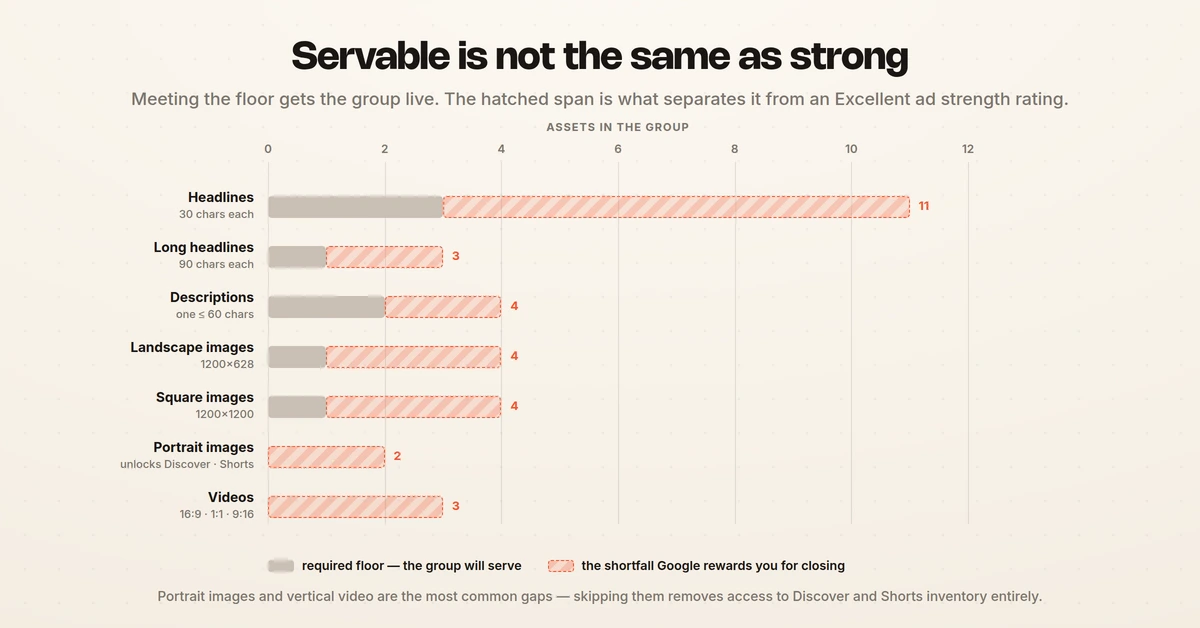
Google rates each asset group's "Ad Strength" from Poor to Excellent based on asset completeness, variety, and quality. An "Excellent" rating does not guarantee performance, but it does ensure maximum placement eligibility across all Google channels. A "Poor" rating restricts where your ads can appear.

Step 5: Set Brand Guidelines and Final URL Expansion

Google introduced campaign-level brand guidelines to give advertisers more control over how their brand appears across auto-generated ad combinations. If you do not set brand guidelines, Google defaults to using the name and logo from whichever asset group performs best. That may not be the brand presentation you want.

Brand Guidelines Setup

Upload your official business name and logo at the campaign level. Set font preferences and brand colors if available. This ensures consistency across all placements, even when Google's AI assembles the final creative.

Final URL Expansion

Final URL expansion lets Google send traffic to pages on your site beyond the landing pages you specify, if the algorithm predicts a better conversion outcome. This is powerful for ecommerce sites with deep product catalogs but risky for lead generation campaigns where you need visitors on specific pages.

For lead gen, consider disabling final URL expansion or using URL exclusion rules. For ecommerce, keep it enabled but monitor which URLs receive traffic via the Insights tab. Exclude any pages that drive low-quality traffic (blog posts, About pages, career listings).

Audience Signals vs. Targeting

Performance Max audience signals are suggestions, not hard targeting. The algorithm uses your custom segments, remarketing lists, and customer match data as starting points, then expands beyond them if it finds converting audiences elsewhere. This is by design.

To get the most out of audience signals, align them with your asset groups. If you have an asset group for enterprise buyers, pair it with a customer match list of enterprise contacts and a custom segment built from enterprise-intent search terms. The tighter the alignment between creative messaging and audience signal, the faster the algorithm finds its footing.

Step 6: Launch, Monitor, and Refresh Performance Max Creative

Uploading assets is not the finish line. Performance Max requires ongoing creative management to maintain performance as audiences shift and ad fatigue sets in.

Monitor Asset Performance Ratings

Google assigns each individual asset a rating: "Best," "Good," "Low," or "Learning." Check these ratings weekly. Replace assets rated "Low" every 2 to 3 weeks. Keep "Best" and "Good" assets running.

One critical nuance: these ratings are relative within your asset group, not absolute quality measures. A "Best" headline in a weak group might still be mediocre copy. Use the ratings for internal comparison, but do not treat a "Best" label as proof that an asset is objectively strong.

Creative Refresh Cadence

Static image and text assets: refresh every 4 to 6 weeks with new themes, seasonal messaging, or updated offers. Do not replace everything at once. Swap 2 to 3 assets at a time so the algorithm can adapt without destabilizing.

Video assets: refresh every 6 to 8 weeks or when view-through rates drop. Video fatigue takes longer to set in but hits harder when it does.

The goal is a "ship of Theseus" approach: continuously replacing individual components so the overall asset group stays fresh without ever forcing the algorithm to relearn from scratch.

What to Watch in Reporting

PMax reporting has improved but still has gaps. You can see impressions, clicks, cost, and conversions at the individual asset level. What you cannot see is which specific combination of headline + image + video drove a given conversion. Knowing that "Headline 7" is rated "Best" and "Image 3" is rated "Best" does not tell you whether they perform well together.

This is where element-level creative analysis becomes critical. Understanding which hooks, visual styles, CTAs, and body copy patterns drive results across your campaigns gives you a strategic advantage that PMax's native reporting cannot provide.

Performance Max creative refresh cadence timeline showing when to replace text image and video assets

Common Mistakes to Avoid

Relying on auto-generated video. Google creates slideshow videos from your images if you do not upload custom video. These auto-generated clips underperform real video by 25 to 40%. Even a simple 15-second branded video is a significant upgrade.

Uploading only minimum assets. Meeting Google's minimum requirements (3 headlines, 1 long headline, 2 descriptions) caps your placement eligibility and limits the algorithm's ability to test combinations. Fill every slot to maximize reach and optimization potential.

Making all headlines say the same thing. If your 15 headlines are all variations of "Best Running Shoes 2026," the algorithm has no variety to work with. Cover different angles: benefits, offers, urgency, brand authority, and social proof.

Ignoring portrait images. Portrait (4:5) images are optional in Google's specs but critical for mobile-first placements like Discovery and YouTube Shorts. Skipping them means your campaign is invisible on some of the highest-growth inventory.

Overhauling all creative at once. Replacing every asset simultaneously forces the algorithm into a full relearning phase. Performance typically dips for 1 to 2 weeks. Stagger your refreshes: swap 2 to 3 assets at a time and give the system 7 to 10 days to stabilize before making more changes.

Five common Performance Max creative mistakes to avoid with correct alternatives

Tools That Make This Easier

Google Ads Asset Report. Built into the Google Ads interface. Shows individual asset performance ratings, impressions, and conversion data. Free, but limited to relative ratings without cross-asset combination insights.

Canva or Figma. For creating images in the correct aspect ratios (1.91:1, 1:1, 4:5). Both offer templates sized for Google Ads placements. Useful for teams without dedicated design resources.

CapCut or Adobe Premiere Rush. For producing quick vertical and square video variants from existing horizontal footage. CapCut is free and handles basic video editing and caption overlays well enough for PMax.

Hawky. Analyzes ad creative at the element level, breaking down which hooks, visuals, CTAs, and body copy patterns actually drive performance. Hawky's creative analysis identifies winning patterns across your campaigns, while its AI creative generation produces new assets based on those patterns. For teams running $50k+/month across PMax and Meta, the ability to see which creative elements drive ROAS (not just which assets Google rates "Best") changes how you plan every refresh cycle.

Google Merchant Center. Essential for ecommerce PMax campaigns. Your product feed quality directly impacts ad quality. Use Merchant Center's diagnostics to fix disapproved products, missing images, and incomplete attributes before they drag down your PMax performance.

Frequently Asked Questions

What are the recommended image sizes for Performance Max?

Performance Max accepts three image aspect ratios. Landscape images (1.91:1) should be 1200 x 628 pixels, square images (1:1) should be 1200 x 1200 pixels, and portrait images (4:5) should be 960 x 1200 pixels. All images must be JPEG, PNG, or GIF format with a maximum file size of 5 MB.

Upload images in all three ratios to maximize placement eligibility across Display, Discovery, YouTube, and Gmail.

How many assets do I need for Performance Max?

Google requires a minimum of 3 headlines, 1 long headline, 2 descriptions, 1 landscape image, and 1 square image per asset group. For optimal performance, aim for 11-15 headlines, 3-5 long headlines, 4-5 descriptions, 15-20 images across all aspect ratios, and 3-5 custom videos. Filling every available slot improves your ad strength score and gives the algorithm more combinations to test.

Does Performance Max auto-generate videos?

Yes. If you do not upload custom video, Google automatically creates slideshow-style videos from your image assets. These auto-generated videos consistently underperform manually created videos by 25 to 40% in advertiser testing. Even a basic 15-second video with product shots, text overlays, and music will outperform the auto-generated version. Always upload at least one custom video per asset group.

How often should I refresh Performance Max creative assets?

Replace individual assets rated "Low" every 2 to 3 weeks. Conduct a broader creative refresh with new themes and seasonal messaging every 4 to 6 weeks for static assets and every 6 to 8 weeks for video. Avoid replacing all assets simultaneously, as this forces the algorithm into a relearning phase that typically causes a 1 to 2 week performance dip. Stagger replacements by swapping 2 to 3 assets at a time.

How do I improve ad strength in Performance Max?

Ad strength improves by filling more asset slots, providing variety across headlines and descriptions, uploading all three image aspect ratios, and adding custom video. Relevance between your assets and landing page also affects the score. Focus on covering different messaging angles (benefits, offers, urgency, social proof) rather than writing variations of the same message. Note that ad strength measures asset completeness and variety, not actual conversion performance.

What is the difference between asset groups in Performance Max?

An asset group is a themed collection of text, image, and video assets paired with audience signals and a landing page. Google combines assets within a group to create ads, so all assets in a group must be thematically consistent.

Create separate asset groups when you have distinct product categories, audience segments, or landing pages. Consolidate into fewer groups when monthly conversion volume per group is below 30, as the algorithm needs sufficient data to optimize effectively.

If your Performance Max campaigns are burning budget on creative that is not pulling its weight, element-level creative analysis is built for that job. Stop guessing which assets drive ROAS and start seeing which hooks, visuals, and CTAs actually convert.

For a deeper look at how creative fatigue works and how to detect it early, see Creative Fatigue Explained: Why Your Best Performing Ads Stop Working. If you are evaluating tools for creative intelligence, check out 9 Best Ad Creative Analysis Tools in 2026.

Ready to Stop Guessing and Start Winning with Creative Intelligence? Book Demo

Performance Max campaigns live or die on creative assets. After reading this guide, you will know the exact specs for every PMax asset type, how to structure asset groups for maximum algorithmic advantage, and when to refresh creative to avoid fatigue. Most teams treat PMax creative as a checkbox exercise. This guide treats it as the strategic lever it actually is.

Performance Max creative assets flowing into Google ad placements including YouTube Search Display and Gmail

Google's Performance Max runs across Search, Display, YouTube, Gmail, Discover, and Maps simultaneously. The algorithm assembles your text, images, and videos into ads on the fly. If you feed it weak inputs, you get weak outputs. No amount of bidding strategy fixes bad creative.

What You Need Before You Start

Before uploading a single asset, make sure you have these prerequisites in place. Skipping any of them leads to wasted spend and misleading performance data.

Conversion tracking must be accurate. Performance Max optimizes toward the conversion actions you define. If your tracking double-counts purchases or misses key events, the algorithm optimizes for the wrong signal. Verify your Google Tag or GA4 setup before launching.

A product feed (for ecommerce). If you run Shopping placements, your Merchant Center feed is the backbone. Incomplete titles, missing GTINs, or low-quality product images in the feed will drag down performance regardless of how strong your uploaded creative is.

Raw creative materials. Gather your brand logo (square and landscape versions), 15-20 high-resolution product and lifestyle images, 2-5 videos (even simple 15-second clips), and your top-performing ad copy from other channels. Repurposing proven copy that already drives strong CTR and low CPL gives PMax a head start.

Clear audience signals. While PMax ultimately finds its own audiences, your initial audience signals (custom segments, remarketing lists, customer match lists) tell the algorithm where to start testing. Pair this with dedicated asset groups per audience theme.

Step 1: Performance Max Text Asset Specs

Text assets are the foundation of every Performance Max ad combination. Google mixes and matches your headlines and descriptions across placements, so each piece must work independently and in combination with others.

Headlines

Performance Max accepts 3 to 15 headlines, each with a maximum of 30 characters. Google recommends including at least one headline under 15 characters because shorter headlines display better on smaller placements like mobile Discovery ads and Gmail promotions.

Write headlines that cover different angles: brand name, primary benefit, specific offer, urgency, and social proof. Avoid making all 15 headlines variations of the same message. The algorithm needs variety to test which combinations resonate across placements.

Pro tip: Pull your top-performing RSA headlines directly into PMax. If a headline already has click-through data proving it works, let PMax use that same copy.

Long Headlines

You can submit 1 to 5 long headlines with up to 90 characters each. Long headlines appear on placements with more real estate, like Display and YouTube. Use these for complete value propositions that would not fit in 30 characters.

Descriptions

Submit 2 to 5 descriptions at up to 90 characters each. Google recommends at least one description under 60 characters for compact placements. Descriptions should expand on your headline's promise with specifics: metrics, timeframes, or concrete outcomes.

Business Name and Call-to-Action

Your business name is limited to 25 characters and appears across all placements. Choose one call-to-action that aligns with your conversion goal, whether that is "Shop Now," "Get Quote," or "Sign Up." Google offers preset CTA options, or you can let the system auto-select.

"Done" looks like this: 11-15 headlines covering distinct angles, 3-5 long headlines with full value propositions, 4-5 descriptions with specific proof points, and a CTA that matches your primary conversion event.

Performance Max text asset specifications showing headline description and character limits

Step 2: Prepare Image Assets That Actually Convert

Image assets appear on Display, Discovery, Gmail, and YouTube. Google accepts three aspect ratios, and you should upload all three to maximize placement eligibility. Campaigns missing portrait images, for example, lose access to mobile-first Discovery placements entirely.

Image Specifications

Performance Max image aspect ratios landscape square and portrait with recommended pixel dimensions

File formats: JPEG, PNG, or GIF. Maximum file size is 5 MB per image.

Logo Specifications

Aspect Ratio

Orientation

Recommended Size

Minimum Size

Max Per Group

1:1

Square

1200 x 1200 px

128 x 128 px

5

4:1

Landscape

1200 x 300 px

512 x 128 px

5

Upload both square and landscape logos. If you only upload one, Google may crop or distort it for placements that require the other format.

What Makes Images Convert

Not all images are created equal. Internal testing data shows lifestyle imagery outperforms product-only shots by approximately 28% on YouTube placements. The algorithm needs variety to find winners, but five excellent images with a "Good" ad strength score will outperform twenty mediocre images rated "Excellent."

Keep the subject centered in the middle 80% of the frame. Google crops images differently for each placement, and edge content gets cut. Avoid heavy text overlays on images. Google recommends at least one image per aspect ratio with no text overlay at all, because text-heavy images perform poorly on Display placements where Google adds its own headline and description layers.

Mix your image types: product shots on white backgrounds, lifestyle images showing the product in use, close-up detail shots, and wider contextual scenes. This diversity gives the algorithm distinct visual approaches to test.

Step 3: Performance Max Video Specs and Creative Best Practices

Video is technically optional in Performance Max. Practically, it is not. YouTube is one of PMax's highest-volume placement channels, and without custom video, Google auto-generates slideshows from your images. These auto-generated videos underperform manually created videos by 25 to 40% based on advertiser testing data.

Video Specifications

Aspect Ratio

Orientation

Use Case

16:9

Horizontal

YouTube in-stream, Display

9:16

Vertical

YouTube Shorts, mobile Discovery

1:1

Square

Display, social-style placements

Duration: Minimum 10 seconds. Google accepts videos up to any length, but 15 to 60 seconds hits the sweet spot for most placements. For YouTube Shorts specifically, keep videos between 10 and 60 seconds.

Formats: MP4, MOV, or AVI. Maximum file size is 1 GB. HD quality recommended.

Quantity: You can upload up to 15 videos per asset group (increased from 5 in early 2026). Aim for at least 3 to 5 covering different aspect ratios.

Video Creative That Works

The first 3 to 5 seconds determine whether someone watches or skips. Lead with a visual hook or a provocative question, not your logo. Brand reveals work better at the 5-second mark or later.

Create at least one video per aspect ratio. Google's AI may flip horizontal videos into vertical or square crops, but the results are often awkward. Purpose-built vertical video performs significantly better on Shorts than a cropped horizontal clip.

Add voiceovers to address passive viewers. Many YouTube placements auto-play without sound initially, so pair voiceover with on-screen text or captions for the first few seconds.

Even a basic 15-second video with product shots, text overlays, and background music outperforms Google's auto-generated slideshow. If you have zero video production capacity, that minimum viable video is worth the effort.

YouTube Shorts and Vertical Video

Google's AI can flip horizontal videos into vertical or square crops, but the results often look awkward with critical content cut off. Purpose-built 9:16 vertical video performs significantly better on Shorts placements than a cropped horizontal clip. With Shorts now a major inventory source in PMax, vertical video is no longer a nice-to-have.

For Shorts-specific video, keep duration between 10 and 60 seconds. Front-load the visual hook in the first 2 seconds. Use on-screen text and captions since many Shorts play with sound off initially. Vertical video is also where lifestyle and UGC-style content tends to outperform polished brand creative.

Step 4: Structure Your Asset Groups Strategically

An asset group is a themed collection of creative assets (text, images, videos) paired with audience signals and a landing page. Google combines assets within a group to create ads, so everything in a single group must be thematically consistent.

When to Use One Asset Group vs. Multiple

The general rule: consolidate until you have enough conversion volume to split. A single asset group with strong creative variety outperforms three thin asset groups that each get a handful of conversions. The threshold is roughly 30 conversions per month per asset group. Below that, the algorithm lacks enough data to optimize effectively.

Split asset groups when you have distinct product categories, audience segments, or landing pages that require different messaging. A running shoe brand, for example, might have separate asset groups for trail running and road running, each with dedicated images, copy, and landing pages.

Asset Group Composition Checklist

For each asset group, aim to fill every slot:

  • 11-15 headlines (varied angles)

  • 3-5 long headlines

  • 4-5 descriptions

  • 15-20 images across all three aspect ratios

  • 3-5 custom videos (horizontal, vertical, square)

  • Square and landscape logos

  • Relevant audience signals

  • Dedicated landing page URL

Google rates each asset group's "Ad Strength" from Poor to Excellent based on asset completeness, variety, and quality. An "Excellent" rating does not guarantee performance, but it does ensure maximum placement eligibility across all Google channels. A "Poor" rating restricts where your ads can appear.

Step 5: Set Brand Guidelines and Final URL Expansion

Google introduced campaign-level brand guidelines to give advertisers more control over how their brand appears across auto-generated ad combinations. If you do not set brand guidelines, Google defaults to using the name and logo from whichever asset group performs best. That may not be the brand presentation you want.

Brand Guidelines Setup

Upload your official business name and logo at the campaign level. Set font preferences and brand colors if available. This ensures consistency across all placements, even when Google's AI assembles the final creative.

Final URL Expansion

Final URL expansion lets Google send traffic to pages on your site beyond the landing pages you specify, if the algorithm predicts a better conversion outcome. This is powerful for ecommerce sites with deep product catalogs but risky for lead generation campaigns where you need visitors on specific pages.

For lead gen, consider disabling final URL expansion or using URL exclusion rules. For ecommerce, keep it enabled but monitor which URLs receive traffic via the Insights tab. Exclude any pages that drive low-quality traffic (blog posts, About pages, career listings).

Audience Signals vs. Targeting

Performance Max audience signals are suggestions, not hard targeting. The algorithm uses your custom segments, remarketing lists, and customer match data as starting points, then expands beyond them if it finds converting audiences elsewhere. This is by design.

To get the most out of audience signals, align them with your asset groups. If you have an asset group for enterprise buyers, pair it with a customer match list of enterprise contacts and a custom segment built from enterprise-intent search terms. The tighter the alignment between creative messaging and audience signal, the faster the algorithm finds its footing.

Step 6: Launch, Monitor, and Refresh Performance Max Creative

Uploading assets is not the finish line. Performance Max requires ongoing creative management to maintain performance as audiences shift and ad fatigue sets in.

Monitor Asset Performance Ratings

Google assigns each individual asset a rating: "Best," "Good," "Low," or "Learning." Check these ratings weekly. Replace assets rated "Low" every 2 to 3 weeks. Keep "Best" and "Good" assets running.

One critical nuance: these ratings are relative within your asset group, not absolute quality measures. A "Best" headline in a weak group might still be mediocre copy. Use the ratings for internal comparison, but do not treat a "Best" label as proof that an asset is objectively strong.

Creative Refresh Cadence

Static image and text assets: refresh every 4 to 6 weeks with new themes, seasonal messaging, or updated offers. Do not replace everything at once. Swap 2 to 3 assets at a time so the algorithm can adapt without destabilizing.

Video assets: refresh every 6 to 8 weeks or when view-through rates drop. Video fatigue takes longer to set in but hits harder when it does.

The goal is a "ship of Theseus" approach: continuously replacing individual components so the overall asset group stays fresh without ever forcing the algorithm to relearn from scratch.

What to Watch in Reporting

PMax reporting has improved but still has gaps. You can see impressions, clicks, cost, and conversions at the individual asset level. What you cannot see is which specific combination of headline + image + video drove a given conversion. Knowing that "Headline 7" is rated "Best" and "Image 3" is rated "Best" does not tell you whether they perform well together.

This is where element-level creative analysis becomes critical. Understanding which hooks, visual styles, CTAs, and body copy patterns drive results across your campaigns gives you a strategic advantage that PMax's native reporting cannot provide.

Performance Max creative refresh cadence timeline showing when to replace text image and video assets

Common Mistakes to Avoid

Relying on auto-generated video. Google creates slideshow videos from your images if you do not upload custom video. These auto-generated clips underperform real video by 25 to 40%. Even a simple 15-second branded video is a significant upgrade.

Uploading only minimum assets. Meeting Google's minimum requirements (3 headlines, 1 long headline, 2 descriptions) caps your placement eligibility and limits the algorithm's ability to test combinations. Fill every slot to maximize reach and optimization potential.

Making all headlines say the same thing. If your 15 headlines are all variations of "Best Running Shoes 2026," the algorithm has no variety to work with. Cover different angles: benefits, offers, urgency, brand authority, and social proof.

Ignoring portrait images. Portrait (4:5) images are optional in Google's specs but critical for mobile-first placements like Discovery and YouTube Shorts. Skipping them means your campaign is invisible on some of the highest-growth inventory.

Overhauling all creative at once. Replacing every asset simultaneously forces the algorithm into a full relearning phase. Performance typically dips for 1 to 2 weeks. Stagger your refreshes: swap 2 to 3 assets at a time and give the system 7 to 10 days to stabilize before making more changes.

Five common Performance Max creative mistakes to avoid with correct alternatives

Tools That Make This Easier

Google Ads Asset Report. Built into the Google Ads interface. Shows individual asset performance ratings, impressions, and conversion data. Free, but limited to relative ratings without cross-asset combination insights.

Canva or Figma. For creating images in the correct aspect ratios (1.91:1, 1:1, 4:5). Both offer templates sized for Google Ads placements. Useful for teams without dedicated design resources.

CapCut or Adobe Premiere Rush. For producing quick vertical and square video variants from existing horizontal footage. CapCut is free and handles basic video editing and caption overlays well enough for PMax.

Hawky. Analyzes ad creative at the element level, breaking down which hooks, visuals, CTAs, and body copy patterns actually drive performance. Hawky's creative analysis identifies winning patterns across your campaigns, while its AI creative generation produces new assets based on those patterns. For teams running $50k+/month across PMax and Meta, the ability to see which creative elements drive ROAS (not just which assets Google rates "Best") changes how you plan every refresh cycle.

Google Merchant Center. Essential for ecommerce PMax campaigns. Your product feed quality directly impacts ad quality. Use Merchant Center's diagnostics to fix disapproved products, missing images, and incomplete attributes before they drag down your PMax performance.

Frequently Asked Questions

What are the recommended image sizes for Performance Max?

Performance Max accepts three image aspect ratios. Landscape images (1.91:1) should be 1200 x 628 pixels, square images (1:1) should be 1200 x 1200 pixels, and portrait images (4:5) should be 960 x 1200 pixels. All images must be JPEG, PNG, or GIF format with a maximum file size of 5 MB.

Upload images in all three ratios to maximize placement eligibility across Display, Discovery, YouTube, and Gmail.

How many assets do I need for Performance Max?

Google requires a minimum of 3 headlines, 1 long headline, 2 descriptions, 1 landscape image, and 1 square image per asset group. For optimal performance, aim for 11-15 headlines, 3-5 long headlines, 4-5 descriptions, 15-20 images across all aspect ratios, and 3-5 custom videos. Filling every available slot improves your ad strength score and gives the algorithm more combinations to test.

Does Performance Max auto-generate videos?

Yes. If you do not upload custom video, Google automatically creates slideshow-style videos from your image assets. These auto-generated videos consistently underperform manually created videos by 25 to 40% in advertiser testing. Even a basic 15-second video with product shots, text overlays, and music will outperform the auto-generated version. Always upload at least one custom video per asset group.

How often should I refresh Performance Max creative assets?

Replace individual assets rated "Low" every 2 to 3 weeks. Conduct a broader creative refresh with new themes and seasonal messaging every 4 to 6 weeks for static assets and every 6 to 8 weeks for video. Avoid replacing all assets simultaneously, as this forces the algorithm into a relearning phase that typically causes a 1 to 2 week performance dip. Stagger replacements by swapping 2 to 3 assets at a time.

How do I improve ad strength in Performance Max?

Ad strength improves by filling more asset slots, providing variety across headlines and descriptions, uploading all three image aspect ratios, and adding custom video. Relevance between your assets and landing page also affects the score. Focus on covering different messaging angles (benefits, offers, urgency, social proof) rather than writing variations of the same message. Note that ad strength measures asset completeness and variety, not actual conversion performance.

What is the difference between asset groups in Performance Max?

An asset group is a themed collection of text, image, and video assets paired with audience signals and a landing page. Google combines assets within a group to create ads, so all assets in a group must be thematically consistent.

Create separate asset groups when you have distinct product categories, audience segments, or landing pages. Consolidate into fewer groups when monthly conversion volume per group is below 30, as the algorithm needs sufficient data to optimize effectively.

If your Performance Max campaigns are burning budget on creative that is not pulling its weight, element-level creative analysis is built for that job. Stop guessing which assets drive ROAS and start seeing which hooks, visuals, and CTAs actually convert.

For a deeper look at how creative fatigue works and how to detect it early, see Creative Fatigue Explained: Why Your Best Performing Ads Stop Working. If you are evaluating tools for creative intelligence, check out 9 Best Ad Creative Analysis Tools in 2026.

Ready to Stop Guessing and Start Winning with Creative Intelligence? Book Demo

Performance Max campaigns live or die on creative assets. After reading this guide, you will know the exact specs for every PMax asset type, how to structure asset groups for maximum algorithmic advantage, and when to refresh creative to avoid fatigue. Most teams treat PMax creative as a checkbox exercise. This guide treats it as the strategic lever it actually is.

Performance Max creative assets flowing into Google ad placements including YouTube Search Display and Gmail

Google's Performance Max runs across Search, Display, YouTube, Gmail, Discover, and Maps simultaneously. The algorithm assembles your text, images, and videos into ads on the fly. If you feed it weak inputs, you get weak outputs. No amount of bidding strategy fixes bad creative.

What You Need Before You Start

Before uploading a single asset, make sure you have these prerequisites in place. Skipping any of them leads to wasted spend and misleading performance data.

Conversion tracking must be accurate. Performance Max optimizes toward the conversion actions you define. If your tracking double-counts purchases or misses key events, the algorithm optimizes for the wrong signal. Verify your Google Tag or GA4 setup before launching.

A product feed (for ecommerce). If you run Shopping placements, your Merchant Center feed is the backbone. Incomplete titles, missing GTINs, or low-quality product images in the feed will drag down performance regardless of how strong your uploaded creative is.

Raw creative materials. Gather your brand logo (square and landscape versions), 15-20 high-resolution product and lifestyle images, 2-5 videos (even simple 15-second clips), and your top-performing ad copy from other channels. Repurposing proven copy that already drives strong CTR and low CPL gives PMax a head start.

Clear audience signals. While PMax ultimately finds its own audiences, your initial audience signals (custom segments, remarketing lists, customer match lists) tell the algorithm where to start testing. Pair this with dedicated asset groups per audience theme.

Step 1: Performance Max Text Asset Specs

Text assets are the foundation of every Performance Max ad combination. Google mixes and matches your headlines and descriptions across placements, so each piece must work independently and in combination with others.

Headlines

Performance Max accepts 3 to 15 headlines, each with a maximum of 30 characters. Google recommends including at least one headline under 15 characters because shorter headlines display better on smaller placements like mobile Discovery ads and Gmail promotions.

Write headlines that cover different angles: brand name, primary benefit, specific offer, urgency, and social proof. Avoid making all 15 headlines variations of the same message. The algorithm needs variety to test which combinations resonate across placements.

Pro tip: Pull your top-performing RSA headlines directly into PMax. If a headline already has click-through data proving it works, let PMax use that same copy.

Long Headlines

You can submit 1 to 5 long headlines with up to 90 characters each. Long headlines appear on placements with more real estate, like Display and YouTube. Use these for complete value propositions that would not fit in 30 characters.

Descriptions

Submit 2 to 5 descriptions at up to 90 characters each. Google recommends at least one description under 60 characters for compact placements. Descriptions should expand on your headline's promise with specifics: metrics, timeframes, or concrete outcomes.

Business Name and Call-to-Action

Your business name is limited to 25 characters and appears across all placements. Choose one call-to-action that aligns with your conversion goal, whether that is "Shop Now," "Get Quote," or "Sign Up." Google offers preset CTA options, or you can let the system auto-select.

"Done" looks like this: 11-15 headlines covering distinct angles, 3-5 long headlines with full value propositions, 4-5 descriptions with specific proof points, and a CTA that matches your primary conversion event.

Performance Max text asset specifications showing headline description and character limits

Step 2: Prepare Image Assets That Actually Convert

Image assets appear on Display, Discovery, Gmail, and YouTube. Google accepts three aspect ratios, and you should upload all three to maximize placement eligibility. Campaigns missing portrait images, for example, lose access to mobile-first Discovery placements entirely.

Image Specifications

Performance Max image aspect ratios landscape square and portrait with recommended pixel dimensions

File formats: JPEG, PNG, or GIF. Maximum file size is 5 MB per image.

Logo Specifications

Aspect Ratio

Orientation

Recommended Size

Minimum Size

Max Per Group

1:1

Square

1200 x 1200 px

128 x 128 px

5

4:1

Landscape

1200 x 300 px

512 x 128 px

5

Upload both square and landscape logos. If you only upload one, Google may crop or distort it for placements that require the other format.

What Makes Images Convert

Not all images are created equal. Internal testing data shows lifestyle imagery outperforms product-only shots by approximately 28% on YouTube placements. The algorithm needs variety to find winners, but five excellent images with a "Good" ad strength score will outperform twenty mediocre images rated "Excellent."

Keep the subject centered in the middle 80% of the frame. Google crops images differently for each placement, and edge content gets cut. Avoid heavy text overlays on images. Google recommends at least one image per aspect ratio with no text overlay at all, because text-heavy images perform poorly on Display placements where Google adds its own headline and description layers.

Mix your image types: product shots on white backgrounds, lifestyle images showing the product in use, close-up detail shots, and wider contextual scenes. This diversity gives the algorithm distinct visual approaches to test.

Step 3: Performance Max Video Specs and Creative Best Practices

Video is technically optional in Performance Max. Practically, it is not. YouTube is one of PMax's highest-volume placement channels, and without custom video, Google auto-generates slideshows from your images. These auto-generated videos underperform manually created videos by 25 to 40% based on advertiser testing data.

Video Specifications

Aspect Ratio

Orientation

Use Case

16:9

Horizontal

YouTube in-stream, Display

9:16

Vertical

YouTube Shorts, mobile Discovery

1:1

Square

Display, social-style placements

Duration: Minimum 10 seconds. Google accepts videos up to any length, but 15 to 60 seconds hits the sweet spot for most placements. For YouTube Shorts specifically, keep videos between 10 and 60 seconds.

Formats: MP4, MOV, or AVI. Maximum file size is 1 GB. HD quality recommended.

Quantity: You can upload up to 15 videos per asset group (increased from 5 in early 2026). Aim for at least 3 to 5 covering different aspect ratios.

Video Creative That Works

The first 3 to 5 seconds determine whether someone watches or skips. Lead with a visual hook or a provocative question, not your logo. Brand reveals work better at the 5-second mark or later.

Create at least one video per aspect ratio. Google's AI may flip horizontal videos into vertical or square crops, but the results are often awkward. Purpose-built vertical video performs significantly better on Shorts than a cropped horizontal clip.

Add voiceovers to address passive viewers. Many YouTube placements auto-play without sound initially, so pair voiceover with on-screen text or captions for the first few seconds.

Even a basic 15-second video with product shots, text overlays, and background music outperforms Google's auto-generated slideshow. If you have zero video production capacity, that minimum viable video is worth the effort.

YouTube Shorts and Vertical Video

Google's AI can flip horizontal videos into vertical or square crops, but the results often look awkward with critical content cut off. Purpose-built 9:16 vertical video performs significantly better on Shorts placements than a cropped horizontal clip. With Shorts now a major inventory source in PMax, vertical video is no longer a nice-to-have.

For Shorts-specific video, keep duration between 10 and 60 seconds. Front-load the visual hook in the first 2 seconds. Use on-screen text and captions since many Shorts play with sound off initially. Vertical video is also where lifestyle and UGC-style content tends to outperform polished brand creative.

Step 4: Structure Your Asset Groups Strategically

An asset group is a themed collection of creative assets (text, images, videos) paired with audience signals and a landing page. Google combines assets within a group to create ads, so everything in a single group must be thematically consistent.

When to Use One Asset Group vs. Multiple

The general rule: consolidate until you have enough conversion volume to split. A single asset group with strong creative variety outperforms three thin asset groups that each get a handful of conversions. The threshold is roughly 30 conversions per month per asset group. Below that, the algorithm lacks enough data to optimize effectively.

Split asset groups when you have distinct product categories, audience segments, or landing pages that require different messaging. A running shoe brand, for example, might have separate asset groups for trail running and road running, each with dedicated images, copy, and landing pages.

Asset Group Composition Checklist

For each asset group, aim to fill every slot:

  • 11-15 headlines (varied angles)

  • 3-5 long headlines

  • 4-5 descriptions

  • 15-20 images across all three aspect ratios

  • 3-5 custom videos (horizontal, vertical, square)

  • Square and landscape logos

  • Relevant audience signals

  • Dedicated landing page URL

Google rates each asset group's "Ad Strength" from Poor to Excellent based on asset completeness, variety, and quality. An "Excellent" rating does not guarantee performance, but it does ensure maximum placement eligibility across all Google channels. A "Poor" rating restricts where your ads can appear.

Step 5: Set Brand Guidelines and Final URL Expansion

Google introduced campaign-level brand guidelines to give advertisers more control over how their brand appears across auto-generated ad combinations. If you do not set brand guidelines, Google defaults to using the name and logo from whichever asset group performs best. That may not be the brand presentation you want.

Brand Guidelines Setup

Upload your official business name and logo at the campaign level. Set font preferences and brand colors if available. This ensures consistency across all placements, even when Google's AI assembles the final creative.

Final URL Expansion

Final URL expansion lets Google send traffic to pages on your site beyond the landing pages you specify, if the algorithm predicts a better conversion outcome. This is powerful for ecommerce sites with deep product catalogs but risky for lead generation campaigns where you need visitors on specific pages.

For lead gen, consider disabling final URL expansion or using URL exclusion rules. For ecommerce, keep it enabled but monitor which URLs receive traffic via the Insights tab. Exclude any pages that drive low-quality traffic (blog posts, About pages, career listings).

Audience Signals vs. Targeting

Performance Max audience signals are suggestions, not hard targeting. The algorithm uses your custom segments, remarketing lists, and customer match data as starting points, then expands beyond them if it finds converting audiences elsewhere. This is by design.

To get the most out of audience signals, align them with your asset groups. If you have an asset group for enterprise buyers, pair it with a customer match list of enterprise contacts and a custom segment built from enterprise-intent search terms. The tighter the alignment between creative messaging and audience signal, the faster the algorithm finds its footing.

Step 6: Launch, Monitor, and Refresh Performance Max Creative

Uploading assets is not the finish line. Performance Max requires ongoing creative management to maintain performance as audiences shift and ad fatigue sets in.

Monitor Asset Performance Ratings

Google assigns each individual asset a rating: "Best," "Good," "Low," or "Learning." Check these ratings weekly. Replace assets rated "Low" every 2 to 3 weeks. Keep "Best" and "Good" assets running.

One critical nuance: these ratings are relative within your asset group, not absolute quality measures. A "Best" headline in a weak group might still be mediocre copy. Use the ratings for internal comparison, but do not treat a "Best" label as proof that an asset is objectively strong.

Creative Refresh Cadence

Static image and text assets: refresh every 4 to 6 weeks with new themes, seasonal messaging, or updated offers. Do not replace everything at once. Swap 2 to 3 assets at a time so the algorithm can adapt without destabilizing.

Video assets: refresh every 6 to 8 weeks or when view-through rates drop. Video fatigue takes longer to set in but hits harder when it does.

The goal is a "ship of Theseus" approach: continuously replacing individual components so the overall asset group stays fresh without ever forcing the algorithm to relearn from scratch.

What to Watch in Reporting

PMax reporting has improved but still has gaps. You can see impressions, clicks, cost, and conversions at the individual asset level. What you cannot see is which specific combination of headline + image + video drove a given conversion. Knowing that "Headline 7" is rated "Best" and "Image 3" is rated "Best" does not tell you whether they perform well together.

This is where element-level creative analysis becomes critical. Understanding which hooks, visual styles, CTAs, and body copy patterns drive results across your campaigns gives you a strategic advantage that PMax's native reporting cannot provide.

Performance Max creative refresh cadence timeline showing when to replace text image and video assets

Common Mistakes to Avoid

Relying on auto-generated video. Google creates slideshow videos from your images if you do not upload custom video. These auto-generated clips underperform real video by 25 to 40%. Even a simple 15-second branded video is a significant upgrade.

Uploading only minimum assets. Meeting Google's minimum requirements (3 headlines, 1 long headline, 2 descriptions) caps your placement eligibility and limits the algorithm's ability to test combinations. Fill every slot to maximize reach and optimization potential.

Making all headlines say the same thing. If your 15 headlines are all variations of "Best Running Shoes 2026," the algorithm has no variety to work with. Cover different angles: benefits, offers, urgency, brand authority, and social proof.

Ignoring portrait images. Portrait (4:5) images are optional in Google's specs but critical for mobile-first placements like Discovery and YouTube Shorts. Skipping them means your campaign is invisible on some of the highest-growth inventory.

Overhauling all creative at once. Replacing every asset simultaneously forces the algorithm into a full relearning phase. Performance typically dips for 1 to 2 weeks. Stagger your refreshes: swap 2 to 3 assets at a time and give the system 7 to 10 days to stabilize before making more changes.

Five common Performance Max creative mistakes to avoid with correct alternatives

Tools That Make This Easier

Google Ads Asset Report. Built into the Google Ads interface. Shows individual asset performance ratings, impressions, and conversion data. Free, but limited to relative ratings without cross-asset combination insights.

Canva or Figma. For creating images in the correct aspect ratios (1.91:1, 1:1, 4:5). Both offer templates sized for Google Ads placements. Useful for teams without dedicated design resources.

CapCut or Adobe Premiere Rush. For producing quick vertical and square video variants from existing horizontal footage. CapCut is free and handles basic video editing and caption overlays well enough for PMax.

Hawky. Analyzes ad creative at the element level, breaking down which hooks, visuals, CTAs, and body copy patterns actually drive performance. Hawky's creative analysis identifies winning patterns across your campaigns, while its AI creative generation produces new assets based on those patterns. For teams running $50k+/month across PMax and Meta, the ability to see which creative elements drive ROAS (not just which assets Google rates "Best") changes how you plan every refresh cycle.

Google Merchant Center. Essential for ecommerce PMax campaigns. Your product feed quality directly impacts ad quality. Use Merchant Center's diagnostics to fix disapproved products, missing images, and incomplete attributes before they drag down your PMax performance.

Frequently Asked Questions

What are the recommended image sizes for Performance Max?

Performance Max accepts three image aspect ratios. Landscape images (1.91:1) should be 1200 x 628 pixels, square images (1:1) should be 1200 x 1200 pixels, and portrait images (4:5) should be 960 x 1200 pixels. All images must be JPEG, PNG, or GIF format with a maximum file size of 5 MB.

Upload images in all three ratios to maximize placement eligibility across Display, Discovery, YouTube, and Gmail.

How many assets do I need for Performance Max?

Google requires a minimum of 3 headlines, 1 long headline, 2 descriptions, 1 landscape image, and 1 square image per asset group. For optimal performance, aim for 11-15 headlines, 3-5 long headlines, 4-5 descriptions, 15-20 images across all aspect ratios, and 3-5 custom videos. Filling every available slot improves your ad strength score and gives the algorithm more combinations to test.

Does Performance Max auto-generate videos?

Yes. If you do not upload custom video, Google automatically creates slideshow-style videos from your image assets. These auto-generated videos consistently underperform manually created videos by 25 to 40% in advertiser testing. Even a basic 15-second video with product shots, text overlays, and music will outperform the auto-generated version. Always upload at least one custom video per asset group.

How often should I refresh Performance Max creative assets?

Replace individual assets rated "Low" every 2 to 3 weeks. Conduct a broader creative refresh with new themes and seasonal messaging every 4 to 6 weeks for static assets and every 6 to 8 weeks for video. Avoid replacing all assets simultaneously, as this forces the algorithm into a relearning phase that typically causes a 1 to 2 week performance dip. Stagger replacements by swapping 2 to 3 assets at a time.

How do I improve ad strength in Performance Max?

Ad strength improves by filling more asset slots, providing variety across headlines and descriptions, uploading all three image aspect ratios, and adding custom video. Relevance between your assets and landing page also affects the score. Focus on covering different messaging angles (benefits, offers, urgency, social proof) rather than writing variations of the same message. Note that ad strength measures asset completeness and variety, not actual conversion performance.

What is the difference between asset groups in Performance Max?

An asset group is a themed collection of text, image, and video assets paired with audience signals and a landing page. Google combines assets within a group to create ads, so all assets in a group must be thematically consistent.

Create separate asset groups when you have distinct product categories, audience segments, or landing pages. Consolidate into fewer groups when monthly conversion volume per group is below 30, as the algorithm needs sufficient data to optimize effectively.

If your Performance Max campaigns are burning budget on creative that is not pulling its weight, element-level creative analysis is built for that job. Stop guessing which assets drive ROAS and start seeing which hooks, visuals, and CTAs actually convert.

For a deeper look at how creative fatigue works and how to detect it early, see Creative Fatigue Explained: Why Your Best Performing Ads Stop Working. If you are evaluating tools for creative intelligence, check out 9 Best Ad Creative Analysis Tools in 2026.

Ready to Stop Guessing and Start Winning with Creative Intelligence? Book Demo