How to Stop Wasting UA Budget on the Wrong Creatives in 2026

How to Stop Wasting UA Budget on the Wrong Creatives in 2026

How to Stop Wasting UA Budget on the Wrong Creatives in 2026

Lokeshwaran Magesh

Lokeshwaran Magesh

Lokeshwaran Magesh

11 Mins Read

11 Mins Read

11 Mins Read

Table of Contents

  • What You Need Before You Start

  • Step 1: Audit Your Current Creative Spend for Waste Signals

  • Step 2: Build an Element-Level Performance Framework

  • Step 3: Set Up a Structured Creative Testing System

  • Step 4: Detect Creative Fatigue Before It Drains Budget

  • Step 5: Use Competitor Intelligence to Avoid Blind Spots

  • Step 6: Turn Winning Patterns Into Repeatable Playbooks

  • Common Mistakes to Avoid

  • Tools That Make This Easier

  • Frequently Asked Questions

Table of Contents

  • What You Need Before You Start

  • Step 1: Audit Your Current Creative Spend for Waste Signals

  • Step 2: Build an Element-Level Performance Framework

  • Step 3: Set Up a Structured Creative Testing System

  • Step 4: Detect Creative Fatigue Before It Drains Budget

  • Step 5: Use Competitor Intelligence to Avoid Blind Spots

  • Step 6: Turn Winning Patterns Into Repeatable Playbooks

  • Common Mistakes to Avoid

  • Tools That Make This Easier

  • Frequently Asked Questions

Table of Contents

  • What You Need Before You Start

  • Step 1: Audit Your Current Creative Spend for Waste Signals

  • Step 2: Build an Element-Level Performance Framework

  • Step 3: Set Up a Structured Creative Testing System

  • Step 4: Detect Creative Fatigue Before It Drains Budget

  • Step 5: Use Competitor Intelligence to Avoid Blind Spots

  • Step 6: Turn Winning Patterns Into Repeatable Playbooks

  • Common Mistakes to Avoid

  • Tools That Make This Easier

  • Frequently Asked Questions

Make Every Ad a Winner

Hooks, CTAs, visuals - decode every detail.

After reading this guide, you'll have a repeatable framework to identify underperforming creatives before they drain your budget, test new concepts without burning cash, and build a creative operation that compounds wins instead of repeating losses.

Most performance marketing teams waste between 30% and 40% of their UA budget on creatives that never had a real chance of converting. The problem isn't a lack of creative output. The problem is a lack of creative intelligence.

Teams produce dozens of ad variations every week, launch them into campaigns, and wait to see what sticks. That's not a strategy. That's expensive guesswork.

This guide walks through a step-by-step process for cutting creative waste across Meta, Google Ads, and other UA channels. Every step is designed to be actionable regardless of your current tool stack.

What You Need Before You Start

Before running through these steps, make sure you have access to the following.

Data access: Pull permissions on your Meta Ads Manager, Google Ads account, and any third-party attribution platform (AppsFlyer, Adjust, Branch, or similar). You need at least 30 days of historical creative performance data to work with.

Tracking foundation: Confirm your pixel or SDK implementation is firing correctly. Server-side tracking should be in place if you're running iOS campaigns. Without accurate conversion data, every creative decision you make is based on incomplete information.

Creative inventory: A spreadsheet or system that catalogs your active creatives with their launch dates, formats, and target audiences. If you don't have this, building one is your actual first step.

Baseline metrics: Know your current benchmarks for CPA, ROAS, CTR, and CPM at the campaign and ad set level. You can't identify waste without knowing what "normal" looks like.

Step 1: Audit Your Current Creative Spend for Waste Signals

Creative waste is the gap between what you spent on an ad and the value it returned relative to your goals. The first step is finding where that gap exists in your account right now.

Four creative waste signals infographic showing high spend low return zombie creatives format mismatches and frequency overload

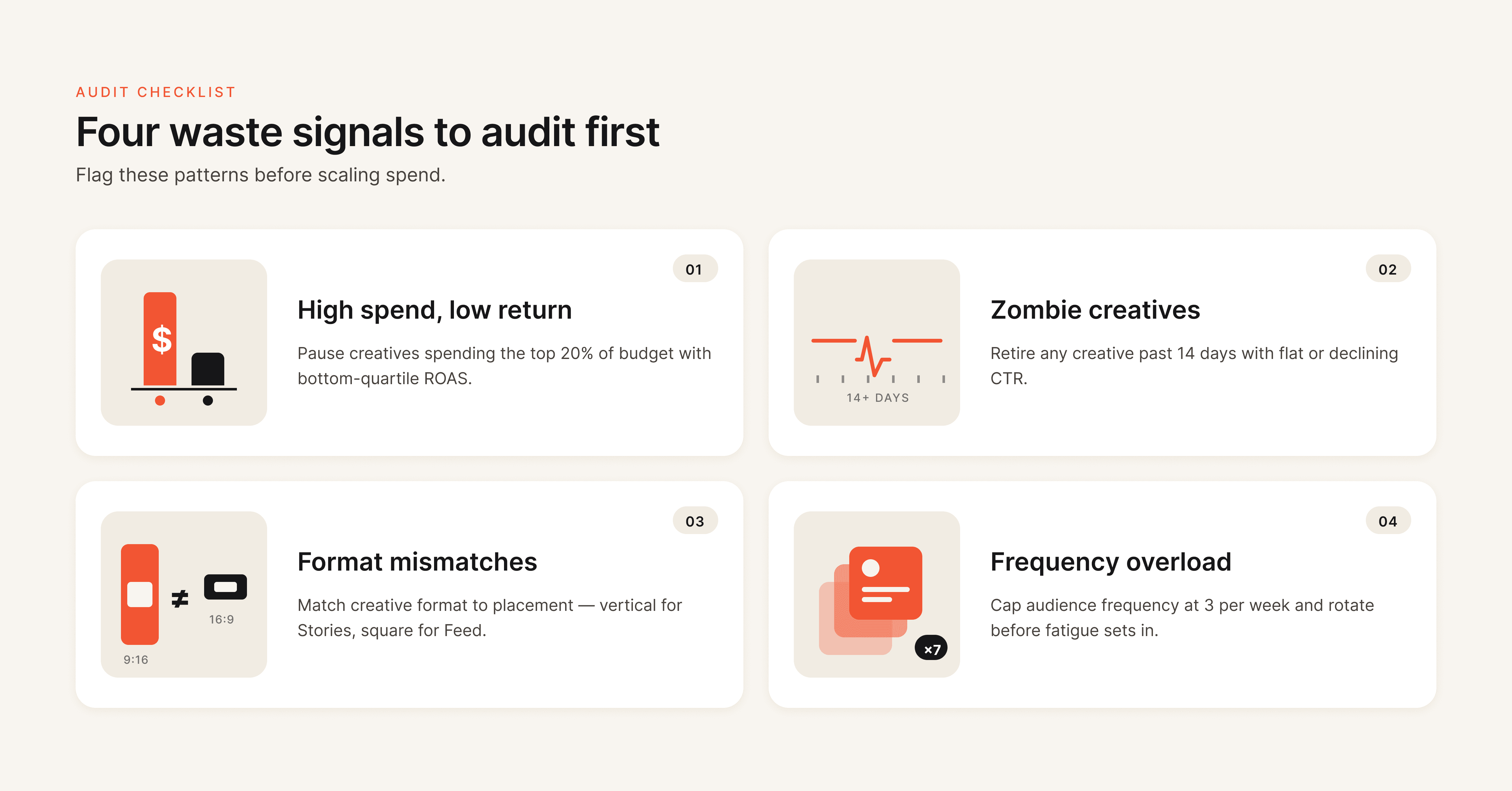
Pull a performance report for the last 30 to 60 days. Sort creatives by spend (highest to lowest) and add columns for CPA, ROAS, CTR, and frequency. You're looking for three patterns.

High spend, low return creatives. These are ads that received significant budget allocation from the algorithm but delivered CPA well above your target or ROAS well below breakeven. On Meta specifically, Advantage+ and CBO campaigns can quietly funnel budget into underperformers if you're not watching at the ad level.

Zombie creatives. Ads that have been running for 30+ days with declining CTR and rising CPA. They're technically "active" but no longer earning their spend. Many teams leave these running because they produced results weeks ago. Past performance does not justify current budget allocation.

Format mismatches. Static images running in Reels placements. Landscape video in Stories. These placement-creative mismatches generate impressions but rarely generate conversions at an efficient cost.

Waste Signal

What to Look For

Action

High spend, low return

CPA > 2x target with 500+ impressions

Pause immediately, analyze why

Zombie creatives

30+ days active, CTR declined 20%+ from peak

Replace with fresh variant

Format mismatches

Wrong aspect ratio or format for placement

Rebuild for correct placement

Frequency overload

Frequency > 3.0 with rising CPA

Rotate creative or expand audience

Pro tip: Don't just look at the last 7 days. Pull the full lifecycle of each creative. An ad might look fine this week but show a clear downward trend over 30 days that tells a different story.

Step 2: Build an Element-Level Performance Framework

Most teams analyze creative performance at the ad level. "Ad A beat Ad B" is the extent of the insight. That's like saying "this restaurant is better than that one" without knowing whether it's the food, the service, or the ambiance driving the difference.

Element-level creative analysis diagram breaking down ad performance by hook visual body copy and CTA components

Element-level creative analysis breaks each ad into its component parts and evaluates which specific elements drive performance. The four core elements are the hook (the first 1 to 3 seconds of video or the headline that stops the scroll), the visual (imagery, color, composition, format), the body copy (messaging, value proposition, proof points), and the CTA (call-to-action text, button, and destination).

When you analyze at this level, you stop making wholesale creative changes and start making surgical ones. If an ad has a strong hook but a weak CTA, you don't scrap the entire ad. You keep the hook and test three new CTAs against it.

How to implement this without specialized tools:

Tag every creative in your tracking spreadsheet with its hook type (question, statistic, pain point, testimonial), visual style (UGC, product-focused, lifestyle, graphic), body copy angle (problem-solution, social proof, urgency, benefit-led), and CTA type (soft ask, direct purchase, free trial, learn more). After 2 to 4 weeks of data, pivot the table to see which element combinations produce the lowest CPA.

How to implement this with creative analytics tools:

Platforms like Hawky automate this process by tagging and scoring each element of every creative, then surfacing which specific hooks, visuals, and CTAs drive performance across your entire ad account. This turns weeks of manual tagging into an automated insight layer.

The output of this step should be a clear picture of which creative elements are pulling their weight and which are dead weight dragging your budget down.

Step 3: Set Up a Structured Creative Testing System

Unstructured creative testing is one of the most expensive habits in performance marketing. Teams launch 10 new ads, let the algorithm pick winners, and call it "testing." That's not testing. That's hoping.

creative-testing-framework-flowchart.

A structured testing system separates your testing budget from your scaling budget and follows a phased approach.

Phase 1: Isolate Variables

Test one element at a time. If you change the hook, the visual, and the CTA simultaneously, you have no idea which change drove the result. This is the core principle of A/B testing applied to ad creative testing. Start with the element your Step 2 analysis identified as the weakest performer.

Run 3 to 5 variations of that single element while keeping everything else constant. Use ABO (Ad Set Budget Optimization) for testing so each variation gets equal budget distribution. CBO lets the algorithm pick favorites before you have enough data.

Phase 2: Test New Against New

A common and expensive mistake is testing new creatives against your existing top performers. Old ads have accumulated optimization data, pixel learning, and audience history. New ads start cold. The comparison is inherently unfair, and it causes teams to prematurely kill promising concepts.

Instead, test new creatives against other new creatives first. Once you identify a winner from the new batch, then run it head-to-head against your current top performer in a separate campaign.

Phase 3: Scale With Guardrails

When a creative proves itself, move it into your scaling campaigns (CBO or Advantage+). But set clear budget guardrails. Increase spend by no more than 20% to 30% per day to avoid triggering the algorithm to re-enter the learning phase.

Testing Phase

Campaign Type

Budget Rule

Duration

Phase 1: Variable isolation

ABO

Equal split across variations

5-7 days or 50 conversions per variation

Phase 2: New vs. new

ABO or CBO with caps

Equal distribution with overspend rules

5-7 days

Phase 3: Winner vs. champion

CBO

Controlled scale, max 20-30% daily increase

7-14 days

Allocate roughly 70% of your total UA budget to scaling proven winners and 30% to testing. That 30% is not wasted spend. It's the investment that keeps your pipeline of winning creatives from running dry.

Step 4: Detect Creative Fatigue Before It Drains Budget

Creative fatigue is the single largest source of invisible budget waste in UA campaigns. Creative fatigue occurs when your target audience has seen an ad so many times that engagement drops, costs rise, and conversions decline, even though nothing about the ad itself has changed.

Creative fatigue detection timeline showing CTR decline and CPA increase with fatigue threshold marker for UA budget optimization

The dangerous part is that fatigue doesn't announce itself. CPA increases gradually. CTR drifts down by fractions of a percent per day. By the time the decline is obvious, you've already wasted weeks of budget on a creative that stopped working days ago.

Early Warning Metrics

Monitor these signals weekly (daily for high-spend accounts):

  • CTR decline without frequency change: The creative is losing effectiveness with fresh impressions, not just saturated audiences

  • Frequency above 3.0 with rising CPA: Your audience is seeing the ad too often and tuning it out

  • Thumbstop ratio dropping on video ads: Fewer people are pausing to watch, meaning the hook has lost its pull

  • CPM increasing while CTR stays flat: The platform is charging more to deliver the same (diminishing) results

The Fatigue Hierarchy
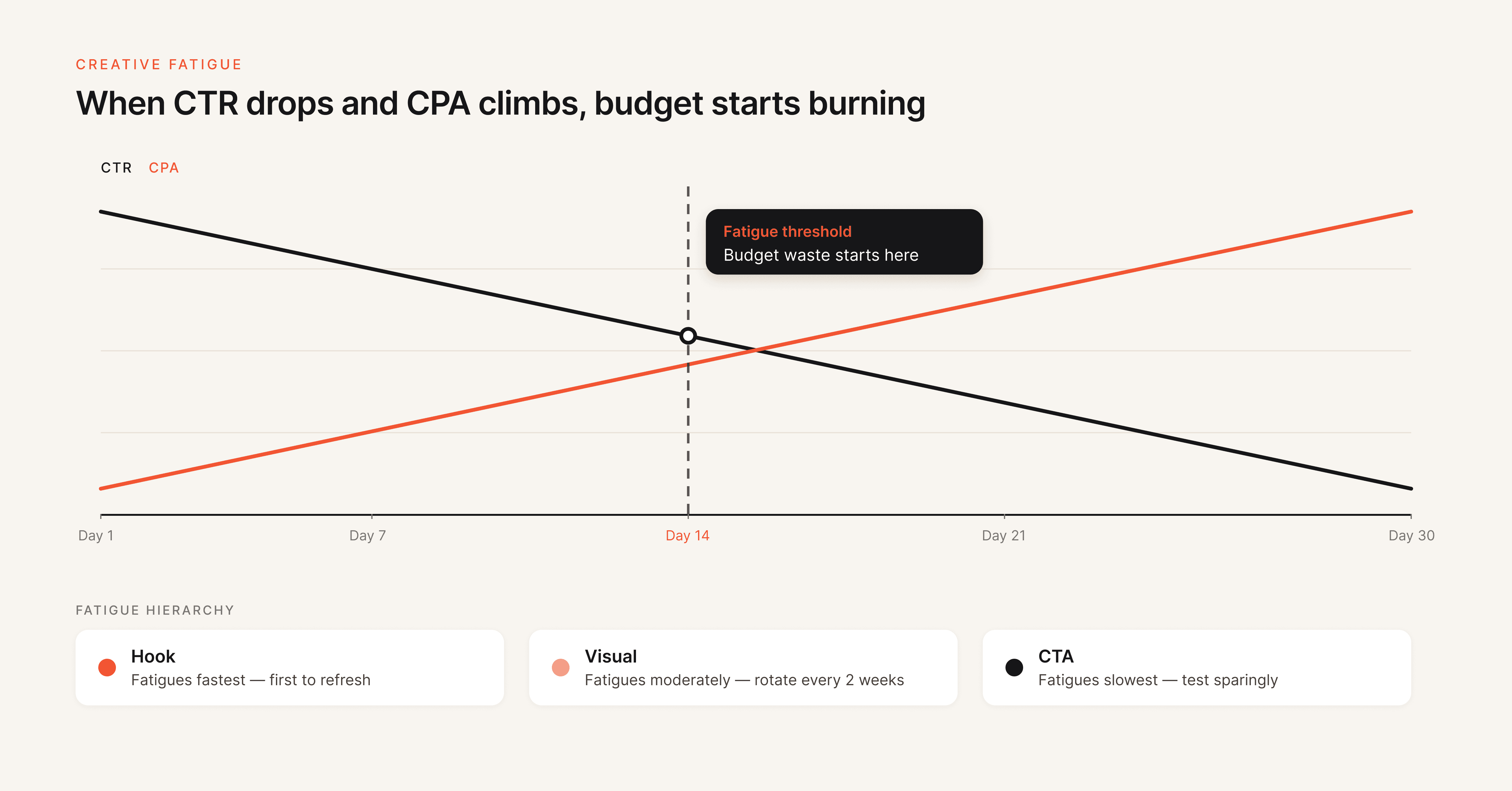
Not all creative elements fatigue at the same rate. Hooks and opening sequences fatigue fastest because they're the most repeated exposure point. Visuals fatigue at a moderate rate. CTAs fatigue slowest.

This means your creative rotation strategy should prioritize hooks first. When a video ad starts fatiguing, try swapping just the first 3 seconds before rebuilding the entire asset. It's faster, cheaper, and often just as effective. For a deeper look at how hook rates impact performance, see Hawky's hook rate guide.

Refresh Cadences

For Meta and Instagram campaigns targeting broad audiences, plan to refresh creatives every 2 to 4 weeks. For TikTok, where content consumption is faster, weekly or even daily rotation may be necessary. Smaller, niche audiences require more frequent rotation than broader segments because frequency accumulates faster.

Teams running $50k+ per month should build a creative calendar that pre-schedules new variations before existing ones hit fatigue thresholds, not after performance has already dropped. For a full breakdown of how fatigue works and why it kills performance, see Creative Fatigue Explained: Why Your Best Performing Ads Stop Working.

Step 5: Use Competitor Intelligence to Avoid Blind Spots

One of the least discussed sources of creative waste is creative overlap with competitors. When your ads look and sound like everyone else's in your category, you're spending money to blend into the noise rather than stand out from it.

Competitor creative intelligence helps you understand what hooks, formats, and messaging your competitors are running, how their creative strategy has evolved over time, and where there are gaps you can exploit.

What to track:

  • Hook patterns (are competitors leading with discounts, pain points, social proof, or product demos?)

  • Format distribution (what percentage of their ads are video vs. static vs. carousel?)

  • Messaging shifts (have they changed their value proposition, offer structure, or CTA language recently?)

  • Volume patterns (are they ramping up creative volume, which might signal a scaling push or seasonal campaign?)

You can do this manually by reviewing the Meta Ad Library weekly. For a more systematic approach, competitor analysis platforms automate tracking across brands and surface strategy changes through weekly alerts.

The goal is not to copy competitors. The goal is to make informed creative decisions. If every competitor in your space is leading with discount hooks, a pain-point-first approach might cut through the clutter at a lower CPA simply because it's different.

Step 6: Turn Winning Patterns Into Repeatable Playbooks

The most expensive creative mistake isn't producing a bad ad. It's producing a great ad and then being unable to replicate what made it work.

When a creative outperforms, most teams celebrate, scale it, and eventually watch it fatigue. Then they start from scratch. That cycle of hit, scale, fatigue, panic is where a massive amount of UA budget gets wasted on the "figuring it out again" phase.

Playbooks break that cycle. A creative playbook documents the specific elements, patterns, and combinations that drive performance for your brand and audience.

What to capture in a playbook:

  • Winning hook formulas (the specific structures, not just the words)

  • Visual styles that consistently produce above-average CTR

  • Body copy frameworks that drive action (problem-agitation-solution, benefit stacking, objection handling)

  • CTA patterns with the highest conversion rates

  • Format and placement combinations that deliver the best ROAS

  • Common pitfalls your team has identified (what doesn't work for your audience)

This isn't a one-time document. It's a living system that gets updated every time you complete a testing cycle. Over time, your playbook becomes the institutional knowledge that prevents your team from repeating expensive mistakes and accelerates the path from concept to winning creative.

Tools like Hawky's Playbooks feature let teams codify winning patterns directly from performance data and share them across creative and media buying teams, turning one-off wins into systematic advantages.

Common Mistakes to Avoid

Killing creatives too early. Many teams pause ads after 48 hours of underwhelming results. Most creatives need 500+ impressions and 5 to 7 days of data before you can make a statistically meaningful decision. Premature kills waste the testing budget you already spent and prevent you from learning what doesn't work.

Testing too many variables at once. If you change the hook, visual, copy, and CTA between two ad variations, a winning result tells you nothing actionable. Isolate one variable per test. It takes more patience but produces insights you can actually use.

Ignoring the creative-to-landing-page connection. Your ad might be performing well at generating clicks, but if the landing page doesn't match the creative's promise, tone, or visual style, those clicks convert poorly. Wasted clicks are wasted budget, even if your CTR looks healthy.

Running the same creatives across platforms without adaptation. Meta creatives don't automatically work on Google, TikTok, or Reddit. Each platform has different user behaviors, format requirements, and content expectations. Cross-platform reuse without adaptation consistently underperforms and wastes budget through low engagement rates.

Not having "kill rules" in writing. Without predefined thresholds for pausing underperformers (e.g., "pause if CPA exceeds 2x target after 500 impressions"), decisions get made emotionally or too slowly. Document your kill rules and apply them consistently.

Tools That Make This Easier

Hawky provides element-level creative analysis, predictive fatigue detection, competitor creative intelligence, and AI creative generation in one platform. It breaks down every ad by hook, visual, CTA, and body copy, scores each element, and surfaces which patterns drive ROAS. The Command Center automates performance monitoring with real-time alerts, and the Playbooks feature turns winning patterns into repeatable systems. Best suited for teams running $10k+/month on Meta and Google Ads who want creative intelligence, not just creative analytics.

Motion focuses on creative analytics with visual reporting that connects creative content to performance metrics. Strong at showing what happened but lighter on predictive capabilities and competitor intelligence. Good for teams that primarily need visual performance dashboards.

Foreplay serves as a creative swipe file and competitor ad library. Useful for the inspiration and research phase of creative production, though it doesn't connect to your ad account data or performance metrics.

Triple Whale and Northbeam handle attribution and spend analytics across channels. They help identify where budget is being wasted at the campaign and channel level but don't go deep on creative-specific analysis.

For a detailed comparison of creative analysis platforms, see 9 Best Ad Creative Analysis Tools in 2026.

Frequently Asked Questions

How much UA budget is typically wasted on underperforming creatives?

Industry data suggests 30% to 40% of digital ad spend goes to creatives that underperform their target metrics. For UA-heavy accounts spending $50k+ per month, that translates to $15k to $20k in monthly waste. The exact amount depends on how structured your testing process is and how quickly you identify and cut underperformers.

What is creative fatigue and how fast does it impact UA budget?

Creative fatigue happens when your target audience sees the same ad too many times, causing engagement to drop and acquisition costs to rise. On Meta, creative fatigue can double your CPA in as little as 10 to 15 days if left unmanaged. The speed depends on audience size, frequency, and how visually distinct your creative is from other ads in the same auction.

How often should you rotate ad creatives to prevent waste?
For Meta and Instagram campaigns with broad audiences, plan to introduce fresh creatives every 2 to 4 weeks. For TikTok, weekly rotation is the baseline. High-spend accounts ($50k+/month) should have a rolling creative pipeline with new variations pre-scheduled before existing ones hit fatigue thresholds. The specific cadence depends on your audience size and daily frequency.

What is element-level creative analysis?
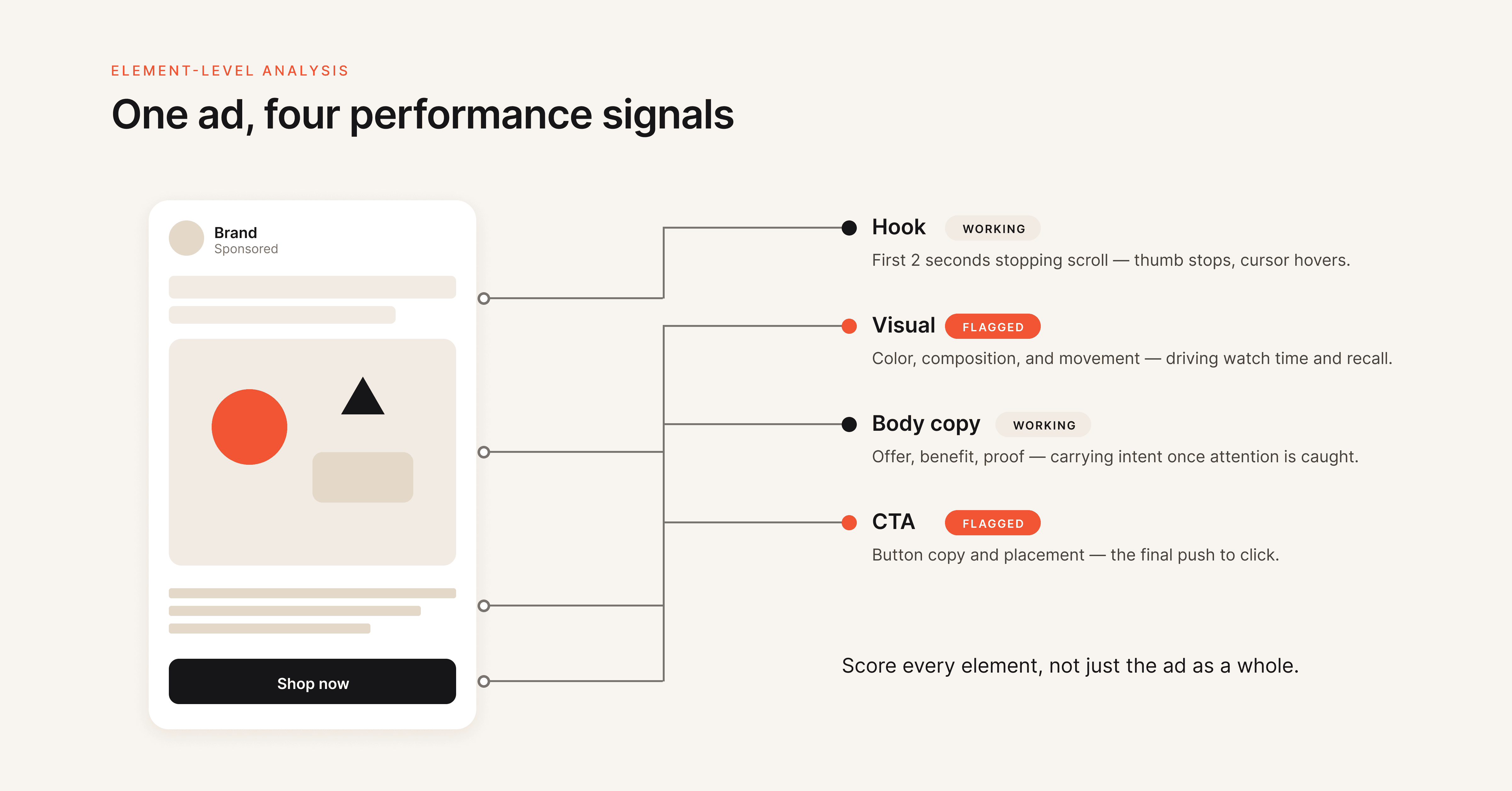
Element-level creative analysis evaluates ad performance by breaking each creative into its individual components: hook, visual, body copy, and CTA. Instead of knowing only that "Ad A beat Ad B," you learn that Ad A's hook drove 3x higher thumbstop rates while Ad B's CTA generated more conversions per click. This granularity lets you make targeted improvements rather than starting from scratch with every new creative.

How do you test new creatives without wasting your budget?

Use a phased ad creative testing system. Allocate 30% of your UA budget specifically for testing. In Phase 1, test new creatives against each other (not against proven winners) using ABO campaigns with equal budget distribution.

In Phase 2, pit the winning new creative against your current top performer. In Phase 3, scale the validated winner gradually. Each variation needs at least 50 conversions or 500 impressions and 5 to 7 days before making a decision.

Can AI tools actually reduce creative waste in UA campaigns?

AI-powered creative intelligence tools reduce waste by automating performance analysis at the element level, predicting fatigue before it impacts budget, and generating new creatives based on winning patterns rather than guesswork. Teams using data-backed creative frameworks report up to 30% higher ROAS compared to teams relying on traditional testing methods. The key is choosing tools that connect creative generation to performance data, not tools that generate creatives in isolation.

Creative waste is not a production problem. It's an intelligence problem. The teams that win in 2026 are not the ones producing the most creatives. They're the ones that know exactly which elements perform, why they perform, and how to replicate that performance before budget gets burned on the wrong concepts.

If your team is still guessing which creatives will work and reacting to fatigue after it's already cost you, Hawky's creative intelligence platform is built for that exact problem.
Ready to Stop Guessing and Start Winning with Creative Intelligence? Book a Demo

After reading this guide, you'll have a repeatable framework to identify underperforming creatives before they drain your budget, test new concepts without burning cash, and build a creative operation that compounds wins instead of repeating losses.

Most performance marketing teams waste between 30% and 40% of their UA budget on creatives that never had a real chance of converting. The problem isn't a lack of creative output. The problem is a lack of creative intelligence.

Teams produce dozens of ad variations every week, launch them into campaigns, and wait to see what sticks. That's not a strategy. That's expensive guesswork.

This guide walks through a step-by-step process for cutting creative waste across Meta, Google Ads, and other UA channels. Every step is designed to be actionable regardless of your current tool stack.

What You Need Before You Start

Before running through these steps, make sure you have access to the following.

Data access: Pull permissions on your Meta Ads Manager, Google Ads account, and any third-party attribution platform (AppsFlyer, Adjust, Branch, or similar). You need at least 30 days of historical creative performance data to work with.

Tracking foundation: Confirm your pixel or SDK implementation is firing correctly. Server-side tracking should be in place if you're running iOS campaigns. Without accurate conversion data, every creative decision you make is based on incomplete information.

Creative inventory: A spreadsheet or system that catalogs your active creatives with their launch dates, formats, and target audiences. If you don't have this, building one is your actual first step.

Baseline metrics: Know your current benchmarks for CPA, ROAS, CTR, and CPM at the campaign and ad set level. You can't identify waste without knowing what "normal" looks like.

Step 1: Audit Your Current Creative Spend for Waste Signals

Creative waste is the gap between what you spent on an ad and the value it returned relative to your goals. The first step is finding where that gap exists in your account right now.

Four creative waste signals infographic showing high spend low return zombie creatives format mismatches and frequency overload

Pull a performance report for the last 30 to 60 days. Sort creatives by spend (highest to lowest) and add columns for CPA, ROAS, CTR, and frequency. You're looking for three patterns.

High spend, low return creatives. These are ads that received significant budget allocation from the algorithm but delivered CPA well above your target or ROAS well below breakeven. On Meta specifically, Advantage+ and CBO campaigns can quietly funnel budget into underperformers if you're not watching at the ad level.

Zombie creatives. Ads that have been running for 30+ days with declining CTR and rising CPA. They're technically "active" but no longer earning their spend. Many teams leave these running because they produced results weeks ago. Past performance does not justify current budget allocation.

Format mismatches. Static images running in Reels placements. Landscape video in Stories. These placement-creative mismatches generate impressions but rarely generate conversions at an efficient cost.

Waste Signal

What to Look For

Action

High spend, low return

CPA > 2x target with 500+ impressions

Pause immediately, analyze why

Zombie creatives

30+ days active, CTR declined 20%+ from peak

Replace with fresh variant

Format mismatches

Wrong aspect ratio or format for placement

Rebuild for correct placement

Frequency overload

Frequency > 3.0 with rising CPA

Rotate creative or expand audience

Pro tip: Don't just look at the last 7 days. Pull the full lifecycle of each creative. An ad might look fine this week but show a clear downward trend over 30 days that tells a different story.

Step 2: Build an Element-Level Performance Framework

Most teams analyze creative performance at the ad level. "Ad A beat Ad B" is the extent of the insight. That's like saying "this restaurant is better than that one" without knowing whether it's the food, the service, or the ambiance driving the difference.

Element-level creative analysis diagram breaking down ad performance by hook visual body copy and CTA components

Element-level creative analysis breaks each ad into its component parts and evaluates which specific elements drive performance. The four core elements are the hook (the first 1 to 3 seconds of video or the headline that stops the scroll), the visual (imagery, color, composition, format), the body copy (messaging, value proposition, proof points), and the CTA (call-to-action text, button, and destination).

When you analyze at this level, you stop making wholesale creative changes and start making surgical ones. If an ad has a strong hook but a weak CTA, you don't scrap the entire ad. You keep the hook and test three new CTAs against it.

How to implement this without specialized tools:

Tag every creative in your tracking spreadsheet with its hook type (question, statistic, pain point, testimonial), visual style (UGC, product-focused, lifestyle, graphic), body copy angle (problem-solution, social proof, urgency, benefit-led), and CTA type (soft ask, direct purchase, free trial, learn more). After 2 to 4 weeks of data, pivot the table to see which element combinations produce the lowest CPA.

How to implement this with creative analytics tools:

Platforms like Hawky automate this process by tagging and scoring each element of every creative, then surfacing which specific hooks, visuals, and CTAs drive performance across your entire ad account. This turns weeks of manual tagging into an automated insight layer.

The output of this step should be a clear picture of which creative elements are pulling their weight and which are dead weight dragging your budget down.

Step 3: Set Up a Structured Creative Testing System

Unstructured creative testing is one of the most expensive habits in performance marketing. Teams launch 10 new ads, let the algorithm pick winners, and call it "testing." That's not testing. That's hoping.

creative-testing-framework-flowchart.

A structured testing system separates your testing budget from your scaling budget and follows a phased approach.

Phase 1: Isolate Variables

Test one element at a time. If you change the hook, the visual, and the CTA simultaneously, you have no idea which change drove the result. This is the core principle of A/B testing applied to ad creative testing. Start with the element your Step 2 analysis identified as the weakest performer.

Run 3 to 5 variations of that single element while keeping everything else constant. Use ABO (Ad Set Budget Optimization) for testing so each variation gets equal budget distribution. CBO lets the algorithm pick favorites before you have enough data.

Phase 2: Test New Against New

A common and expensive mistake is testing new creatives against your existing top performers. Old ads have accumulated optimization data, pixel learning, and audience history. New ads start cold. The comparison is inherently unfair, and it causes teams to prematurely kill promising concepts.

Instead, test new creatives against other new creatives first. Once you identify a winner from the new batch, then run it head-to-head against your current top performer in a separate campaign.

Phase 3: Scale With Guardrails

When a creative proves itself, move it into your scaling campaigns (CBO or Advantage+). But set clear budget guardrails. Increase spend by no more than 20% to 30% per day to avoid triggering the algorithm to re-enter the learning phase.

Testing Phase

Campaign Type

Budget Rule

Duration

Phase 1: Variable isolation

ABO

Equal split across variations

5-7 days or 50 conversions per variation

Phase 2: New vs. new

ABO or CBO with caps

Equal distribution with overspend rules

5-7 days

Phase 3: Winner vs. champion

CBO

Controlled scale, max 20-30% daily increase

7-14 days

Allocate roughly 70% of your total UA budget to scaling proven winners and 30% to testing. That 30% is not wasted spend. It's the investment that keeps your pipeline of winning creatives from running dry.

Step 4: Detect Creative Fatigue Before It Drains Budget

Creative fatigue is the single largest source of invisible budget waste in UA campaigns. Creative fatigue occurs when your target audience has seen an ad so many times that engagement drops, costs rise, and conversions decline, even though nothing about the ad itself has changed.

Creative fatigue detection timeline showing CTR decline and CPA increase with fatigue threshold marker for UA budget optimization

The dangerous part is that fatigue doesn't announce itself. CPA increases gradually. CTR drifts down by fractions of a percent per day. By the time the decline is obvious, you've already wasted weeks of budget on a creative that stopped working days ago.

Early Warning Metrics

Monitor these signals weekly (daily for high-spend accounts):

  • CTR decline without frequency change: The creative is losing effectiveness with fresh impressions, not just saturated audiences

  • Frequency above 3.0 with rising CPA: Your audience is seeing the ad too often and tuning it out

  • Thumbstop ratio dropping on video ads: Fewer people are pausing to watch, meaning the hook has lost its pull

  • CPM increasing while CTR stays flat: The platform is charging more to deliver the same (diminishing) results

The Fatigue Hierarchy

Not all creative elements fatigue at the same rate. Hooks and opening sequences fatigue fastest because they're the most repeated exposure point. Visuals fatigue at a moderate rate. CTAs fatigue slowest.

This means your creative rotation strategy should prioritize hooks first. When a video ad starts fatiguing, try swapping just the first 3 seconds before rebuilding the entire asset. It's faster, cheaper, and often just as effective. For a deeper look at how hook rates impact performance, see Hawky's hook rate guide.

Refresh Cadences

For Meta and Instagram campaigns targeting broad audiences, plan to refresh creatives every 2 to 4 weeks. For TikTok, where content consumption is faster, weekly or even daily rotation may be necessary. Smaller, niche audiences require more frequent rotation than broader segments because frequency accumulates faster.

Teams running $50k+ per month should build a creative calendar that pre-schedules new variations before existing ones hit fatigue thresholds, not after performance has already dropped. For a full breakdown of how fatigue works and why it kills performance, see Creative Fatigue Explained: Why Your Best Performing Ads Stop Working.

Step 5: Use Competitor Intelligence to Avoid Blind Spots

One of the least discussed sources of creative waste is creative overlap with competitors. When your ads look and sound like everyone else's in your category, you're spending money to blend into the noise rather than stand out from it.

Competitor creative intelligence helps you understand what hooks, formats, and messaging your competitors are running, how their creative strategy has evolved over time, and where there are gaps you can exploit.

What to track:

  • Hook patterns (are competitors leading with discounts, pain points, social proof, or product demos?)

  • Format distribution (what percentage of their ads are video vs. static vs. carousel?)

  • Messaging shifts (have they changed their value proposition, offer structure, or CTA language recently?)

  • Volume patterns (are they ramping up creative volume, which might signal a scaling push or seasonal campaign?)

You can do this manually by reviewing the Meta Ad Library weekly. For a more systematic approach, competitor analysis platforms automate tracking across brands and surface strategy changes through weekly alerts.

The goal is not to copy competitors. The goal is to make informed creative decisions. If every competitor in your space is leading with discount hooks, a pain-point-first approach might cut through the clutter at a lower CPA simply because it's different.

Step 6: Turn Winning Patterns Into Repeatable Playbooks

The most expensive creative mistake isn't producing a bad ad. It's producing a great ad and then being unable to replicate what made it work.

When a creative outperforms, most teams celebrate, scale it, and eventually watch it fatigue. Then they start from scratch. That cycle of hit, scale, fatigue, panic is where a massive amount of UA budget gets wasted on the "figuring it out again" phase.

Playbooks break that cycle. A creative playbook documents the specific elements, patterns, and combinations that drive performance for your brand and audience.

What to capture in a playbook:

  • Winning hook formulas (the specific structures, not just the words)

  • Visual styles that consistently produce above-average CTR

  • Body copy frameworks that drive action (problem-agitation-solution, benefit stacking, objection handling)

  • CTA patterns with the highest conversion rates

  • Format and placement combinations that deliver the best ROAS

  • Common pitfalls your team has identified (what doesn't work for your audience)

This isn't a one-time document. It's a living system that gets updated every time you complete a testing cycle. Over time, your playbook becomes the institutional knowledge that prevents your team from repeating expensive mistakes and accelerates the path from concept to winning creative.

Tools like Hawky's Playbooks feature let teams codify winning patterns directly from performance data and share them across creative and media buying teams, turning one-off wins into systematic advantages.

Common Mistakes to Avoid

Killing creatives too early. Many teams pause ads after 48 hours of underwhelming results. Most creatives need 500+ impressions and 5 to 7 days of data before you can make a statistically meaningful decision. Premature kills waste the testing budget you already spent and prevent you from learning what doesn't work.

Testing too many variables at once. If you change the hook, visual, copy, and CTA between two ad variations, a winning result tells you nothing actionable. Isolate one variable per test. It takes more patience but produces insights you can actually use.

Ignoring the creative-to-landing-page connection. Your ad might be performing well at generating clicks, but if the landing page doesn't match the creative's promise, tone, or visual style, those clicks convert poorly. Wasted clicks are wasted budget, even if your CTR looks healthy.

Running the same creatives across platforms without adaptation. Meta creatives don't automatically work on Google, TikTok, or Reddit. Each platform has different user behaviors, format requirements, and content expectations. Cross-platform reuse without adaptation consistently underperforms and wastes budget through low engagement rates.

Not having "kill rules" in writing. Without predefined thresholds for pausing underperformers (e.g., "pause if CPA exceeds 2x target after 500 impressions"), decisions get made emotionally or too slowly. Document your kill rules and apply them consistently.

Tools That Make This Easier

Hawky provides element-level creative analysis, predictive fatigue detection, competitor creative intelligence, and AI creative generation in one platform. It breaks down every ad by hook, visual, CTA, and body copy, scores each element, and surfaces which patterns drive ROAS. The Command Center automates performance monitoring with real-time alerts, and the Playbooks feature turns winning patterns into repeatable systems. Best suited for teams running $10k+/month on Meta and Google Ads who want creative intelligence, not just creative analytics.

Motion focuses on creative analytics with visual reporting that connects creative content to performance metrics. Strong at showing what happened but lighter on predictive capabilities and competitor intelligence. Good for teams that primarily need visual performance dashboards.

Foreplay serves as a creative swipe file and competitor ad library. Useful for the inspiration and research phase of creative production, though it doesn't connect to your ad account data or performance metrics.

Triple Whale and Northbeam handle attribution and spend analytics across channels. They help identify where budget is being wasted at the campaign and channel level but don't go deep on creative-specific analysis.

For a detailed comparison of creative analysis platforms, see 9 Best Ad Creative Analysis Tools in 2026.

Frequently Asked Questions

How much UA budget is typically wasted on underperforming creatives?

Industry data suggests 30% to 40% of digital ad spend goes to creatives that underperform their target metrics. For UA-heavy accounts spending $50k+ per month, that translates to $15k to $20k in monthly waste. The exact amount depends on how structured your testing process is and how quickly you identify and cut underperformers.

What is creative fatigue and how fast does it impact UA budget?

Creative fatigue happens when your target audience sees the same ad too many times, causing engagement to drop and acquisition costs to rise. On Meta, creative fatigue can double your CPA in as little as 10 to 15 days if left unmanaged. The speed depends on audience size, frequency, and how visually distinct your creative is from other ads in the same auction.

How often should you rotate ad creatives to prevent waste?

For Meta and Instagram campaigns with broad audiences, plan to introduce fresh creatives every 2 to 4 weeks. For TikTok, weekly rotation is the baseline. High-spend accounts ($50k+/month) should have a rolling creative pipeline with new variations pre-scheduled before existing ones hit fatigue thresholds. The specific cadence depends on your audience size and daily frequency.

What is element-level creative analysis?

Element-level creative analysis evaluates ad performance by breaking each creative into its individual components: hook, visual, body copy, and CTA. Instead of knowing only that "Ad A beat Ad B," you learn that Ad A's hook drove 3x higher thumbstop rates while Ad B's CTA generated more conversions per click. This granularity lets you make targeted improvements rather than starting from scratch with every new creative.

How do you test new creatives without wasting your budget?

Use a phased ad creative testing system. Allocate 30% of your UA budget specifically for testing. In Phase 1, test new creatives against each other (not against proven winners) using ABO campaigns with equal budget distribution.

In Phase 2, pit the winning new creative against your current top performer. In Phase 3, scale the validated winner gradually. Each variation needs at least 50 conversions or 500 impressions and 5 to 7 days before making a decision.

Can AI tools actually reduce creative waste in UA campaigns?

AI-powered creative intelligence tools reduce waste by automating performance analysis at the element level, predicting fatigue before it impacts budget, and generating new creatives based on winning patterns rather than guesswork. Teams using data-backed creative frameworks report up to 30% higher ROAS compared to teams relying on traditional testing methods. The key is choosing tools that connect creative generation to performance data, not tools that generate creatives in isolation.

Creative waste is not a production problem. It's an intelligence problem. The teams that win in 2026 are not the ones producing the most creatives. They're the ones that know exactly which elements perform, why they perform, and how to replicate that performance before budget gets burned on the wrong concepts.

If your team is still guessing which creatives will work and reacting to fatigue after it's already cost you, Hawky's creative intelligence platform is built for that exact problem.
Ready to Stop Guessing and Start Winning with Creative Intelligence? Book a Demo

After reading this guide, you'll have a repeatable framework to identify underperforming creatives before they drain your budget, test new concepts without burning cash, and build a creative operation that compounds wins instead of repeating losses.

Most performance marketing teams waste between 30% and 40% of their UA budget on creatives that never had a real chance of converting. The problem isn't a lack of creative output. The problem is a lack of creative intelligence.

Teams produce dozens of ad variations every week, launch them into campaigns, and wait to see what sticks. That's not a strategy. That's expensive guesswork.

This guide walks through a step-by-step process for cutting creative waste across Meta, Google Ads, and other UA channels. Every step is designed to be actionable regardless of your current tool stack.

What You Need Before You Start

Before running through these steps, make sure you have access to the following.

Data access: Pull permissions on your Meta Ads Manager, Google Ads account, and any third-party attribution platform (AppsFlyer, Adjust, Branch, or similar). You need at least 30 days of historical creative performance data to work with.

Tracking foundation: Confirm your pixel or SDK implementation is firing correctly. Server-side tracking should be in place if you're running iOS campaigns. Without accurate conversion data, every creative decision you make is based on incomplete information.

Creative inventory: A spreadsheet or system that catalogs your active creatives with their launch dates, formats, and target audiences. If you don't have this, building one is your actual first step.

Baseline metrics: Know your current benchmarks for CPA, ROAS, CTR, and CPM at the campaign and ad set level. You can't identify waste without knowing what "normal" looks like.

Step 1: Audit Your Current Creative Spend for Waste Signals

Creative waste is the gap between what you spent on an ad and the value it returned relative to your goals. The first step is finding where that gap exists in your account right now.

Four creative waste signals infographic showing high spend low return zombie creatives format mismatches and frequency overload

Pull a performance report for the last 30 to 60 days. Sort creatives by spend (highest to lowest) and add columns for CPA, ROAS, CTR, and frequency. You're looking for three patterns.

High spend, low return creatives. These are ads that received significant budget allocation from the algorithm but delivered CPA well above your target or ROAS well below breakeven. On Meta specifically, Advantage+ and CBO campaigns can quietly funnel budget into underperformers if you're not watching at the ad level.

Zombie creatives. Ads that have been running for 30+ days with declining CTR and rising CPA. They're technically "active" but no longer earning their spend. Many teams leave these running because they produced results weeks ago. Past performance does not justify current budget allocation.

Format mismatches. Static images running in Reels placements. Landscape video in Stories. These placement-creative mismatches generate impressions but rarely generate conversions at an efficient cost.

Waste Signal

What to Look For

Action

High spend, low return

CPA > 2x target with 500+ impressions

Pause immediately, analyze why

Zombie creatives

30+ days active, CTR declined 20%+ from peak

Replace with fresh variant

Format mismatches

Wrong aspect ratio or format for placement

Rebuild for correct placement

Frequency overload

Frequency > 3.0 with rising CPA

Rotate creative or expand audience

Pro tip: Don't just look at the last 7 days. Pull the full lifecycle of each creative. An ad might look fine this week but show a clear downward trend over 30 days that tells a different story.

Step 2: Build an Element-Level Performance Framework

Most teams analyze creative performance at the ad level. "Ad A beat Ad B" is the extent of the insight. That's like saying "this restaurant is better than that one" without knowing whether it's the food, the service, or the ambiance driving the difference.

Element-level creative analysis diagram breaking down ad performance by hook visual body copy and CTA components

Element-level creative analysis breaks each ad into its component parts and evaluates which specific elements drive performance. The four core elements are the hook (the first 1 to 3 seconds of video or the headline that stops the scroll), the visual (imagery, color, composition, format), the body copy (messaging, value proposition, proof points), and the CTA (call-to-action text, button, and destination).

When you analyze at this level, you stop making wholesale creative changes and start making surgical ones. If an ad has a strong hook but a weak CTA, you don't scrap the entire ad. You keep the hook and test three new CTAs against it.

How to implement this without specialized tools:

Tag every creative in your tracking spreadsheet with its hook type (question, statistic, pain point, testimonial), visual style (UGC, product-focused, lifestyle, graphic), body copy angle (problem-solution, social proof, urgency, benefit-led), and CTA type (soft ask, direct purchase, free trial, learn more). After 2 to 4 weeks of data, pivot the table to see which element combinations produce the lowest CPA.

How to implement this with creative analytics tools:

Platforms like Hawky automate this process by tagging and scoring each element of every creative, then surfacing which specific hooks, visuals, and CTAs drive performance across your entire ad account. This turns weeks of manual tagging into an automated insight layer.

The output of this step should be a clear picture of which creative elements are pulling their weight and which are dead weight dragging your budget down.

Step 3: Set Up a Structured Creative Testing System

Unstructured creative testing is one of the most expensive habits in performance marketing. Teams launch 10 new ads, let the algorithm pick winners, and call it "testing." That's not testing. That's hoping.

creative-testing-framework-flowchart.

A structured testing system separates your testing budget from your scaling budget and follows a phased approach.

Phase 1: Isolate Variables

Test one element at a time. If you change the hook, the visual, and the CTA simultaneously, you have no idea which change drove the result. This is the core principle of A/B testing applied to ad creative testing. Start with the element your Step 2 analysis identified as the weakest performer.

Run 3 to 5 variations of that single element while keeping everything else constant. Use ABO (Ad Set Budget Optimization) for testing so each variation gets equal budget distribution. CBO lets the algorithm pick favorites before you have enough data.

Phase 2: Test New Against New

A common and expensive mistake is testing new creatives against your existing top performers. Old ads have accumulated optimization data, pixel learning, and audience history. New ads start cold. The comparison is inherently unfair, and it causes teams to prematurely kill promising concepts.

Instead, test new creatives against other new creatives first. Once you identify a winner from the new batch, then run it head-to-head against your current top performer in a separate campaign.

Phase 3: Scale With Guardrails

When a creative proves itself, move it into your scaling campaigns (CBO or Advantage+). But set clear budget guardrails. Increase spend by no more than 20% to 30% per day to avoid triggering the algorithm to re-enter the learning phase.

Testing Phase

Campaign Type

Budget Rule

Duration

Phase 1: Variable isolation

ABO

Equal split across variations

5-7 days or 50 conversions per variation

Phase 2: New vs. new

ABO or CBO with caps

Equal distribution with overspend rules

5-7 days

Phase 3: Winner vs. champion

CBO

Controlled scale, max 20-30% daily increase

7-14 days

Allocate roughly 70% of your total UA budget to scaling proven winners and 30% to testing. That 30% is not wasted spend. It's the investment that keeps your pipeline of winning creatives from running dry.

Step 4: Detect Creative Fatigue Before It Drains Budget

Creative fatigue is the single largest source of invisible budget waste in UA campaigns. Creative fatigue occurs when your target audience has seen an ad so many times that engagement drops, costs rise, and conversions decline, even though nothing about the ad itself has changed.

Creative fatigue detection timeline showing CTR decline and CPA increase with fatigue threshold marker for UA budget optimization

The dangerous part is that fatigue doesn't announce itself. CPA increases gradually. CTR drifts down by fractions of a percent per day. By the time the decline is obvious, you've already wasted weeks of budget on a creative that stopped working days ago.

Early Warning Metrics

Monitor these signals weekly (daily for high-spend accounts):

  • CTR decline without frequency change: The creative is losing effectiveness with fresh impressions, not just saturated audiences

  • Frequency above 3.0 with rising CPA: Your audience is seeing the ad too often and tuning it out

  • Thumbstop ratio dropping on video ads: Fewer people are pausing to watch, meaning the hook has lost its pull

  • CPM increasing while CTR stays flat: The platform is charging more to deliver the same (diminishing) results

The Fatigue Hierarchy

Not all creative elements fatigue at the same rate. Hooks and opening sequences fatigue fastest because they're the most repeated exposure point. Visuals fatigue at a moderate rate. CTAs fatigue slowest.

This means your creative rotation strategy should prioritize hooks first. When a video ad starts fatiguing, try swapping just the first 3 seconds before rebuilding the entire asset. It's faster, cheaper, and often just as effective. For a deeper look at how hook rates impact performance, see Hawky's hook rate guide.

Refresh Cadences

For Meta and Instagram campaigns targeting broad audiences, plan to refresh creatives every 2 to 4 weeks. For TikTok, where content consumption is faster, weekly or even daily rotation may be necessary. Smaller, niche audiences require more frequent rotation than broader segments because frequency accumulates faster.

Teams running $50k+ per month should build a creative calendar that pre-schedules new variations before existing ones hit fatigue thresholds, not after performance has already dropped. For a full breakdown of how fatigue works and why it kills performance, see Creative Fatigue Explained: Why Your Best Performing Ads Stop Working.

Step 5: Use Competitor Intelligence to Avoid Blind Spots

One of the least discussed sources of creative waste is creative overlap with competitors. When your ads look and sound like everyone else's in your category, you're spending money to blend into the noise rather than stand out from it.

Competitor creative intelligence helps you understand what hooks, formats, and messaging your competitors are running, how their creative strategy has evolved over time, and where there are gaps you can exploit.

What to track:

  • Hook patterns (are competitors leading with discounts, pain points, social proof, or product demos?)

  • Format distribution (what percentage of their ads are video vs. static vs. carousel?)

  • Messaging shifts (have they changed their value proposition, offer structure, or CTA language recently?)

  • Volume patterns (are they ramping up creative volume, which might signal a scaling push or seasonal campaign?)

You can do this manually by reviewing the Meta Ad Library weekly. For a more systematic approach, competitor analysis platforms automate tracking across brands and surface strategy changes through weekly alerts.

The goal is not to copy competitors. The goal is to make informed creative decisions. If every competitor in your space is leading with discount hooks, a pain-point-first approach might cut through the clutter at a lower CPA simply because it's different.

Step 6: Turn Winning Patterns Into Repeatable Playbooks

The most expensive creative mistake isn't producing a bad ad. It's producing a great ad and then being unable to replicate what made it work.

When a creative outperforms, most teams celebrate, scale it, and eventually watch it fatigue. Then they start from scratch. That cycle of hit, scale, fatigue, panic is where a massive amount of UA budget gets wasted on the "figuring it out again" phase.

Playbooks break that cycle. A creative playbook documents the specific elements, patterns, and combinations that drive performance for your brand and audience.

What to capture in a playbook:

  • Winning hook formulas (the specific structures, not just the words)

  • Visual styles that consistently produce above-average CTR

  • Body copy frameworks that drive action (problem-agitation-solution, benefit stacking, objection handling)

  • CTA patterns with the highest conversion rates

  • Format and placement combinations that deliver the best ROAS

  • Common pitfalls your team has identified (what doesn't work for your audience)

This isn't a one-time document. It's a living system that gets updated every time you complete a testing cycle. Over time, your playbook becomes the institutional knowledge that prevents your team from repeating expensive mistakes and accelerates the path from concept to winning creative.

Tools like Hawky's Playbooks feature let teams codify winning patterns directly from performance data and share them across creative and media buying teams, turning one-off wins into systematic advantages.

Common Mistakes to Avoid

Killing creatives too early. Many teams pause ads after 48 hours of underwhelming results. Most creatives need 500+ impressions and 5 to 7 days of data before you can make a statistically meaningful decision. Premature kills waste the testing budget you already spent and prevent you from learning what doesn't work.

Testing too many variables at once. If you change the hook, visual, copy, and CTA between two ad variations, a winning result tells you nothing actionable. Isolate one variable per test. It takes more patience but produces insights you can actually use.

Ignoring the creative-to-landing-page connection. Your ad might be performing well at generating clicks, but if the landing page doesn't match the creative's promise, tone, or visual style, those clicks convert poorly. Wasted clicks are wasted budget, even if your CTR looks healthy.

Running the same creatives across platforms without adaptation. Meta creatives don't automatically work on Google, TikTok, or Reddit. Each platform has different user behaviors, format requirements, and content expectations. Cross-platform reuse without adaptation consistently underperforms and wastes budget through low engagement rates.

Not having "kill rules" in writing. Without predefined thresholds for pausing underperformers (e.g., "pause if CPA exceeds 2x target after 500 impressions"), decisions get made emotionally or too slowly. Document your kill rules and apply them consistently.

Tools That Make This Easier

Hawky provides element-level creative analysis, predictive fatigue detection, competitor creative intelligence, and AI creative generation in one platform. It breaks down every ad by hook, visual, CTA, and body copy, scores each element, and surfaces which patterns drive ROAS. The Command Center automates performance monitoring with real-time alerts, and the Playbooks feature turns winning patterns into repeatable systems. Best suited for teams running $10k+/month on Meta and Google Ads who want creative intelligence, not just creative analytics.

Motion focuses on creative analytics with visual reporting that connects creative content to performance metrics. Strong at showing what happened but lighter on predictive capabilities and competitor intelligence. Good for teams that primarily need visual performance dashboards.

Foreplay serves as a creative swipe file and competitor ad library. Useful for the inspiration and research phase of creative production, though it doesn't connect to your ad account data or performance metrics.

Triple Whale and Northbeam handle attribution and spend analytics across channels. They help identify where budget is being wasted at the campaign and channel level but don't go deep on creative-specific analysis.

For a detailed comparison of creative analysis platforms, see 9 Best Ad Creative Analysis Tools in 2026.

Frequently Asked Questions

How much UA budget is typically wasted on underperforming creatives?

Industry data suggests 30% to 40% of digital ad spend goes to creatives that underperform their target metrics. For UA-heavy accounts spending $50k+ per month, that translates to $15k to $20k in monthly waste. The exact amount depends on how structured your testing process is and how quickly you identify and cut underperformers.

What is creative fatigue and how fast does it impact UA budget?

Creative fatigue happens when your target audience sees the same ad too many times, causing engagement to drop and acquisition costs to rise. On Meta, creative fatigue can double your CPA in as little as 10 to 15 days if left unmanaged. The speed depends on audience size, frequency, and how visually distinct your creative is from other ads in the same auction.

How often should you rotate ad creatives to prevent waste?

For Meta and Instagram campaigns with broad audiences, plan to introduce fresh creatives every 2 to 4 weeks. For TikTok, weekly rotation is the baseline. High-spend accounts ($50k+/month) should have a rolling creative pipeline with new variations pre-scheduled before existing ones hit fatigue thresholds. The specific cadence depends on your audience size and daily frequency.

What is element-level creative analysis?

Element-level creative analysis evaluates ad performance by breaking each creative into its individual components: hook, visual, body copy, and CTA. Instead of knowing only that "Ad A beat Ad B," you learn that Ad A's hook drove 3x higher thumbstop rates while Ad B's CTA generated more conversions per click. This granularity lets you make targeted improvements rather than starting from scratch with every new creative.

How do you test new creatives without wasting your budget?

Use a phased ad creative testing system. Allocate 30% of your UA budget specifically for testing. In Phase 1, test new creatives against each other (not against proven winners) using ABO campaigns with equal budget distribution.

In Phase 2, pit the winning new creative against your current top performer. In Phase 3, scale the validated winner gradually. Each variation needs at least 50 conversions or 500 impressions and 5 to 7 days before making a decision.

Can AI tools actually reduce creative waste in UA campaigns?

AI-powered creative intelligence tools reduce waste by automating performance analysis at the element level, predicting fatigue before it impacts budget, and generating new creatives based on winning patterns rather than guesswork. Teams using data-backed creative frameworks report up to 30% higher ROAS compared to teams relying on traditional testing methods. The key is choosing tools that connect creative generation to performance data, not tools that generate creatives in isolation.

Creative waste is not a production problem. It's an intelligence problem. The teams that win in 2026 are not the ones producing the most creatives. They're the ones that know exactly which elements perform, why they perform, and how to replicate that performance before budget gets burned on the wrong concepts.

If your team is still guessing which creatives will work and reacting to fatigue after it's already cost you, Hawky's creative intelligence platform is built for that exact problem.

Ready to Stop Guessing and Start Winning with Creative Intelligence? Book a Demo