Shopping Ads
Last updated
Visual product listings that pull image, price, and title from a product feed and surface them in search results before the click. They drive about 65% of retail Google Ads clicks and usually beat text search on ROAS, but only with a clean feed.
Shopping Ads
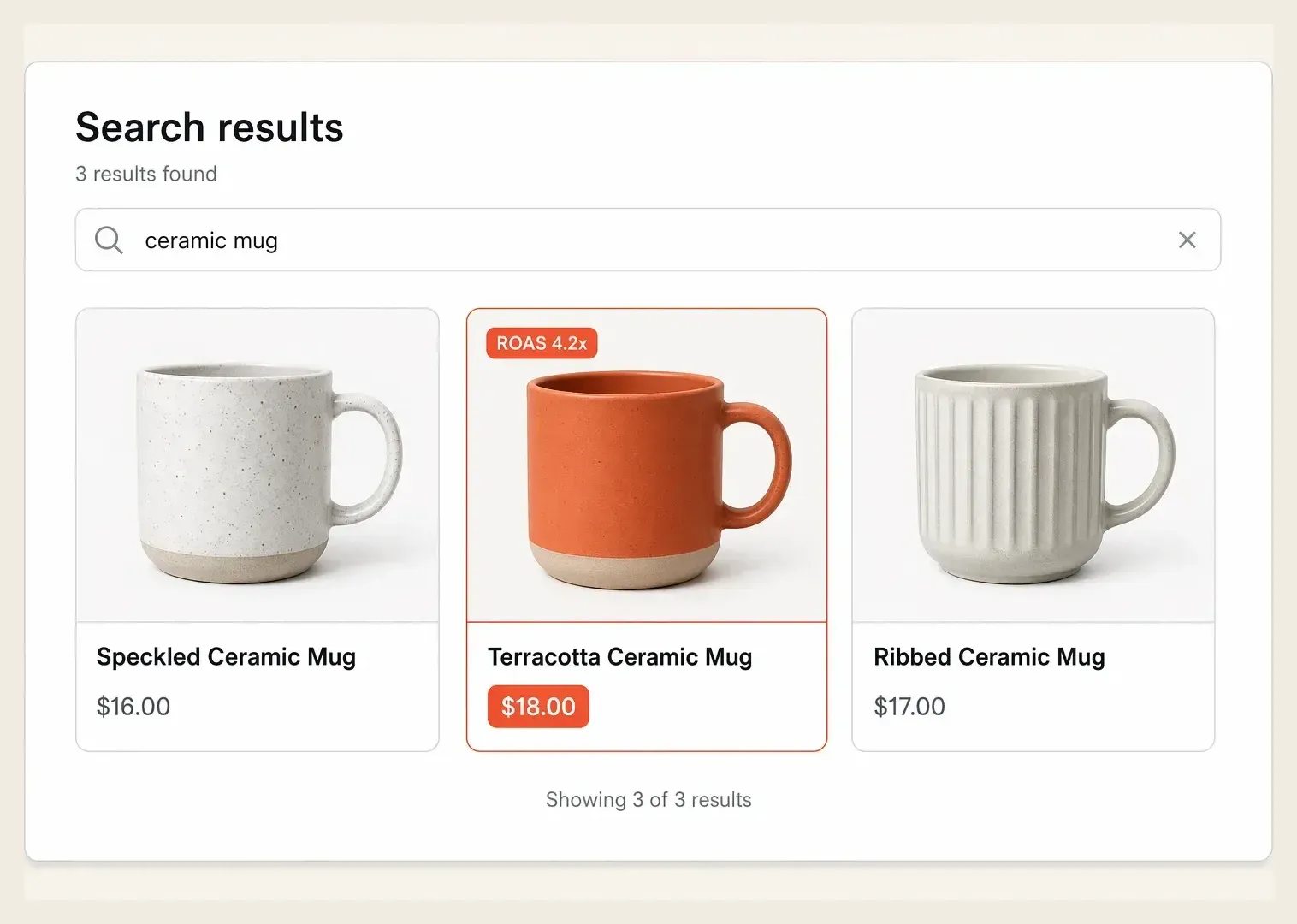
Shopping ads are visual product listings that show a photo, price, store name, and title directly in search results and across retail placements, pulling their data from a product feed rather than from manually written ad copy. When someone searches for a product, these ads surface the actual item with its image and price before the click, so the shopper sees what they will get and what it costs upfront. They power Google Shopping, the shopping tab, and dynamic retail placements, and they are built around the catalog feed, not the keyword.
Why It Matters
Shopping ads matter because showing the product and price before the click filters for genuine purchase intent. Shopping campaigns drive roughly 65% of all Google Ads clicks for retailers and account for the majority of retail search ad spend, because a shopper who clicks a listing has already seen the item and the price and still wants more. That pre-qualification produces some of the highest-intent traffic in paid media.
The performance edge is real. Shopping ads frequently deliver a stronger ROAS than text search ads for ecommerce, since the visual listing does the qualifying work and reduces wasted clicks from mismatched expectations. The catch is that the entire system runs on feed quality. A weak title, a missing attribute, or a stale price quietly suppresses impressions, so the lever is not bidding alone, it is the data feeding the engine.
How It Works
Shopping ads work by matching a search query to products in your feed, then ranking and showing the most relevant listings based on feed data and bids. There are no keywords to write, the platform reads your product attributes and decides where to show each item.
- Build the feed: titles, images, prices, GTINs, and product types are submitted through a merchant feed.
- Let the system match: the platform pairs queries to products using the feed, not manual keywords.
- Structure the campaign: group products by margin, category, or performance to control bids and budget.
- Optimize the data: better titles, cleaner categories, and complete attributes lift relevance and impressions.
Because there is no headline to write, the product feed is the creative. A precise, attribute-rich title and a clean primary image do the heavy lifting that ad copy does in a text campaign, which is why feed hygiene is the real optimization surface.
A Real Example
An outdoor gear retailer runs Shopping ads with generic titles like "Hydration Pack" and a blended 2.1x ROAS, struggling to compete on its best products. An audit shows the feed is the bottleneck: titles lack brand, capacity, and use case, so the listings match broad, low-intent queries.
The team rewrites titles to "Brand 2L Trail Running Hydration Pack" structure, fixes product types, and splits the campaign by margin tier. Within 30 days, impressions on high-margin items climb, the CTR improves because titles now match intent, and blended ROAS rises from 2.1x to 3.4x on the same budget. Nothing changed about the bid strategy first, the win came from the feed.
Common Mistakes
| ❌ Mistakes | ✅ Better Approach |
|---|---|
| Submit vague titles like "Running Shoes" with no detail | Write attribute-rich titles with brand, model, size, and use case |
| Run every product in one campaign at one bid | Segment by margin or category to control spend by ROAS |
| Ignore disapproved items and feed errors | Audit the feed regularly so suppressed products start showing |
| Use a low-quality or cropped primary image | Use clean, compliant images that match the listing intent |
How Hawky Helps
Shopping performance is a feed and bidding problem, and Hawky runs both with agents instead of dashboards. The Performance Agent manages the buy across the catalog, segmenting products by margin and shifting budget toward the items holding the strongest ROAS while pulling back on the ones bleeding spend, all against your target and with a reversible audit trail. It treats the feed as the bidding surface it is.
On the data side, Hawky's Copilot answers what is suppressing impressions and which competitor listings are winning the queries you want, with sources, so feed gaps surface before they cost a month of sales. Everything the agents learn about which titles, categories, and price points convert is stored in FeatherDB, the account's living memory, so Shopping decisions compound instead of resetting each week. The result is a Shopping account where the feed and the bids are managed together, continuously.
Frequently Asked Questions
What is the difference between Shopping ads and search ads?
Shopping ads are visual product listings that pull image, price, and title from a product feed and match to queries automatically, while search ads are keyword-targeted text listings with manually written copy. Shopping shows the product and price before the click, which pre-qualifies intent and often delivers higher ROAS for ecommerce than text ads.
How do I improve my Shopping ads performance?
The fastest lever is the product feed, not the bids. Write detailed, attribute-rich titles, fix disapproved items, use clean primary images, and segment products by margin so high-value items get the budget. Feed quality directly controls how often and how well your products show, so improving the data usually lifts impressions and ROAS before any bid change.
Do Shopping ads use keywords?
No, Shopping ads do not use keyword targeting the way search ads do. The platform reads your product feed and matches listings to relevant queries automatically based on titles, attributes, and product types. You influence which searches you appear in by optimizing the feed and by using negative keywords to exclude irrelevant traffic.
Are Shopping ads good for small ecommerce stores?
Yes. Shopping ads let small stores compete on individual products by showing the item and price directly, which levels the field against larger advertisers on high-intent searches. With a clean feed and tight campaign structure segmented by margin, even a modest budget can capture profitable, ready-to-buy traffic.
Quick Takeaway
Shopping ads turn your product feed into the creative, surfacing image and price to pre-qualified buyers, and the biggest performance lever is feed quality, not the bid. Let a Performance Agent manage bids by margin and a Copilot surface the feed gaps holding back impressions.
When your Shopping ROAS stalls and feed errors quietly suppress your best products, the fix is agents that manage the feed and the bids together. Ready to hire your first AI performance team? Book Demo