Google Ads Automation: From Rules and Scripts to Autonomous AI Agents
Google Ads automation is the practice of letting software handle campaign work that people used to do by hand, from adjusting bids and pausing weak ads to writing responsive search ad copy and shifting budget across channels. It runs on a spectrum. At the low end sit native automated rules and scripts that fire fixed actions. At the high end sit autonomous AI agents that run the whole optimization job against a KPI, with guardrails, approval gates, and an audit trail.
Most advertisers already use some automation without calling it that. The real decision is not whether to automate, but how much judgment you hand off and how much control you keep.
Can Google Ads be automated?
Yes, and it can be automated at four distinct levels. Each level automates more of the work, and each trades a bit of manual control for scale and speed. Understanding the levels helps you match the tool to the job instead of buying software that overlaps with what Google already gives you for free.
The cleanest way to think about it is a ladder. Native rules and scripts automate individual tasks. Google's AI bidding and Performance Max automate decisions inside a campaign. An autonomous AI agent automates the job across campaigns and channels.
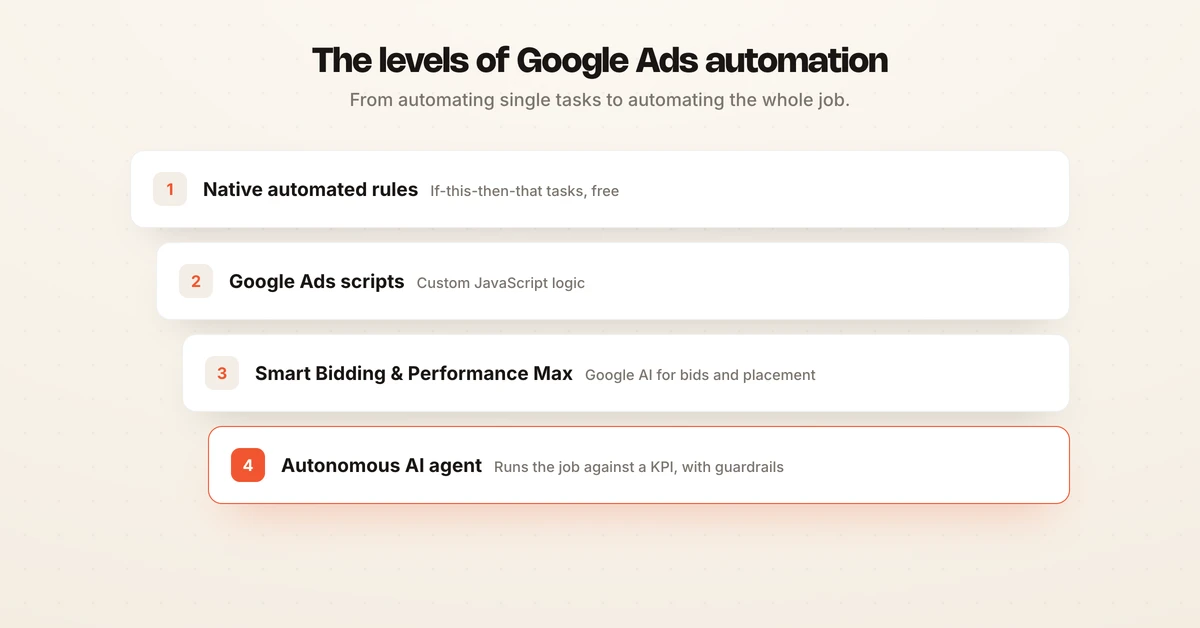
Here is how the levels compare.
| Level | What it is | What it automates | Skill needed | Control model |
|---|---|---|---|---|
| Native automated rules | Built-in if-this-then-that logic | Ad status, budgets, bids, emails | None | You define exact conditions |
| Google Ads scripts | JavaScript in a browser IDE | Bulk edits, external data, custom reports | JavaScript | You write and maintain the logic |
| Smart Bidding and Performance Max | Google AI | Bids, placement, creative serving | Low | Google decides inside your goals |
| Autonomous AI agent | Goal-seeking software operator | The full optimize loop against a KPI | None | Guardrails, approval, reversible |
What can Google Ads automated rules do?
Automated rules make account changes for you based on conditions and a schedule. According to Google Ads Help, rules can change ad status, budgets, and bids, and can trigger emails when conditions are met. They run at the campaign, ad group, or keyword level.
The common patterns are practical. Google's guidance shows examples like pausing ads with a clickthrough rate under 0.2 percent and over 1,000 impressions in a day, or raising a keyword bid when an ad drops off the first page of results. Teams also use rules to cap spend and to schedule budget changes around promotions.
Rules are free and require no code, which makes them the right starting point. Their limit is that they only fire the action you preprogram. A rule cannot reason about why clickthrough rate fell, and it will happily pause a converting ad if the condition you wrote is too blunt.
Google Ads scripts add custom logic
Scripts let you automate changes that rules cannot express, using JavaScript. Per Google Ads Help, scripts can change bids, pause ad groups, add keywords, pull in external data, and run on a schedule of once, daily, weekly, or monthly. Google positions them for teams that manage large campaigns and have scripting skills.
The upside is flexibility. A script can increase CPC bids by a set percentage for every keyword over a volume threshold, pull inventory data to pause out-of-stock products, or build a custom report and write it to a spreadsheet. Google itself notes that if you lack scripting skills, automated rules may be the better path.
The cost is maintenance. Scripts break when account structures change or when the underlying API shifts, and they execute your logic literally, without judgment. Someone has to own that code.
Smart Bidding and Performance Max hand decisions to Google AI
Smart Bidding is Google's AI automating the bid itself, not just the schedule. The strategies are Target CPA, Target ROAS, Maximize conversions, and Maximize conversion value. Google's Target CPA documentation explains that the system sets bids in real time to hit your cost or value target, and common guidance is to have roughly 30 conversions in 30 days before Target CPA and 50 before Target ROAS so the model has enough signal.
Performance Max goes further. Google describes it as a goal-based campaign type that reaches inventory across Search, YouTube, Display, Discover, Gmail, and Maps from one campaign, using AI for bidding, budget, audience, and creative selection. You feed it goals, conversion data, and assets, and it optimizes serving in real time.
Responsive search ads sit alongside this. As Google explains, you supply up to 15 headlines and 4 descriptions, and Google's system assembles and tests combinations for you. If you want the mechanics, the responsive search ads glossary entry and the Performance Max glossary entry cover them in more depth.
The catch with this level is transparency. Google's AI optimizes inside the goal you set, but it does not explain each move, coordinate budget across separate campaigns, or protect you from a target that is set wrong. For the underlying mechanics, see machine learning in advertising.
What to automate and what to keep manual
Not every task should be automated, and not every task should stay manual. The line falls between execution, which software handles well, and strategy, which still needs a human owner.
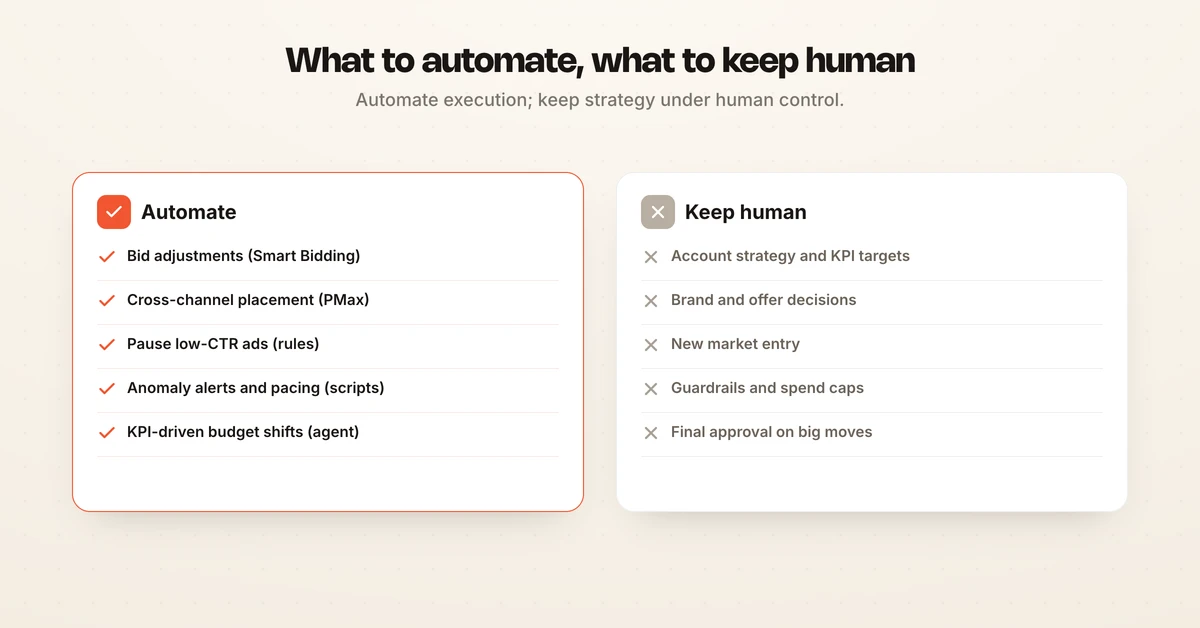
| Automate this | Keep human |
|---|---|
| Bid adjustments via Smart Bidding | Account strategy and KPI targets |
| Cross-channel placement via Performance Max | Brand and offer decisions |
| Pausing low-CTR ads with rules | New market entry |
| Anomaly alerts and budget pacing with scripts | Setting guardrails and spend caps |
| KPI-driven budget shifts with an AI agent | Final approval on large moves |
The pattern is consistent across levels. Automate the repetitive, high-frequency decisions where speed matters and the risk of any single action is small. Keep the low-frequency, high-stakes calls, like what your target ROAS should be, under human control. Managing the cost side of this well matters too, and the Google Ads cost guide covers where automation saves and where it can quietly overspend.
Google Ads automation tools beyond native features
Third-party tools exist because native rules and scripts stop at the account boundary and require manual upkeep. They add cross-account rule engines, richer reporting, and templates. Two of the most cited are Optmyzr and Revealbot.
Optmyzr offers a Rule Engine that spans Google Ads, Microsoft Ads, Meta, LinkedIn, and Amazon, with plans that scale by ad spend and account volume. Revealbot provides a rule engine with condition-action triggers and AND/OR logic that can check and act as often as every 15 minutes across Meta, Google, Snapchat, and TikTok. Both are 14-day-trial products aimed at agencies and larger advertisers.
These tools are more powerful than native rules, but they share the same DNA. They are still rule engines. A human writes the conditions, and the tool executes them faster and across more accounts. For a broader survey of the category, see advertising automation tools.
Where autonomous AI agents change the model
An autonomous AI agent does not just run tasks, it runs the job. This is the difference that matters for the top tier of Google Ads automation. Rules and scripts automate if-this-then-that steps. An agent plans, launches, optimizes, and reports against a KPI, then adjusts based on what happened.
Hawky's Performance Agent is built for this. It operates as an always-on operator across Google, Meta, and YouTube, working against a target you set such as ROAS, CAC, LTV, or contribution margin. It runs a closed Test-Track-Optimize-Scale loop rather than firing isolated actions.
The autonomous part is paired with control at every step. Every move the agent makes is logged with the trigger that caused it and a confidence score, and every change is one-click reversible. You set guardrails and spend caps, run it in shadow mode to watch before it acts, and choose approval-gated or fully autonomous operation. That audit trail and reversibility are what make autonomy safe to run on live spend.
The delivery model is flexible too. You can run the Performance Agent DIY or fully managed, pricing is outcome-based, and there is a 30-day pilot. Across a cohort of 200-plus customers, the median lift was +25% ROAS in the first 90 days. You can see how the loop maps to day-to-day work on the campaign management page, and the pricing page covers the outcome-based model.
Frequently asked questions
Can Google Ads be automated?
Yes. Google Ads can be automated at several levels: native automated rules for if-this-then-that changes, Google Ads scripts for custom JavaScript logic, Smart Bidding and Performance Max for AI-driven bidding and placement, and third-party or autonomous AI agents that run the optimization loop end to end. Rules and scripts automate individual tasks. An AI agent automates the job itself, with guardrails, approval gates, and an audit trail.
What are the best Google Ads automation tools?
The best tool depends on the layer of automation you need. Google's own automated rules and scripts are free and cover single-account tasks like pausing ads and adjusting bids. Third-party platforms such as Optmyzr and Revealbot add cross-account rule engines and reporting. An autonomous AI agent like Hawky's Performance Agent sits at the top tier, planning, launching, and optimizing campaigns against a KPI with every move logged and reversible.
What can Google Ads automated rules do?
According to Google Ads Help, automated rules can change ad status, budgets, and bids, and trigger emails based on conditions you set. For example, you can pause ads with a clickthrough rate under 0.2 percent and over 1,000 impressions, or raise a keyword bid when an ad falls off the first page. Rules run on a schedule and act on conditions, but they cannot reason about why performance changed or coordinate decisions across campaigns.
Is Smart Bidding a form of automation?
Yes. Smart Bidding is Google's AI-driven automation for bids. Strategies include Target CPA, Target ROAS, Maximize conversions, and Maximize conversion value. Google recommends roughly 30 conversions in 30 days before Target CPA and 50 before Target ROAS so the model has enough signal. Smart Bidding automates the bid decision, but it does not manage budgets, creative, or campaign structure on its own.
Are Google Ads scripts still worth using?
Google Ads scripts remain useful for teams with JavaScript skills who manage large accounts. Per Google Ads Help, scripts can change bids, pause ad groups, add keywords, pull external data, and run on a schedule. The tradeoff is maintenance: scripts break when account structures or APIs change, and they execute logic without judgment. For non-technical teams, automated rules or an AI agent are lower-maintenance paths.
How is an autonomous AI agent different from Google Ads automated rules?
Automated rules fire a fixed action when a condition is met. An autonomous AI agent decides what to do, executes it, measures the result, and adjusts, running a closed Test-Track-Optimize-Scale loop against a KPI. Hawky's Performance Agent logs every action with a trigger and confidence score, keeps changes one-click reversible, and can run approval-gated or fully autonomous inside spend caps and guardrails.
If you are tired of stitching together rules, scripts, and Smart Bidding and want one operator that runs Google Ads against your KPI with guardrails and an audit trail, Hawky's Performance Agent is built for that job.
Ready to hire your first AI performance team? Book Demo