How to Run Google Ads: A Step-by-Step Setup Guide for Beginners
To run Google Ads, you create a free Google Ads account, set up conversion tracking, then build a campaign by choosing a goal, a campaign type such as Search, your keywords, a daily budget, and a bidding strategy before you write your ads and hit launch. Conversion tracking comes before spend, because without it Google cannot optimize toward results and you cannot tell which clicks turned into customers.
This guide walks you through the full setup, step by step, in beginner-friendly language. By the end you will know how to create your first campaign, whether you need a website, and how to keep the account running well after launch.
What you need before you start
Before you touch the campaign builder, get three things ready. First, a landing page or website that the ad will send people to. Second, a clear goal, such as leads, sales, calls, or store visits. Third, a rough monthly budget so you know how much you are willing to spend while you learn.
You also need a Google account to sign in with and a payment method on hand. That is genuinely all it takes to open the door, according to Google Ads Help. The work is in setting it up so it actually performs.
How to set up your first campaign
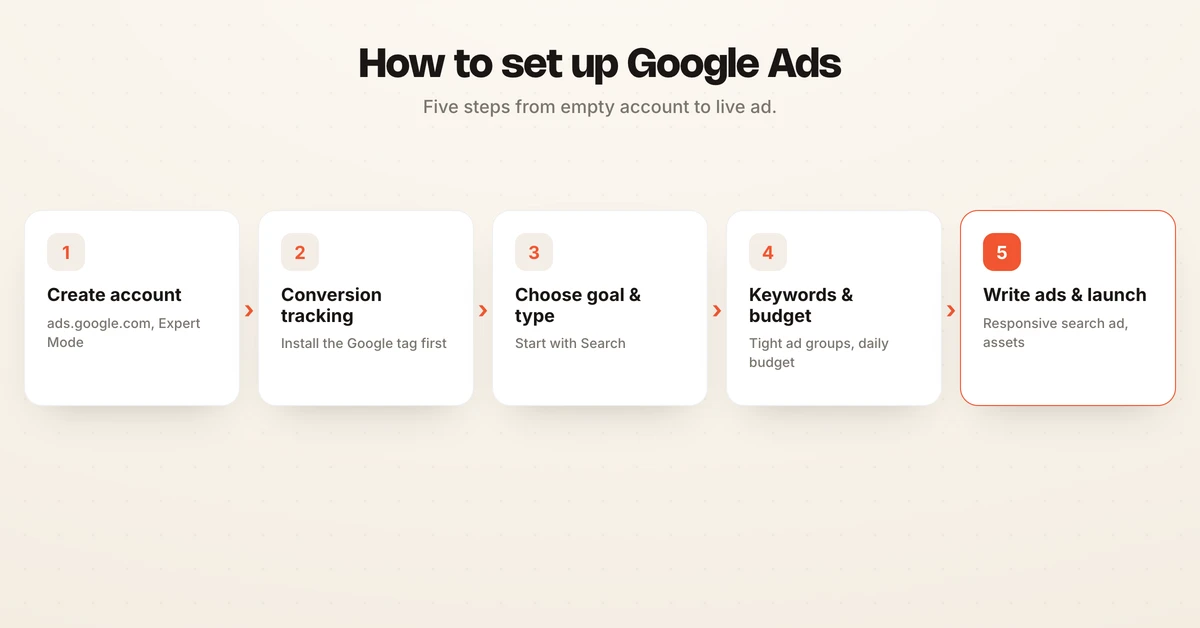
Here is the full flow, from empty account to live ad. Follow it in order, because a few of these steps depend on the ones before them.
-
Create your Google Ads account. Go to ads.google.com and sign in with a Google login. New accounts often push you into a guided "Smart" setup, but you want full control, so look for the option to switch to Expert Mode. This unlocks manual keyword, budget, and bidding settings that the simplified flow hides.
-
Set up conversion tracking first. In the left menu, open Goals, then Conversions, and create a conversion action for the outcome that matters, such as a purchase, a form submission, or a phone call. Install the Google tag on your site directly or through Google Tag Manager, which Google Ads Help walks through in detail. Track three to five meaningful actions, not every click, so the signal you send Google stays clean.
-
Choose your campaign goal and type. Click New campaign and pick an objective like Sales, Leads, or Website traffic. Then choose a campaign type. For most beginners this should be Search, because it shows text ads to people actively searching for what you sell. The table below explains when to use each type.
-
Set your networks, locations, and language. For a Search campaign, you can uncheck the Display Network so your budget stays on search results while you learn. Set the geographic areas you serve and the languages your customers speak. Tight targeting here stops you from paying for clicks you can never convert.
-
Build ad groups and add keywords. Group closely related keywords into tightly themed ad groups of roughly 10 to 20 keywords each, so your ads stay relevant to what people typed. Use match types deliberately, since they control how loosely Google matches searches to your keywords.
-
Set your budget and bidding strategy. Enter a daily budget you are comfortable with, then choose how you bid. Beginners often start with Maximize conversions once tracking has data, or Manual CPC for tighter control early on. For a deeper look at the options, see our guide to Google Ads bidding strategies, and to understand what a click actually costs, read our breakdown of Google Ads cost and the cost per click glossary entry.
-
Write a responsive search ad. Add up to 15 headlines and 4 descriptions, which Google mixes and matches to find the best combinations, per Google Ads Help. Include your keyword in a few headlines, name your offer, and add a clear call to action. Our responsive search ads glossary entry explains how the format assembles combinations.
-
Add assets (formerly extensions). Attach at least four asset types, such as sitelinks, callouts, structured snippets, and a call asset. Google recommends using as many relevant asset types as possible because they give your ad more real estate and are only shown when predicted to help, according to Google Ads Help. Each asset should say something new rather than repeat your headlines.
-
Review and launch. Check your budget, targeting, keywords, and ad one more time, confirm billing, and click Publish. Your ads enter review and usually go live within a day.
-
Monitor and adjust. New campaigns run through a learning phase, so give them two to four weeks of steady traffic before judging results. Watch conversions, search terms, and cost per conversion, add negative keywords for irrelevant searches, and refine from there.
Google Ads campaign types and when to use each
You picked Search above because it is the cleanest starting point, but Google offers several campaign types for different goals. Here is how they compare.
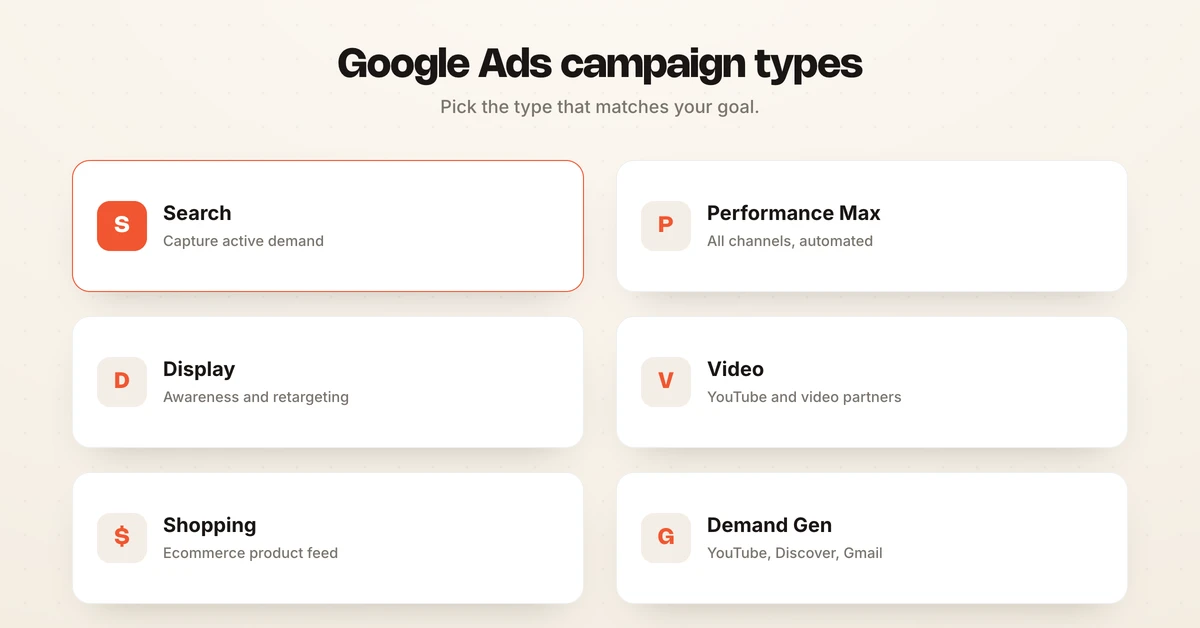
| Campaign type | Where ads show | Best for |
|---|---|---|
| Search | Google search results | Capturing active demand from people searching for your product or service |
| Performance Max | All Google channels at once | Scaling with automation once you have conversion data and clear goals |
| Display | Websites and apps in the Google Display Network | Building awareness and retargeting past visitors visually |
| Video | YouTube and video partners | Reaching audiences with video for awareness or consideration |
| Shopping | Search results with product images and prices | Ecommerce stores selling physical products from a product feed |
| Demand Gen | YouTube, Discover, and Gmail feeds | Visual, social-style demand generation for lifestyle and consumer brands |
Beginners should master Search before expanding. Performance Max can perform well, but it hands more control to Google's automation and is harder to diagnose when it underperforms. Prove Search works, then broaden your mix.
Do I need a website to run Google Ads?
For most campaign types you need a landing page to send clicks to, but you do not strictly need a full website that you built and host yourself. Sending paid traffic somewhere useful is the requirement, not the technology behind it.
If you do not have a site, you have real alternatives. Google Smart campaigns can use an automated landing page that Google generates from your business details, as described in Google Ads Help. You can also run Call ads so people phone you directly, or tie a campaign to your Google Business Profile so nearby customers get directions to your location.
That said, a dedicated landing page almost always converts better than a generic one, because you control the message, the offer, and the next step. If you plan to spend seriously, build a simple one-page site before you scale, so every click you pay for has the best chance to convert.
Pre-launch checklist
Run through this list before you hit publish. Skipping a row here is where most first campaigns leak money.
| Check | Why it matters |
|---|---|
| Conversion tracking installed and tested | Google cannot optimize, and you cannot measure ROI, without it |
| Goal and campaign type match your objective | The wrong type spends budget in the wrong place |
| Display Network unchecked on Search campaigns | Keeps early budget on high-intent search traffic |
| Locations and language set to who you serve | Stops you paying for clicks you cannot convert |
| Keywords grouped into tight, themed ad groups | Improves relevance, quality, and cost per click |
| Negative keywords added for obvious junk terms | Blocks irrelevant searches from day one |
| Daily budget set to a level you can sustain | Automated bidding needs steady data to learn |
| Responsive search ad has strong headlines and descriptions | More combinations means better matching and higher ad strength |
| At least four asset types attached | Adds ad real estate and lifts click-through rate |
| Billing confirmed and payment method valid | Ads will not serve without it |
Frequently asked questions
How do I start running Google Ads?
Create a free Google Ads account at ads.google.com with a Google login, switch to Expert Mode so you keep full control, set up conversion tracking, then build a campaign by choosing a goal, campaign type, keywords, budget, and bidding before you write ads and launch. Setting up conversion tracking before you spend is the single most important first move, because without it Google cannot optimize toward results and you cannot tell which clicks became customers.
How do I set up my first Google Ads campaign?
Inside your account, click New campaign, pick an objective such as Sales or Leads, choose Search as the campaign type, then set your networks, location, and language. Add tightly themed keywords with the right match types, set a daily budget and a bidding strategy, write a responsive search ad with up to 15 headlines and 4 descriptions, attach assets like sitelinks and callouts, and click Publish. Start with one campaign and one or two ad groups so the data stays clean while you learn.
Do I need a website to run Google Ads?
For most campaign types you need a landing page to send clicks to, but you do not strictly need a full website you built yourself. Google Smart campaigns can use an automated landing page Google generates, and you can run Call ads or campaigns tied to your Google Business Profile so people phone you or visit your location instead. A dedicated landing page still tends to convert better, so a simple one-page site is worth building before you scale spend.
How much does it cost to run Google Ads?
There is no minimum spend and you set your own daily budget, so you can start with a few dollars a day, though cost per click varies widely by industry and keyword competition. You pay when someone clicks your ad on the Search Network, and Google multiplies your daily budget by roughly 30.4 to calculate your monthly charge cap. Give the campaign enough budget to gather data, since automated bidding needs a steady flow of conversions to learn.
What is the best campaign type for beginners?
A standard Search campaign is the best starting point for most beginners because it targets people actively searching for what you sell and gives you clear control over keywords, budget, and ads. Performance Max can drive strong results but hands more control to Google's automation and is harder to diagnose when it underperforms. Learn Search first, prove it works, then expand into Performance Max, Display, or Video.
How long before Google Ads starts working?
New campaigns enter a learning phase while Google's algorithms gather conversion data, and most accounts need two to four weeks of steady traffic before performance stabilizes. Avoid making large daily edits during this window, because frequent changes reset the learning and slow results. Setting realistic expectations early keeps you from switching off a campaign that just needs time and data.
Setup is step one. Running it well is the hard part.
Getting a campaign live is the easy half. The real work starts the next day: watching search terms, cutting waste, adjusting bids, testing new ads, and repeating that loop across every campaign, every day. Most teams do not have the hours, and manual management is where good setups quietly drift.
This is where an agentic performance marketing platform changes the shape of the work. Hawky's Performance Agent operates your Meta, Google, and YouTube campaigns against a KPI you set, making the daily bid, budget, and creative decisions inside guardrails you define, with a full audit trail of every action. You can see how teams put it to work in our Google Ads automation guide, review the plans on the pricing page, and read outcomes like a +25% ROAS lift in the first 90 days across 200-plus customers in the case study.
If launching Google Ads is easy but running them well every day is not, Hawky's Performance Agent is built for that job.
Ready to hire your first AI performance team? Book Demo