Google Ads Transparency Center: How to Use It (2026 Guide)
The Google Ads Transparency Center is a free tool at adstransparency.google.com that shows every verified advertiser's active ads across Search, YouTube, Display, and Gmail. You search by advertiser name or domain, filter by region, date, and format, and see the actual ad copy and creative competitors are running. It reveals what competitors run, not how those ads perform.
Competitor research used to mean guessing at what rivals were doing. The Transparency Center makes their live ads public and free to browse. This guide covers exactly how to use it, what you can and cannot see, and how to turn it into real competitive intelligence.
What is the Google Ads Transparency Center?
The Google Ads Transparency Center is Google's public library of ads from verified advertisers, launched to show who is behind every ad. It gives anyone free access to the active campaigns a verified advertiser is running across Google Search, YouTube, Display, and Gmail, with no account required.
Its purpose is transparency, but for marketers it doubles as a competitor research tool. You can look up any competitor and see the exact headlines, descriptions, and creative they are running right now, which turns a black box into an open window. It is the Google equivalent of the Meta Ad Library.
The catch is scope. The Transparency Center only shows verified advertisers, so any brand that has not completed Google's advertiser verification will not appear. For those that have, it is the most authoritative free source of their live Google ads.
How to use the Google Ads Transparency Center
Using the Transparency Center takes three steps, and none of them cost anything. The whole flow runs in a browser with no login.
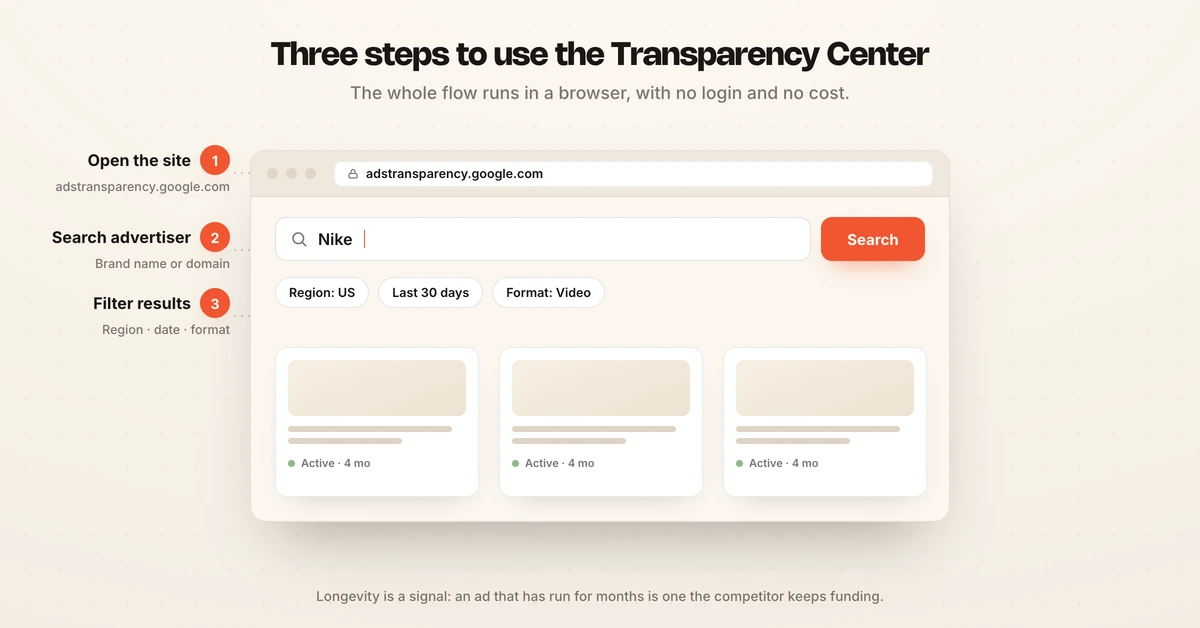
- Go to the site. Open adstransparency.google.com in any browser.
- Search the advertiser. Type the competitor's brand name or domain into the search bar. Searching the brand name (for example, "Nike") matches the verified advertiser identity better than the raw domain.
- Filter the results. Narrow by region, date range, and ad format (text, image, or video) to focus on the market and creative type you care about.
Once results load, you can browse every active ad, click into individual creatives, and see the date ranges they have been running. Longevity is a useful signal here: an ad that has run for months is one the competitor keeps funding, which usually means it works.
Pro tip: if you spot a competitor's ad live on Google, click the three-dot menu and choose "About this ad." That reveals the legal advertiser name and links straight to their Transparency Center page, which is the fastest way to find an advertiser whose legal name differs from their brand.
What you can see (and what you can't)
The Transparency Center shows you the creative, but not the performance behind it. Knowing this line is what keeps your research honest.
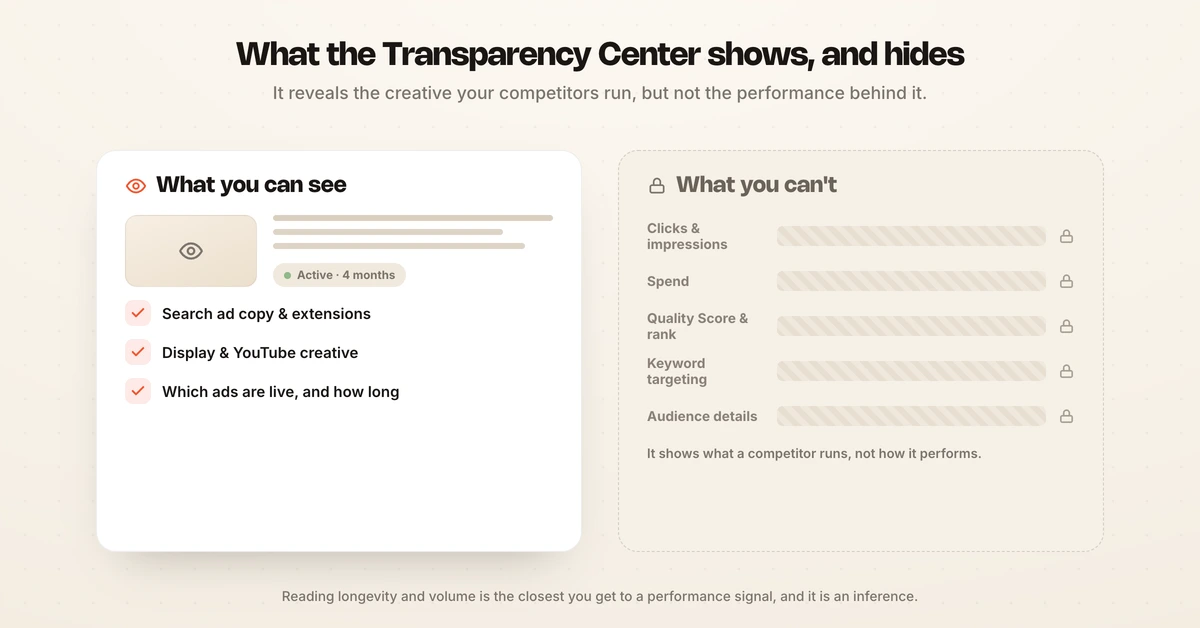
For Search ads, you can see competitors' ad copy: headlines, descriptions, and extensions. For Display and YouTube, you see the actual creative assets, images, and videos, so you can study visual strategy, banner formats, and video hooks. Across all formats, you see which ads are live and roughly how long they have run.
What it cannot tell you is how any of it performs, per Pixis:
- No click, impression, or spend data.
- No Quality Score or ad rank.
- No keyword targeting or audience details.
The tool answers "what is my competitor running," not "what is working for them." Reading longevity and volume is the closest you get to a performance signal, and it is an inference, not a metric.
How to use it for competitor research
The Transparency Center becomes useful when you research systematically instead of browsing once. Turn it into a repeatable check rather than a one-off curiosity.
Track a few things for each competitor over time. Note their dominant hooks and headlines, the offers they lead with, the formats they favor (text versus video), and how long their top ads run. Ads that stay live for months are your competitor telling you, indirectly, what converts for them. Revisit on a schedule, because a shift in messaging or a new offer is a signal worth catching early.
The limitation is that manual checking does not scale and shows only a snapshot. To track changes over time across many competitors, and to layer the performance context the Transparency Center lacks, teams use a dedicated tool. Hawky's Competitor Analysis maintains a searchable repository of competitor ads and flags weekly what changed in their hooks, offers, and messaging, so you catch shifts without checking by hand. For the full method, see competitor ad analysis.
What to track for each competitor
A useful competitor review looks at the same signals every time, so you can spot change rather than just admire ads. Build a simple checklist and run it per competitor on a schedule, capturing a screenshot each time so you have a baseline to compare against, an approach AdMapix frames as reading the signals the tool exposes.
Track these each time you check:
- Dominant hooks and headlines: the opening lines they lead with across ads.
- Offers and promotions: discounts, free trials, or guarantees they push.
- Format mix: how much they lean on text versus Display versus YouTube video.
- Ad longevity: which ads have run for months, your best proxy for what converts.
- New entries: creatives or offers that appeared since your last check.
The signal that matters most is change. A competitor swapping their lead offer, testing a new hook, or suddenly ramping video is telling you where they are placing bets. Catching that early is worth far more than a one-time snapshot, which is exactly why manual, ad-hoc checking leaves value on the table.
Google Ads Transparency Center vs. paid ad spy tools
The Transparency Center is free and authoritative, but paid tools add the layers it deliberately leaves out. Choosing between them depends on how deep your research needs to go.
| Transparency Center | Paid ad spy tools | |
|---|---|---|
| Cost | Free | Paid |
| Coverage | Verified advertisers only | Broader, historical archives |
| Data | Creative and dates | Creative plus estimates and trends |
| Change tracking | Manual | Automated alerts |
| Best for | Quick, authoritative lookups | Ongoing competitive monitoring |
Use the Transparency Center for a fast, authoritative look at exactly what a competitor is running today. Use a paid tool when you need historical archives, change alerts, or estimated performance context. Many teams use both, starting free and adding a paid layer as competitive monitoring becomes a routine. For options, see the best Google Ads competitor analysis tools.
Frequently asked questions
What is the Google Ads Transparency Center?
The Google Ads Transparency Center is Google's free public library of ads from verified advertisers, available at adstransparency.google.com. It shows the active ads a verified advertiser is running across Search, YouTube, Display, and Gmail, including ad copy and creative assets. It exists for transparency, but marketers use it to see exactly what competitors are advertising right now, with no account required.
How do I see a competitor's Google Ads?
Go to adstransparency.google.com and search the competitor's brand name or domain, then filter by region, date, and format. You will see their live Search ad copy and Display and YouTube creative. If you spot a competitor's ad on Google, click the three-dot menu and choose "About this ad" to reveal their legal advertiser name and jump to their Transparency Center page.
Is the Google Ads Transparency Center free?
Yes, it is completely free and publicly accessible, with no Google account required to search or view ads. Google built it for advertising transparency, so anyone can look up a verified advertiser's live ads at no cost. The trade-off for being free is that it shows only creative and dates, with no performance, spend, or targeting data.
What are the limitations of the Google Ads Transparency Center?
The Transparency Center shows what ads run, not how they perform. It provides no click, impression, or spend data, no Quality Score, and no keyword targeting or audience details. It also covers only verified advertisers, so brands that have not completed Google's verification will not appear. Longevity is the closest thing to a performance signal, and it is an inference rather than a metric.
How is it different from the Meta Ad Library?
Both are free public ad libraries, but the Transparency Center covers Google Search, YouTube, Display, and Gmail, while the Meta Ad Library covers Facebook and Instagram. The Transparency Center is limited to verified advertisers; the Meta Ad Library covers all active ads and offers extra detail for political and social issue ads. Marketers researching a full competitor usually check both.
If tracking what every competitor runs across Google and catching their messaging shifts without manual checking is the problem, Hawky's Competitor Analysis is built for that job.
Ready to hire your first AI performance team? Book Demo