TikTok Creative Center: How to Use It (2026 Guide)
The TikTok Creative Center is TikTok's free research hub at creative-center.tiktok.com, where its Top Ads library shows real running ads filtered by industry, region, objective, and format, alongside trending sounds and hashtags. It surfaces what is working in your category right now, though it shows category winners rather than a specific brand's full ad set. Basic browsing is free; a few features need a free TikTok Business account.
TikTok rewards native, trend-aware creative more than any other platform, and the Creative Center is where you study what native looks like this week. This guide covers how to use it for competitor research, trend discovery, and creative analysis, and where its limits are.
What is the TikTok Creative Center?
The TikTok Creative Center is TikTok For Business's free research portal for advertisers and creators. Its core is the Top Ads library, a browsable collection of real, high-performing ads you can filter by industry, region, campaign objective, and format, giving you direct visibility into what converts on the platform.
You will see it referred to a few different ways. The TikTok ads Creative Center, the TikTok business Creative Center, and the TikTok creative hub all point to the same product, and outside the US it is often written TikTok Creative Centre. TikTok's own naming is TikTok For Business Creative Center.
Beyond ads, it houses trend data: trending sounds, hashtags, and creators, plus keyword insights and a Commercial Music Library of tracks licensed for paid use. For a platform where a trending sound can carry a creative, that trend layer is as valuable as the ad examples.
The one thing to understand up front is what it is not. The Creative Center shows category-level winners, not a searchable archive of one brand's ads, so it answers "what works in my vertical" better than "what is this exact competitor running."
How to use the TikTok Creative Center
Getting value from the Creative Center is about filtering intentionally, not scrolling. Access it and set filters before you start browsing.
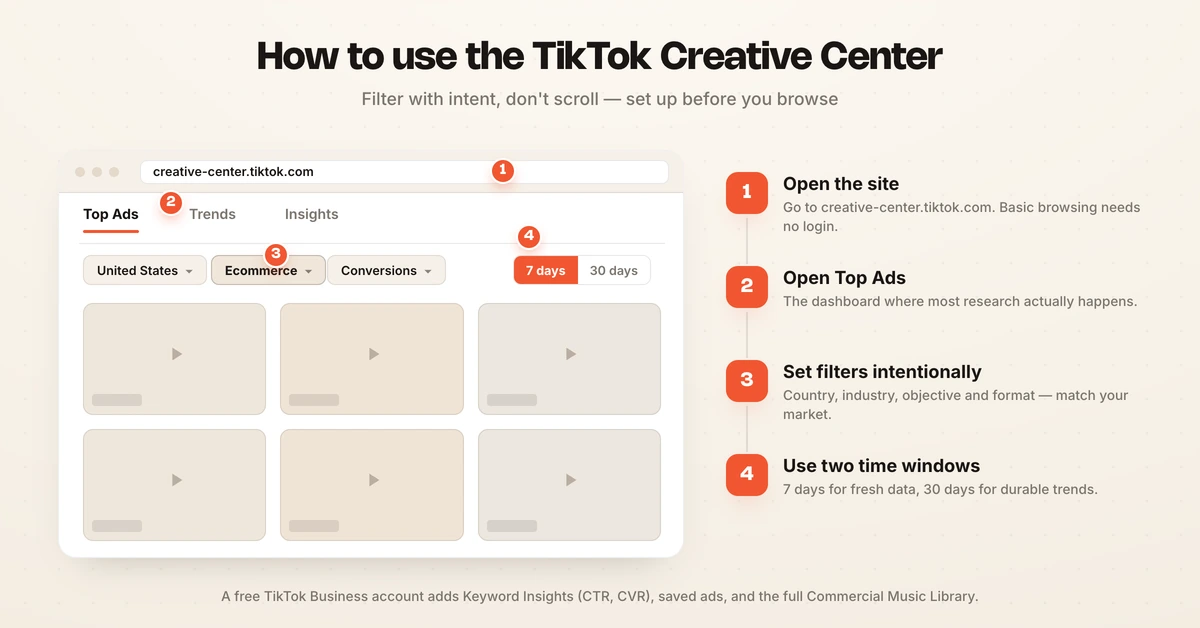
- Open the site. Go to creative-center.tiktok.com, or in Ads Manager go to Tools and then Creative Library. Basic browsing needs no login.
- Open Top Ads. This dashboard sits under Inspiration, and the TikTok Creative Center Inspiration section is where most research happens, showing successful campaigns across industries.
- Set filters intentionally. Choose your country, industry vertical, campaign objective, and ad format so the ads shown match your market and goal.
- Use two time windows. Start with a 7-day window for fresh data, then rerun at 30 days to tell durable trends from one-off spikes, per Stackmatix.
A free TikTok Business account unlocks the deeper layers: full Keyword Insights metrics like CTR and CVR, the ability to save and bookmark ads, and the complete Commercial Music Library. For serious research, the free account is worth creating.
How to find competitor TikTok ads
The Creative Center does not let you search by brand name, which is the key limitation for direct competitor research. You cannot type in a rival and see their ads the way you can in the Google Ads Transparency Center. Instead, you work around it.
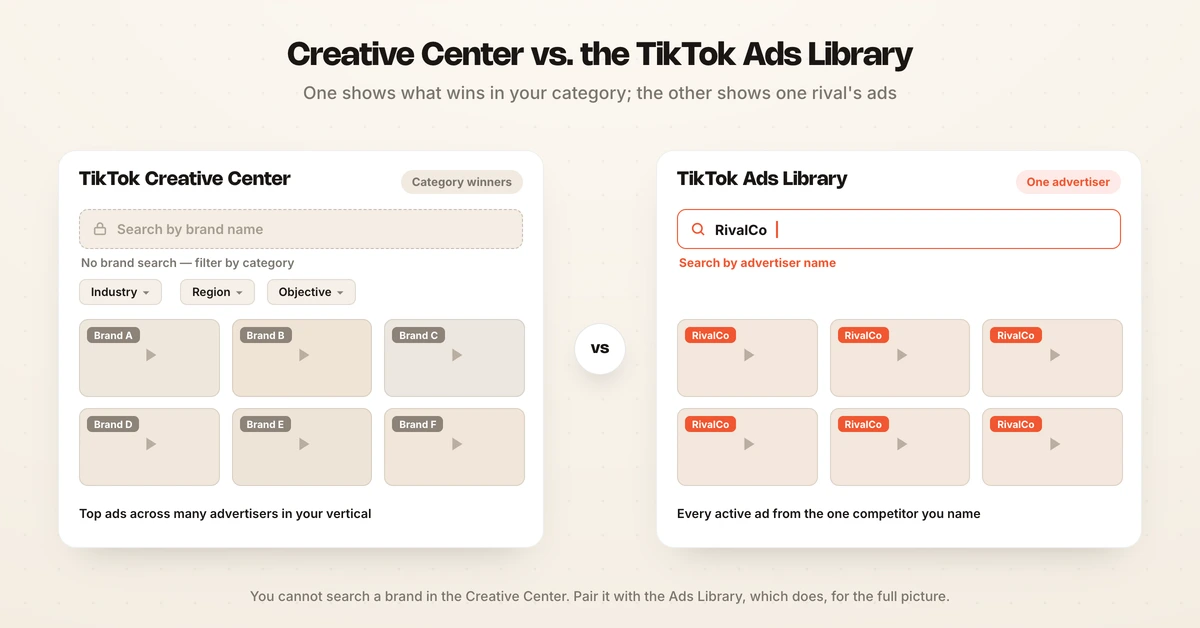
Filter by industry and region to surface ads from the competitors spending heavily in your vertical, since the biggest advertisers in your category tend to dominate the Top Ads results. For a specific competitor, supplement the Creative Center with the TikTok Ads Library, which does let you search by advertiser name and view their active ads, per AdLibrary. Cross-referencing both gives you the fullest picture.
Save the competitor ads you find and analyze their elements: the hook in the first second, the pacing, and the UGC style. For the deeper method of learning from rivals, see competitor creative analysis, and for broader tool lists, the best TikTok ad spy tools and the best TikTok ads tools.
The two TikTok tools serve different research jobs, so it helps to know which to reach for:
| Creative Center | TikTok Ads Library | |
|---|---|---|
| Search by brand | No | Yes |
| Best for | Category winners, trends | A specific competitor |
| Filters | Industry, region, objective, format | Advertiser, region |
| Trends and sounds | Yes | No |
| Cost | Free | Free |
Reach for the Creative Center when you want to know what wins in your vertical and which sounds are rising. Reach for the Ads Library when you have a specific rival in mind and want their active ads. Used together, they cover both the category view and the head-to-head view.
How to find trends and sounds with Trend Discovery
TikTok Creative Center Trend Discovery, labelled simply Trends in the navigation, is where the Creative Center earns its keep for TikTok specifically. Navigate to the Trends tab and select Songs to see trending sounds, filterable by region, industry, and time period, so you can match audio to your market. TikTok Creative Center songs data is refreshed continuously, which is why the same tab read a week apart can return a completely different list.
For any music you plan to use in a paid ad, pull from the Commercial Music Library (Sounds, then Commercial Music Library) rather than the organic Trending Songs tab. The Commercial Music Library contains tracks specifically licensed for advertising, which keeps your ads compliant. The trending hashtags and creators tabs round out the picture for spotting formats and partnerships on the rise.
Trends move fast on TikTok, so timing matters more here than on other platforms. A sound or format that is climbing is worth building around; one that has already peaked is a signal you are late. Pair the 7-day and 30-day views to judge whether a trend is still rising or already fading, and act on the rising ones while they are cheap to ride.
How to analyze Top Ads for patterns
The Creative Center pays off when you analyze in volume, not one ad at a time. A single ad is an anecdote; a pattern across many is a strategy you can borrow. Set a minimum per session and build a library over time.
Analyze at least 15 to 20 ads per session to spot reliable patterns, and build a running database of 50 to 100 ads over four to six weeks to separate durable patterns from temporary spikes, per AdMapix. For each ad, note the hook, the format, the pacing, and the sound, then look for what the winners share.
The limitation of manual analysis is that it is a snapshot and does not scale across competitors or platforms. Hawky's Competitor Analysis maintains a searchable repository of competitor ads across Meta, Google, and TikTok and flags weekly what changed in their hooks and offers, complementing the TikTok-native view the Creative Center gives you. For the full framework, see competitor ad analysis.
Frequently asked questions
What is the TikTok Creative Center?
The TikTok Creative Center is TikTok For Business's free research hub at creative-center.tiktok.com. Its Top Ads library shows real, high-performing ads filtered by industry, region, objective, and format, and it also surfaces trending sounds, hashtags, and creators plus a Commercial Music Library. Marketers use it to see what creative works in their category right now and to find trends to build on.
How do I get to the TikTok Creative Center?
Go to creative-center.tiktok.com in any browser, or open TikTok Ads Manager and choose Tools, then Creative Library. Basic browsing of Top Ads and Trend Discovery needs no login at all. Creating a free TikTok Business account unlocks the rest: full Keyword Insights metrics, saved and bookmarked ads, and the complete Commercial Music Library.
How do I find competitor TikTok ads?
The Creative Center does not allow searching by brand name, so filter by industry and region to surface ads from competitors spending heavily in your vertical. For a specific competitor, use the separate TikTok Ads Library, which lets you search by advertiser name and view their active ads. Cross-referencing the Creative Center and the Ads Library gives you the fullest picture of a competitor's TikTok creative.
Is the TikTok Creative Center free?
Yes, the TikTok Creative Center is free, and basic browsing of Top Ads and trends requires no account. A free TikTok Business account unlocks deeper features, including full Keyword Insights metrics like CTR and CVR, the ability to save and bookmark ads, and the complete Commercial Music Library. There is no paid tier for the core research tools.
What is the difference between the TikTok Creative Center and the TikTok Ads Library?
The Creative Center shows category-level top ads filtered by industry, region, objective, and format, so it answers what works in your vertical. The TikTok Ads Library lets you search by advertiser name to see a specific brand's active ads. Use the Creative Center for trends and category winners, and the Ads Library for direct competitor lookups; most researchers use both together.
Can I see TikTok ad performance metrics in the Creative Center?
You can see some performance context, such as CTR and conversion signals through Keyword Insights, but only with a free TikTok Business account, and the data is directional rather than a competitor's exact numbers. The Top Ads library shows which ads are performing well by surfacing them, but it does not expose a competitor's spend, impressions, or precise results. It shows what is working, not the full metrics behind it.
If tracking competitor creative across Meta, Google, and TikTok and catching their messaging shifts without manual checking is the problem, Hawky's Competitor Analysis is built for that job.
Ready to hire your first AI performance team? Book Demo