Google Ad Sizes & Specs: The Complete 2026 Guide
The best-performing Google display ad sizes are 300x250 (medium rectangle), 728x90 (leaderboard), 336x280 (large rectangle), and 300x600 (half-page), plus 320x100 and 320x50 for mobile. Responsive Display Ads use landscape images at 1.91:1 (1200x628) and square at 1:1 (1200x1200). Uploaded static ads are capped at 150 KB, while responsive assets can go up to 5 MB.
Getting Google ad sizes right is the difference between your ads showing across the network and getting filtered out of premium inventory. This guide lists every important size and spec for 2026, which ones to prioritize, and the file requirements that keep your ads eligible.
What are Google display ad sizes?
Google display ad sizes are the standard pixel dimensions your image ads must match to serve across the Google Display Network, which reaches millions of websites and apps. There are two ways to run display ads, and they use sizes differently.
Uploaded (static) display ads require you to design each size individually, giving you full control over every banner but demanding many versions. Responsive Display Ads let you upload a few flexible assets that Google automatically resizes and recombines to fit any placement, which is now the default and the easier path for most advertisers.
The reason sizes matter is inventory coverage. A handful of dimensions account for most available ad space, so covering them determines how widely your ads can appear. Missing the high-coverage sizes means your ads simply do not show in many places.
The best-performing Google display ad sizes
A few sizes deliver the highest inventory coverage and the strongest results, so prioritize these before designing anything niche. The table below lists the sizes worth having, per LinearDesign.
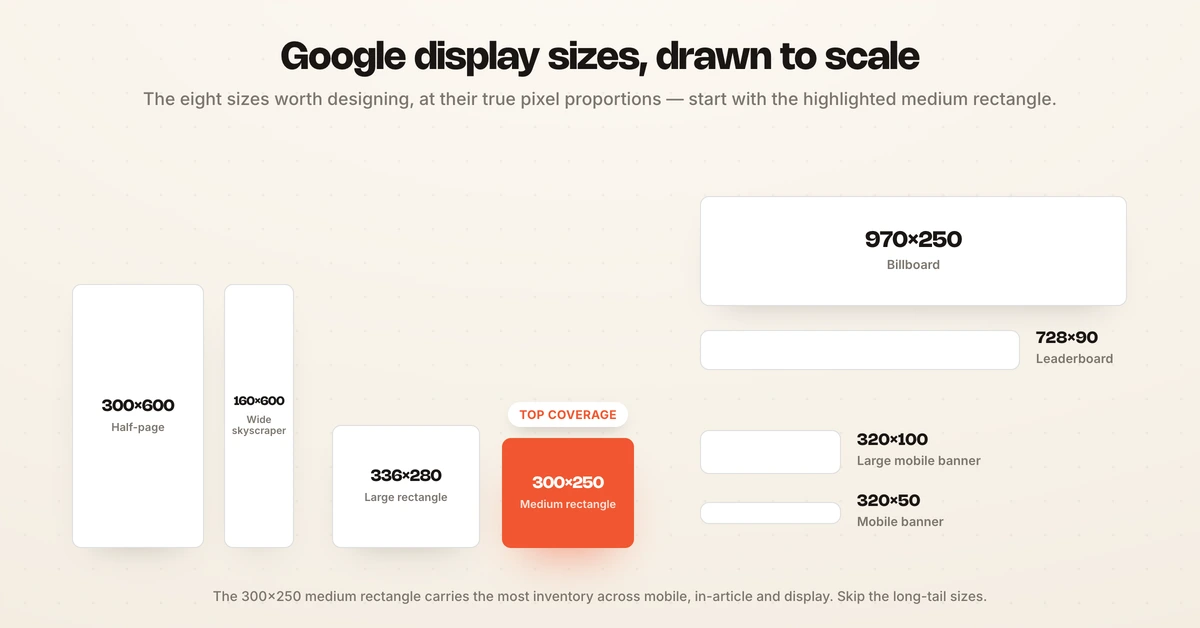
| Size (px) | Name | Notes |
|---|---|---|
| 300x250 | Medium rectangle | Highest coverage; works on mobile and desktop |
| 336x280 | Large rectangle | High-performing within articles |
| 728x90 | Leaderboard | Top-of-page desktop standard |
| 300x600 | Half-page (large skyscraper) | High-impact, growing inventory |
| 320x100 | Large mobile banner | Strongest mobile performer |
| 320x50 | Mobile banner | Standard mobile size |
| 160x600 | Wide skyscraper | Desktop sidebar |
| 970x250 | Billboard | Premium high-impact desktop |
If you only design a few, start with 300x250, 728x90, 336x280, 300x600, and the two mobile banners. Those cover the large majority of available placements, per CreativeOS. The medium rectangle at 300x250 is the single best-performing size, because it appears across mobile, in-article, and display inventory.
You can safely skip the long tail. Older or rarely served sizes like 468x60 (banner), 234x60 (half banner), and 120x600 (skyscraper) carry little inventory in 2026 and are not worth designing unless a specific placement demands them. Focus your design time on the high-coverage sizes above and let Responsive Display Ads cover the rest automatically, rather than producing a banner for every dimension Google has ever supported.
Responsive Display Ad specs
Responsive Display Ads are Google's recommended format, and they need only a few flexible assets instead of dozens of fixed banners. You upload images in up to three aspect ratios and Google assembles the ads.
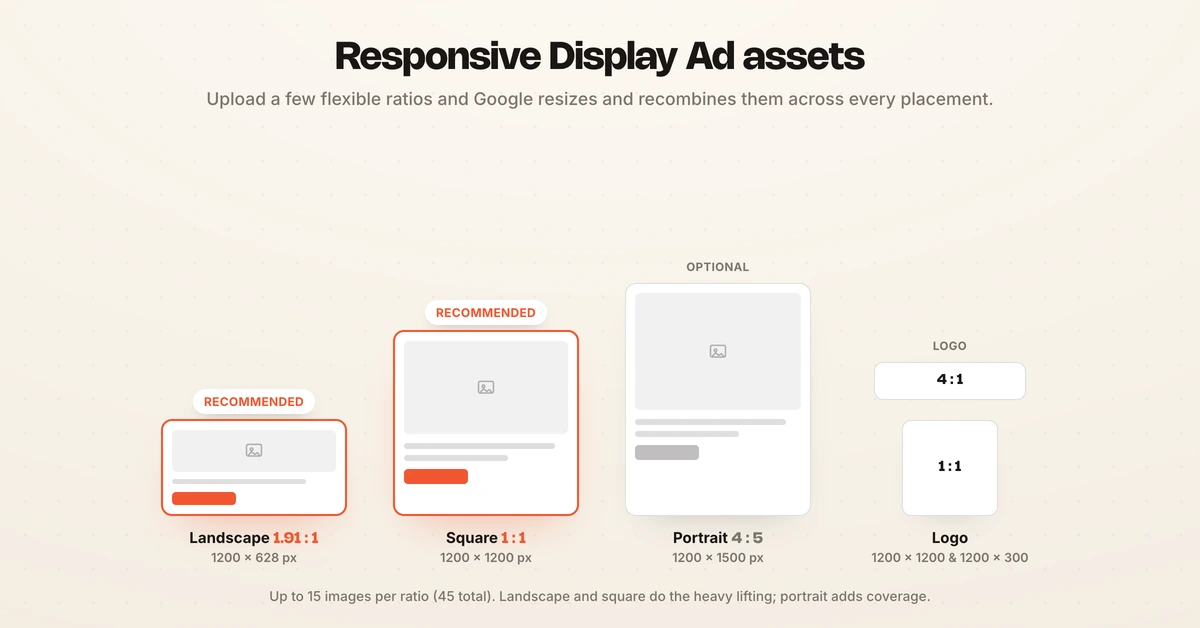
The required and optional image assets are:
- Landscape (1.91:1): 1200x628 px recommended, 600x314 px minimum.
- Square (1:1): 1200x1200 px recommended, 300x300 px minimum.
- Portrait (4:5, optional): 1200x1500 px, for extra coverage.
- Logo (1:1 and 4:1): 1200x1200 px and 1200x300 px.
You can upload up to 15 images per aspect ratio across the three ratios, for a potential 45 images, which gives Google more to test and optimize. More quality assets generally mean wider reach and better performance, since the system has more combinations to serve.
File size and format requirements
Google enforces strict file limits, and exceeding them gets your ad disapproved. Uploaded static display ads are capped at 150 KB per file, while Responsive Display Ad and Performance Max image assets can be up to 5 MB, per Google's specs.
Choose the format for the job. JPG offers the best compression and suits photographs and gradients, especially when you are close to the 150 KB limit. PNG is best for images needing transparency or with sharp edges and text. GIF is accepted for static and animated banners, with animation capped at 30 seconds.
Keeping static files under 150 KB is the most common spec issue, so compress images before uploading. For responsive assets the limit is generous, which is another reason the responsive format is easier to work with.
Google ad sizes beyond display
Display is where sizes matter most, but Google runs other ad types with their own specs. Knowing the basics keeps your whole account consistent.
Search ads are text, not images, so they use character limits rather than pixel sizes: up to 15 headlines of 30 characters and 4 descriptions of 90 characters in a responsive search ad. YouTube video ads follow video specs, with a 16:9 or 9:16 aspect ratio depending on placement, plus a companion banner at 300x250. Demand Gen and Performance Max campaigns reuse the responsive image assets above.
The practical takeaway is that responsive formats now dominate across Google, so a strong set of flexible image assets covers display, Demand Gen, and Performance Max at once. For running the campaigns these sizes feed, see how to run Google Ads.
How to produce every size efficiently
Designing dozens of banner sizes by hand is the tedious part of display advertising, and it is where most teams cut corners. Building one strong concept and then adapting it cleanly to every required size keeps quality high without the manual grind.
This is a natural fit for automation. Tools that generate multiple sizes and formats from a single winning creative remove the resizing bottleneck, and Hawky's AI Creative Generation can adapt one concept into the formats each placement needs. For the broader category, see the best creative automation software, and for the Facebook equivalent of this guide, Facebook ad sizes and specs.
Frequently asked questions
What are the Google display ad sizes?
The core Google display ad sizes are 300x250 (medium rectangle), 336x280 (large rectangle), 728x90 (leaderboard), 300x600 (half-page), 160x600 (wide skyscraper), and 970x250 (billboard) for desktop, plus 320x100 (large mobile banner) and 320x50 (mobile banner) for mobile. These cover most available inventory. Responsive Display Ads instead use landscape (1200x628) and square (1200x1200) image assets that Google resizes automatically.
What is the best Google ad size?
The medium rectangle at 300x250 is the best-performing Google display ad size, because it appears across mobile, in-article, and display inventory, giving it the widest coverage. After it, prioritize 728x90, 336x280, 300x600, and the mobile banners 320x100 and 320x50. If you run Responsive Display Ads, the landscape 1200x628 and square 1200x1200 assets do the heavy lifting across placements.
What are Google Ads image requirements?
Uploaded static display ads must be under 150 KB per file in JPG, PNG, or GIF format. Responsive Display Ad image assets can be up to 5 MB and should be provided in landscape (1.91:1, 1200x628), square (1:1, 1200x1200), and optionally portrait (4:5) ratios, plus logos at 1:1 and 4:1. You can upload up to 15 images per aspect ratio, for a total of 45, so Google has more to optimize.
Should I use Responsive Display Ads or uploaded ads?
For most advertisers, Responsive Display Ads are the better choice because you upload a few flexible assets and Google fits them to every placement automatically, maximizing coverage with less design work. Uploaded static ads give you pixel-perfect control over each banner, which suits brands with strict design requirements, but they demand designing many sizes. Many advertisers run responsive as the default and add uploaded ads for specific high-value placements.
What file format is best for Google display ads?
JPG is best when your file is close to the 150 KB limit or contains photographs and gradients, because it compresses efficiently. PNG is best for images that need transparency or have sharp edges and text, since it keeps them crisp. GIF works for both static and animated banners, with animation limited to 30 seconds. Choose the format that keeps quality high while staying under the file-size cap.
Google's specs are the easy part; producing every size at quality is the work. If adapting one winning concept into every Google ad size without the manual grind is the problem, Hawky's AI Creative Generation is built for that job.
Ready to hire your first AI performance team? Book Demo