Facebook Ad Account Restricted? How to Fix It and What Not to Do
A Facebook ad account restricted by Meta is one that has been stopped from running ads, usually because something in the account, the page, the creative or the payment method was flagged against its advertising policies. Restriction is reversible: you request a review in Account Quality, and if the decision is overturned the account resumes without losing its campaigns or its learning history.
The panic is understandable, because revenue stops the moment the account does. The useful thing to know is that most restrictions are automated decisions, and automated decisions are the ones most often reversed on review.
This guide separates restriction from the three things people confuse it with, covers the causes worth checking first, walks the review process, and lists the moves that turn a temporary restriction into a permanent one.
What does "Facebook ad account restricted" mean?
A restricted ad account has had its ability to run ads suspended while Meta reviews a suspected policy issue, which is different from the account being deleted or the business being banned. Campaigns, audiences and historical data stay in place, and delivery stops.
The restriction notice appears in Meta Ads Manager and in Account Quality, which is the dashboard Meta built for exactly this: it shows what was flagged, which asset it applies to, and whether a review is still available.
Two things are worth understanding immediately. Most restrictions are issued by automated classifiers rather than a human, and the appeal route exists precisely because those classifiers produce false positives at scale.
Restricted, disabled, rejected, or flagged: which one is it?
These four words describe four different states, and the fix differs for each, so identifying the right one is the first step rather than a technicality.
| State | What it means | Scope | Usually reversible? |
|---|---|---|---|
| Ad rejected | One ad failed review | A single ad | Yes, edit and resubmit |
| Ad account restricted | Account cannot run ads pending review | One ad account | Often, via review request |
| Ad account disabled | Account shut down after a decision | One ad account | Sometimes, via review request |
| Business account restricted | The whole Business Manager is limited | Every asset inside it | Harder, and slower |
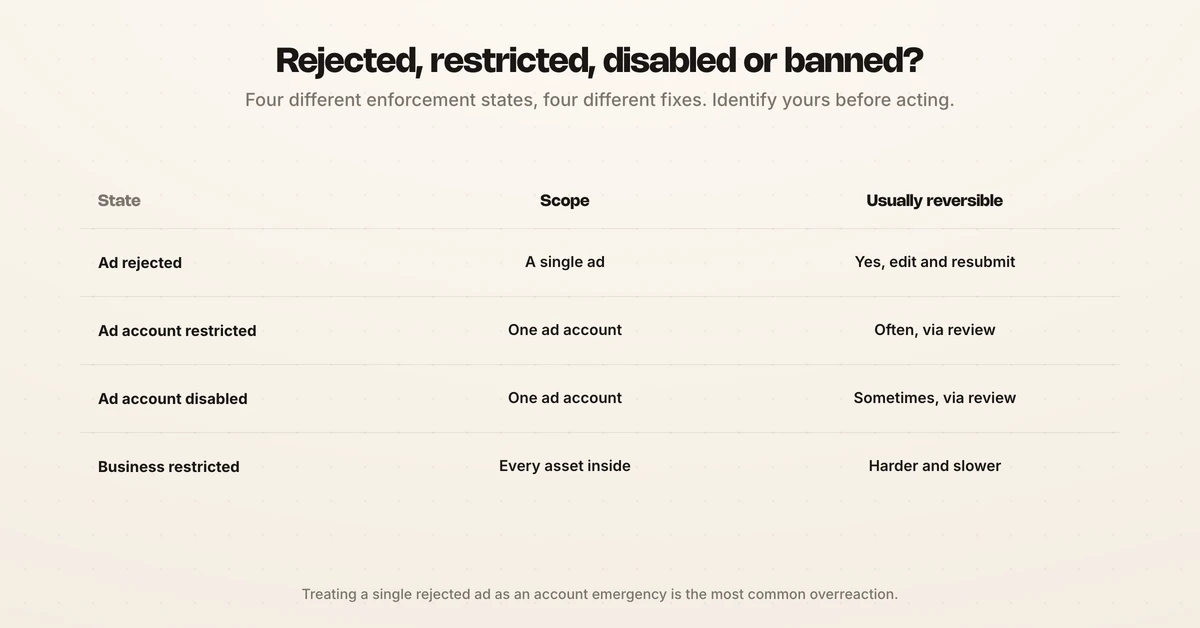
A rejected ad is routine and needs no drama: fix the creative and resubmit, checking it against the Facebook ad sizes and specs while you are in there. A restricted account is an account-level stop. A disabled account is the outcome after a decision has been made. A restricted Business Manager is the serious one, because it takes every ad account, page and pixel with it.
Check which of the four you are actually in before doing anything else, because the most common mistake is treating a single rejected ad as an account emergency.
Why is your Facebook ad account restricted?
A Facebook ad account is restricted for one of five reasons, and four of them have nothing to do with the ad you were running when it happened.
- Policy violations in creative or landing page. Meta's advertising standards cover the ad and the destination. A compliant ad pointing at a non-compliant page still violates.
- Restricted categories handled incorrectly. Credit, housing, employment, health claims, politics, alcohol and dating each carry extra rules, and running them without the required declaration is a frequent trigger. Meta documents these under ad restrictions.
- Payment problems. A failed charge, a chargeback, or a card that does not match the business is read as risk, not as an accounting error. Spend pacing matters here too, and a sudden CPM swing is often what draws the attention, which the Facebook ads cost guide covers.
- Unusual account activity. A new login location, a sudden spend jump, a new admin, or a brand-new account spending aggressively on day one all raise the risk score.
- Page quality history. Restrictions follow the page and the business, not just the ad account. Poor feedback scores on a linked page pull the ad account down with them, and the Meta ads updates for 2026 track how the enforcement surface keeps moving.
The pattern behind all five is risk scoring rather than punishment. Meta is predicting whether an account is likely to cause harm, and a legitimate advertiser can trip the prediction by looking statistically unusual.
How to fix a restricted Facebook ad account
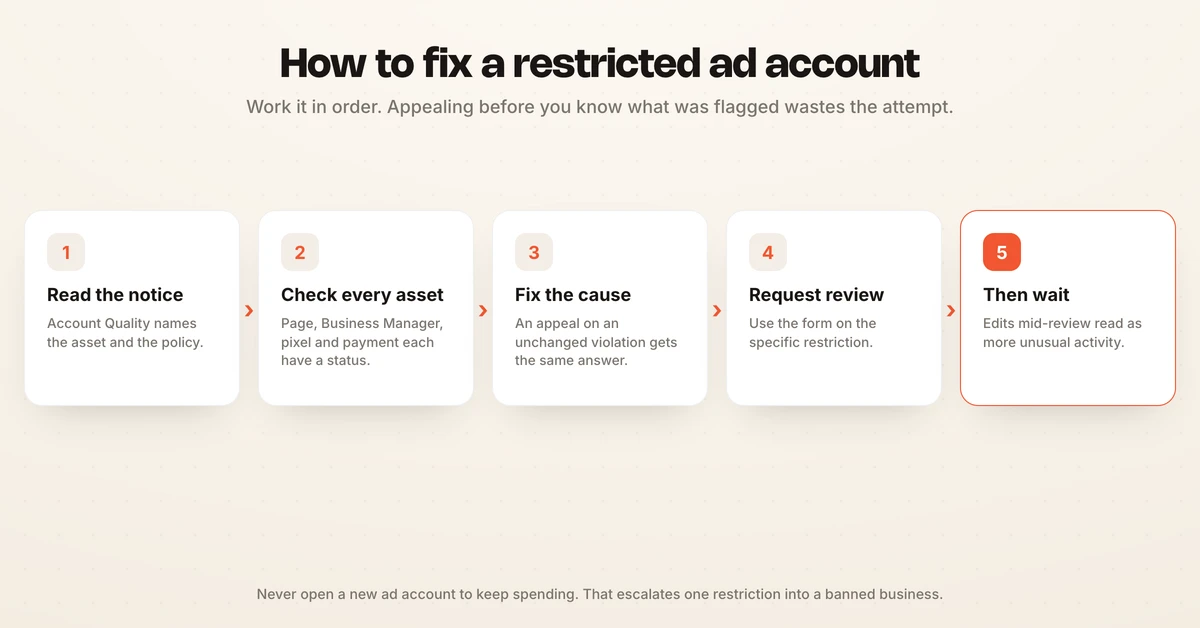
Work the process in order, because skipping to the appeal before you know what was flagged produces a weak submission and a wasted attempt.
- Open Account Quality and read the actual notice. It names the asset and the policy. "Account restricted" with no detail usually means the issue sits on the business or page, not the ad account.
- Check every linked asset, not just the one that stopped. Page, Business Manager, pixel, catalogue and payment method each have their own status.
- Fix the underlying issue first. If a landing page carries an unsupported claim, change the page before requesting review. An appeal on an unchanged violation gets the same answer.
- Request review in Account Quality. Use the form attached to the specific restriction rather than a generic support ticket.
- Write the appeal as evidence, not as protest. State what your business does, what the ad promotes, and specifically why it complies. Where you fixed something, say what changed.
- Wait for the decision before touching anything. Editing campaigns, adding admins or changing payment methods mid-review reads as more unusual activity.
If the first review fails, read the second notice carefully rather than resubmitting the same text. A repeat appeal that adds no new information rarely changes the outcome.
What not to do
The moves that feel productive are frequently the ones that make a restriction permanent, because they look exactly like the behaviour Meta restricts accounts to prevent.
- Do not create a new ad account to keep spending. Circumventing an enforcement is itself a violation, and it commonly escalates a single restricted ad account into a restricted business.
- Do not add a new payment method from an unrelated entity. It reads as evasion.
- Do not hand access to an agency promising to "unlock" accounts. Adding unknown admins during a review is the strongest possible unusual-activity signal.
- Do not submit the same appeal repeatedly. Volume does not help and can close the route.
- Do not delete the flagged ads before you have read what was flagged. You lose the evidence you need for the appeal.
The rule underneath all five: during a review, an account should look stable and ordinary. Every change you make is a data point in a risk model.
How to reduce the chance of it happening again
Prevention is mostly about being predictable, because the risk model is looking for discontinuity.
| Habit | Why it lowers risk |
|---|---|
| Warm new accounts gradually | A day-one spend spike on a new account is the classic trigger |
| Keep payment details matching the business entity | Mismatches read as fraud risk |
| Run the landing page through policy before the ad | Half of creative-flagged issues actually sit on the page |
| Keep admin access tight and stable | Frequent admin changes raise the score |
| Watch page feedback scores | Page quality drags the ad account with it |
| Keep a second, legitimately separate business structure | Not a backup to evade, but continuity for a genuinely distinct entity |
None of this is exotic. The accounts that get restricted repeatedly are usually the ones where spend, access and creative all change at once.
What a restriction costs beyond the paused spend
The visible cost is the stopped delivery. The larger cost is the learning phase, because campaigns that resume after a multi-day gap frequently re-enter learning and rebuild their optimisation from a colder start.
That is the argument for catching policy issues before launch rather than after: a rejected ad costs an edit, while a restriction costs the account's momentum. Reviewing creative against policy at the point of production, rather than at the point of submission, is where the time is actually saved. Hawky's Creative Agent produces variants bound to a specific campaign and ad set with seat-level approval before anything ships, so the review happens while a human is still in the loop.
Reviewing what actually shipped is easier when every ad carries its evidence, which is what Creative Analysis exists for. Once delivery resumes, the recovery is an optimisation problem: budgets to rebalance, campaigns to pull back out of learning, and creative to rotate. The Facebook ads optimization guide covers the levers, and scaling Facebook ads covers getting spend back up without tripping the same risk signals.
Frequently asked questions
Why is my Facebook ad account restricted?
The five common causes are a policy violation in the ad creative or its landing page, a restricted category such as credit, housing, employment or health handled without the required declaration, a payment problem such as a failed charge or chargeback, unusual account activity such as a sudden spend jump or new admin, and poor quality history on the linked page. Account Quality names which one applies. Most restrictions are automated decisions rather than human ones.
How long does a Facebook ad account restriction last?
It lasts until a review decision is made, so there is no fixed duration you can plan around, and Meta does not publish a guaranteed turnaround. Restrictions resolved in your favour lift as soon as the review completes and the account resumes with its campaigns intact. Submitting a clear, specific appeal once is more effective than submitting several.
Can I create a new ad account if mine is restricted?
No, and this is the single most damaging mistake. Creating a new account to work around an enforcement is itself a violation of Meta's terms, and it commonly escalates a restricted ad account into a restricted Business Manager, which takes every page, pixel and ad account with it. Fix and appeal the existing account instead.
What is the difference between a restricted and a disabled ad account?
Restricted means the account has been stopped from running ads while a suspected issue is reviewed. Disabled means a decision has already been made and the account has been shut down. Both can be appealed through Account Quality, but a restriction is generally the earlier and more recoverable state.
Does a restricted ad account affect my Facebook page?
It can work in both directions. A restriction on the ad account alone leaves the page able to post organically, but poor page quality and feedback scores are themselves a cause of ad account restriction, so the page's health feeds the ad account's risk score. A restriction at the Business Manager level affects every asset inside it, page included.
Will my campaigns and learning data survive a restriction?
The campaigns, audiences, pixel data and historical reporting stay in place, so nothing is deleted when an account is restricted. What does not survive intact is optimisation momentum: campaigns paused for several days often re-enter the learning phase when they resume, and creative fatigue compounds the restart because the assets sat unrotated, so expect a period of unstable delivery rather than an instant return to previous performance. If performance does not recover after the learning phase settles, why Facebook ads are not converting works through the usual causes.
A restriction is a compliance problem for a few days and an optimisation problem for a few weeks after that. The spend that was paused is recoverable; the momentum is what quietly costs the quarter. If rebuilding delivery after a stop is landing on a team that is already at capacity, Hawky's Performance Agent is built for that job.
Ready to hire your first AI performance team? Book Demo