Facebook Ad Objectives Explained: Which to Choose (2026)
Facebook ad objectives are the six campaign goals (Awareness, Traffic, Engagement, Leads, App promotion, and Sales) that tell Meta's delivery algorithm which action to optimize your budget toward.
The objective is the first choice you make in Ads Manager, and it shapes who sees the ad, which auctions you enter, and how Meta measures success. Pick the wrong one and the algorithm optimizes for the wrong outcome, so a campaign meant to drive purchases spends its budget chasing cheap clicks. This guide breaks down all six current objectives, maps them to the old ones, and shows how to match each to a goal.
What are the Facebook ad objectives?
Facebook ad objectives are the six outcomes Meta lets you optimize a campaign toward: Awareness, Traffic, Engagement, Leads, App promotion, and Sales. You select one when you create a campaign, and it trains Meta's delivery system to find the people most likely to take that specific action.
These six live under a framework Meta calls ODAX, short for Outcome-Driven Ad Experiences. Meta announced ODAX in December 2021, rolled it out through 2022, and made it the only way to build a campaign in Ads Manager by 2023, according to Social Media Examiner. The change collapsed the previous 11 objectives into these six flat outcomes.
The objective sits at the campaign level. Below it, the ad set holds the finer controls: the optimization goal, the conversion location, the audience, and the budget. That structure matters because two campaigns can share the same objective yet optimize for very different events depending on the ad-set settings.
One rule catches many advertisers off guard. You cannot change the objective after a campaign launches, so switching from Traffic to Sales means building a new campaign. The Meta Business Help Center lists each objective and the optimization options tied to it.
Why campaign objectives matter for performance marketers
The objective is the single instruction that steers Meta's machine learning. When you choose Sales, the system studies who bought before and hunts for lookalike behavior in the auction. When you choose Traffic, it looks for cheap clickers, who are a very different crowd.
That difference shows up directly in your metrics. Facebook campaign objectives set the benchmark you are measured against, so a lead campaign and a traffic campaign spending the same ad spend can post very different cost-per-result numbers. WordStream's 2024 data put the average conversion rate for Facebook lead campaigns at 7.72% with a cost per click (CPC) of $1.88, well below the $4.66 Google Ads average, per WordStream. An objective mismatch is what quietly inflates CPL, drags CTR, and wastes budget.
Choosing well also protects your budget from waste, because the algorithm optimizes hard for whatever you told it to value. Get the objective right and the same creative, audience, and spend can produce a materially better return.
The 6 Facebook campaign objectives explained
Each Facebook campaign objective optimizes for a different event and fits a different point in the customer journey. The table below maps every objective to its main use case and the optimization events it can target inside the ad set.
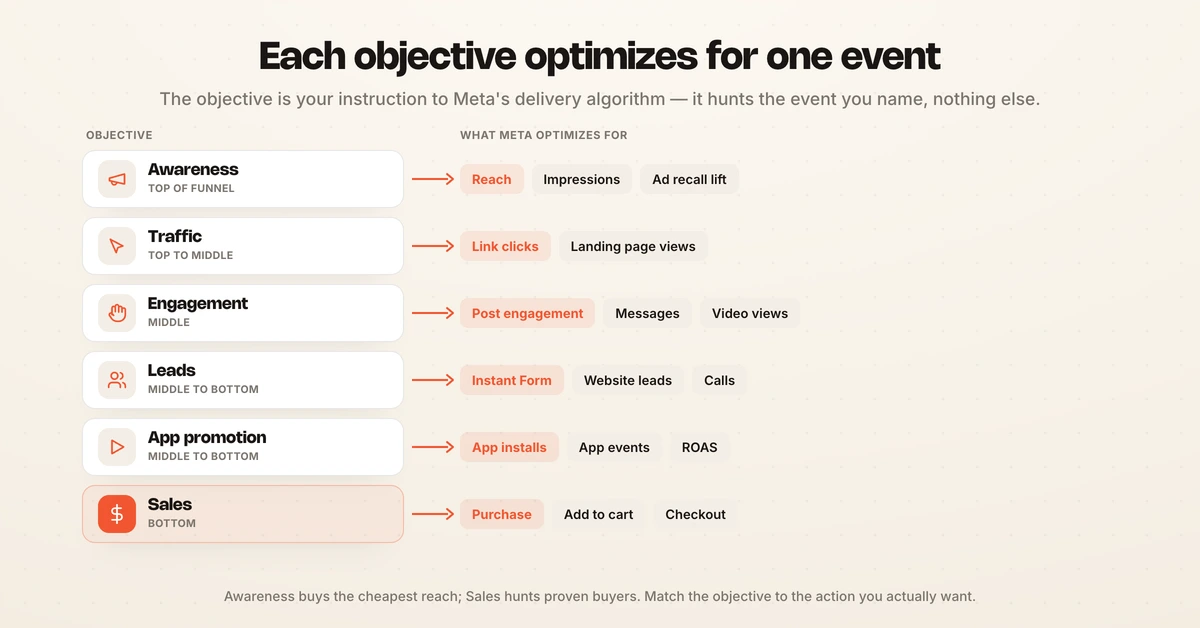
| Objective | Best use case | Optimization events | Funnel stage |
|---|---|---|---|
| Awareness | Introduce a brand or product to a cold audience | Reach, impressions, ad recall lift, video views | Top |
| Traffic | Send people to a website, app, Messenger, or WhatsApp | Link clicks, landing page views | Top to middle |
| Engagement | Drive post interaction, messages, or video views | Post engagement, messaging conversations, video views, on-ad conversions | Middle |
| Leads | Collect contact details or inquiries | Instant Form submissions, website leads, Messenger, calls | Middle to bottom |
| App promotion | Get installs or in-app actions | App installs, app events, value (ROAS) | Middle to bottom |
| Sales | Drive purchases and revenue | Purchase, add to cart, initiate checkout, value | Bottom |
Here is what each one does in plain terms.
Awareness optimizes for the cheapest reach or the highest ad recall lift. Use it when the goal is memory, not clicks, such as a launch where you want the most eyeballs per dollar.
Traffic sends people off Facebook to a destination you choose, optimizing for link clicks or landing page views. It suits blog promotion, content downloads, or warming an audience before a conversion push, though clicks alone do not guarantee action.
Engagement covers a broad set of interactions: post likes and comments, video views, and messaging conversations that start in the ad. It works for building social proof or opening a chat-based sales path.
Leads captures contact information through native Instant Forms, website lead events, Messenger, or phone calls. It is the workhorse for service businesses, B2B, and any funnel where a human follows up after the form.
App promotion is the only objective that drives app installs and in-app events, and it carries a closed mandate, meaning no other objective can install an app. Choose it when the conversion happens inside a mobile app rather than a browser.
Sales optimizes for purchase, add-to-cart, and checkout events tracked by the Meta Pixel and Conversions API. It is the objective for ecommerce and any campaign where the goal is revenue, and it is covered in detail further down.
How the old objectives map to the new ODAX objectives
If you learned Facebook ads before 2022, the old 11-objective menu maps cleanly onto the six ODAX outcomes. Meta grouped the legacy objectives under three funnel banners (Awareness, Consideration, Conversion) and then flattened them, as Jon Loomer documented. Most old objectives simply moved down into the optimization-goal and conversion-location settings inside the ad set.
| Old objective (pre-ODAX) | Current ODAX objective |
|---|---|
| Brand Awareness | Awareness |
| Reach | Awareness |
| Traffic | Traffic |
| Post Engagement, Page Likes, Event Responses | Engagement |
| Video Views | Awareness or Engagement (optimization goal) |
| Messages | Engagement or Leads (messaging location) |
| Lead Generation | Leads |
| App Installs | App promotion |
| Conversions | Sales |
| Catalog Sales | Sales |
| Store Traffic | No direct ODAX replacement |
Two mappings trip people up. Video Views is no longer its own objective, so if video is the format you now pick Awareness or Engagement and set video views as the optimization goal. Store Traffic was left out of ODAX and sunset for new campaign creation, so there is no one-to-one replacement for offline store visits at the objective level.
Facebook awareness vs conversion: reading the funnel
The clearest way to choose an objective is to place it on the funnel, and the split between Facebook awareness and conversion objectives is where most of the confusion lives. Awareness and Traffic sit at the top, where the audience is cold and the job is exposure. Sales and Leads sit at the bottom, where the audience is warm and the job is action.
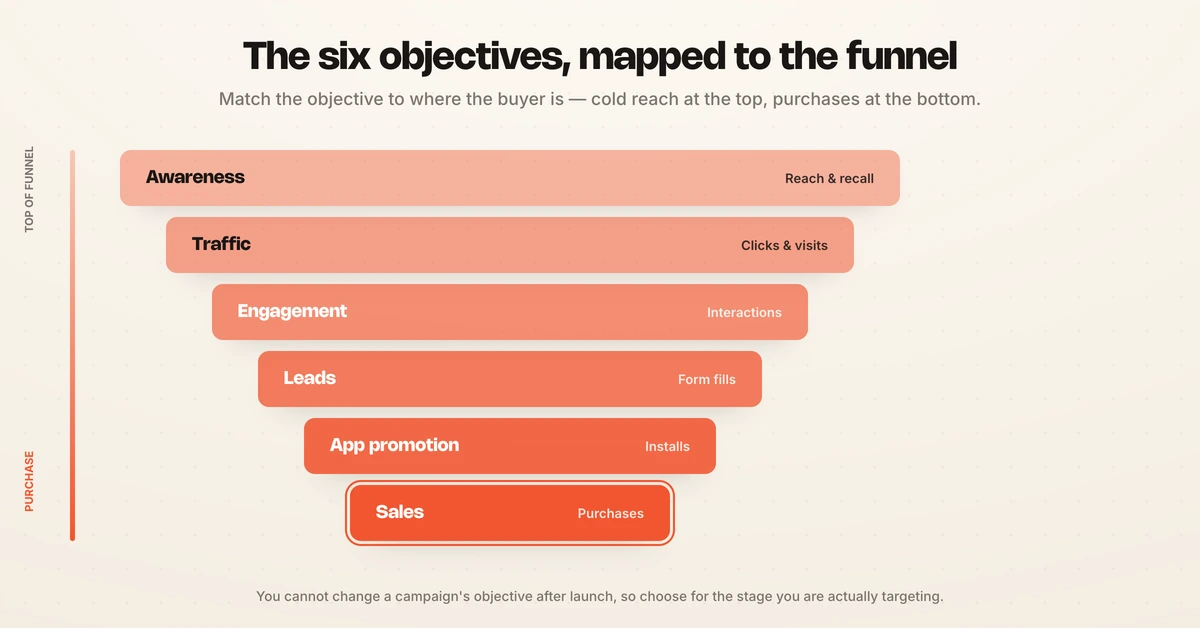
Awareness objectives optimize for a soft signal like reach or recall, so they buy attention cheaply but rarely produce immediate revenue. Conversion-style objectives (Sales and Leads) optimize for a hard signal like a purchase or a form fill, so they cost more per result but tie directly to pipeline.
A practical funnel reads like this: Awareness to build reach, Traffic or Engagement to warm interest, then Leads or Sales to capture the outcome. Retargeting the people who engaged at the top with a bottom-funnel objective is usually where the efficient conversions come from. For a deeper look at how this plays out against real numbers, Hawky's guide to Facebook ads benchmarks sets expectations by stage.
Which Facebook ad objective should you choose?
The right Facebook ad objective is the one that matches the exact action you want and the temperature of your audience. Start from the outcome, not the format, then work backward to the objective that optimizes for it.
Use this quick decision guide:
- You want purchases or revenue: choose Sales. It optimizes for the checkout event and is the default for ecommerce.
- You want form fills, calls, or demo requests: choose Leads. Instant Forms keep the user on-platform and cut friction.
- You want app installs or in-app actions: choose App promotion. No other objective can do it.
- You want clicks to a page or article: choose Traffic, but treat clicks as a means, not the end.
- You want comments, shares, video views, or DMs: choose Engagement to build a warm, retargetable audience.
- You want maximum reach for a launch: choose Awareness to buy attention at the lowest cost.
Two guardrails keep this simple. Run one objective per campaign so your data stays clean and comparable. And match the objective to the conversion event you can actually measure, because optimizing for a signal you do not track leaves the algorithm guessing. Hawky's glossary defines the underlying metrics if any term here is unfamiliar, and the how to run Facebook ads guide walks through the full setup.
What is the Facebook conversion (Sales) objective?
The Facebook conversion objective, now called Sales, optimizes your budget to find people most likely to complete a purchase or another high-value action on your site or app. It replaced the old Conversions and Catalog Sales objectives when ODAX consolidated the menu, and it is the objective ecommerce brands reach for by default.
Sales works by learning from a tracked conversion event. You install the Meta Pixel and the Conversions API (CAPI) so Meta can see purchases, add-to-carts, and checkouts, then the delivery system optimizes toward whichever of those events you set. Without accurate event tracking, the objective cannot optimize, which is why a broken Pixel quietly wrecks Sales performance.
A Facebook conversion campaign performs best on a warm or intent-rich audience, such as site visitors, cart abandoners, or lookalikes of past buyers. Sending a Sales objective at a cold audience can work with a compelling offer, but it usually costs more per purchase than warming first. Retargeting is where the Sales objective tends to earn its highest ROAS.
Meta has folded most of its automation into this objective. Advantage+ shopping now runs as the default toggle inside a Sales campaign rather than a separate campaign type, and Meta's end-to-end AI ad tools have passed a $60 billion annual revenue run rate, per Meta's FY2025 results. That automation optimizes delivery inside the objective you chose, but it does not choose the objective, set the guardrails, or decide when to scale.
How Facebook ad objectives work in practice
In practice, objective selection is a sequence that shifts as an audience warms, not a one-time decision. A D2C brand spending $50k a month on Meta runs Awareness and Engagement to fill the top of the funnel, Traffic to move readers to content, and Sales plus Leads to convert the warm pool.
The cost is that each objective needs its own campaigns, creative, and read on the data, and the objective that wins this week may not win next week. That means monitoring, testing, and reallocation across dozens of ad sets, every day, which is usually where budget leaks, creative fatigue, and delayed reactions creep in. For the mechanics of tightening delivery, see Hawky's guide to Facebook ads optimization.
This is the job Hawky's Performance Agent is built to run. It is an always-on operator that plans, launches, and optimizes Meta campaigns against your KPI (ROAS, CAC, or contribution margin), then shifts budget between objectives as audiences warm. Every move is logged with the trigger data and a confidence score, and every move is one-click reversible.
The autonomy is configurable rather than absolute, which is the point. You pick the gate, from shadow mode to approval-gated to fully autonomous, with the same audit trail throughout. Guardrails and spend caps keep humans in command while the agent handles the repetitive testing, and the Command Center keeps every account and objective in one view.
How to get started with Facebook ad objectives
Getting started is less about memorizing all six objectives and more about matching one to a measurable goal. These steps keep the first campaign clean.
- Define the outcome first. Name the exact action (purchase, lead, install, reach) before you open Ads Manager, then pick the objective that optimizes for it.
- Confirm your tracking. For Sales and website Leads, verify the Meta Pixel and Conversions API fire correctly, because the objective optimizes only for events it can see.
- Match audience temperature. Point conversion objectives at warm audiences and awareness objectives at cold ones, and plan a warming path between them.
- Run one objective per campaign. Keep the data comparable so you can read cost per result without noise.
- Budget by funnel stage. Weight spend toward the objectives that map to your primary KPI, and watch Facebook ads cost signals as you scale.
From there, creative quality does the heavy lifting inside whichever objective you chose. The Facebook ad creative best practices guide covers what to feed each stage, and Hawky's pricing page ties cost to results rather than seats.
Facebook ad objectives examples
A few concrete scenarios make the choice obvious.
- A skincare D2C brand launching a serum runs Awareness to seed the launch, then retargets viewers with a Sales objective optimized for purchase. The split keeps top-funnel cost low and conversion cost efficient.
- A B2B software company runs a Leads objective with Instant Forms to book demos, then follows up in its CRM. It skips Sales because the actual sale closes off-platform.
- A mobile fitness app runs App promotion for installs, then a second App promotion campaign optimized for the in-app subscription event once install volume is stable.
Each example starts from the outcome and lands on the objective that optimizes for it. For the wider context on how Meta's system keeps shifting, see Hawky's Meta Ads updates 2026 roundup.
Frequently asked questions
What are the Facebook ad objectives? Facebook ad objectives are the six campaign goals in Meta's ODAX framework: Awareness, Traffic, Engagement, Leads, App promotion, and Sales. Each one optimizes your budget toward a specific action, and you select one at the campaign level when you build the campaign in Ads Manager.
Which Facebook campaign objective should I choose? Choose the objective that matches the exact action you want and your audience temperature. Pick Sales for purchases, Leads for form fills or calls, App promotion for installs, Traffic for clicks, Engagement for interactions, and Awareness for reach. Run one objective per campaign so the data stays clean.
What is the conversions objective? The conversions objective, now called Sales in ODAX, optimizes delivery to find people most likely to complete a purchase or another tracked high-value action. It requires the Meta Pixel and Conversions API to measure events and performs best on warm or intent-rich audiences such as cart abandoners and lookalikes of past buyers.
How many Facebook ad objectives are there? There are six Facebook ad objectives under the current ODAX framework. Meta consolidated the previous 11 objectives into these six in 2022, moving the finer distinctions down into optimization goals and conversion locations inside the ad set.
Can you change a Facebook campaign objective after it launches? No. The objective is locked at campaign creation, so switching outcomes means building a new campaign. Plan the objective before you launch, since it trains the delivery algorithm from the first impression.
If choosing objectives, wiring conversion tracking, and reallocating budget across the funnel by hand is slowing your team down, Hawky's Performance Agent is built for that job.
Ready to hire your first AI performance team? Book Demo