Google Ads Campaign Types Explained (2026 Guide)
Google Ads campaign types are the seven buying structures you choose between when you launch a campaign, namely Search, Performance Max, Shopping, Display, Demand Gen, Video, and App, and each one places your ads on different Google surfaces and optimizes toward a specific goal.
Picking the right type is the first strategic decision in any account, because it decides where your ads appear, which auction they compete in, and how much control you keep over targeting and bids. Choose wrong and you pay for reach that never converts. Choose right and every dollar lands in front of the audience most likely to act.
This guide breaks down each Google Ads campaign type, what it is best for, and how to decide which one to use, updated for how the platform works in 2026.
What are the different types of Google Ads campaigns?
The different types of Google Ads campaigns are Search, Performance Max, Shopping, Display, Demand Gen, Video, and App, as listed in Google Ads Help. Each type maps to a goal and a set of placements, so the type you pick is really a choice about where your budget goes and what Google's automation is told to optimize.
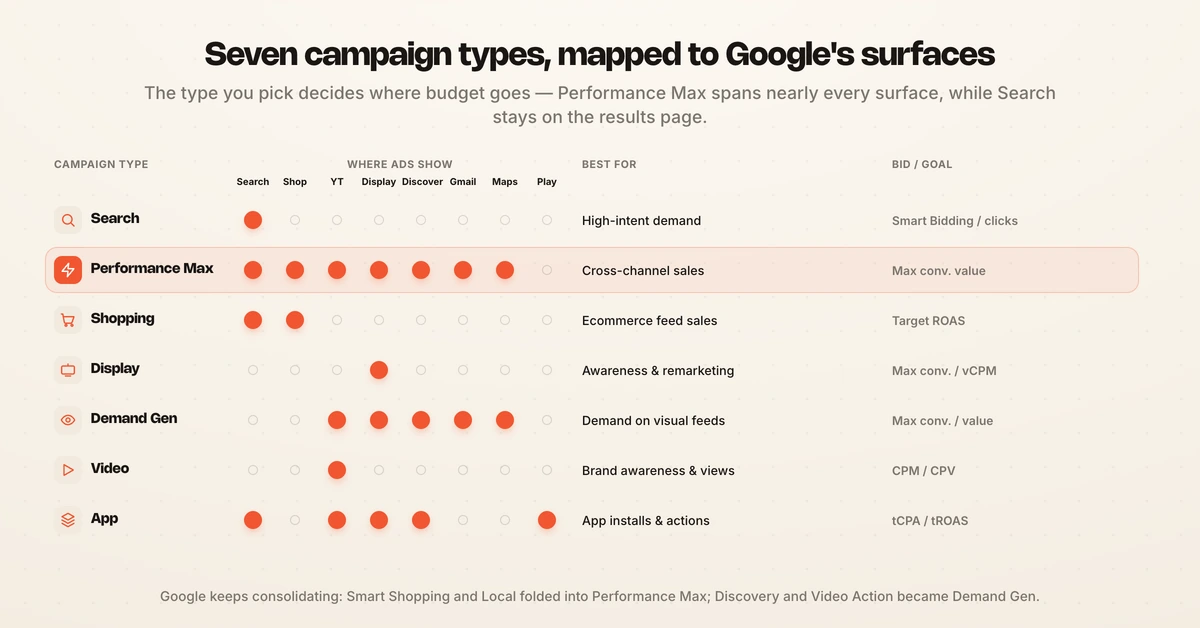
Google has consolidated its lineup heavily over the past two years, which is why older guides feel out of date. Smart Shopping and Local campaigns were folded into Performance Max, Discovery campaigns became Demand Gen, and Video Action Campaigns were absorbed into Demand Gen in July 2025 (Google Ads Help). Standalone Display is next in line, with Google letting advertisers migrate Display campaigns into Demand Gen from June 2026 and moving the rest automatically afterward (Google Ads Help).
Here is how the seven current types compare at a glance.
| Campaign type | Where ads show | Best for | Default bidding or goal |
|---|---|---|---|
| Search | Search results and Search partners | Capturing high-intent demand | Smart Bidding for conversions, or max clicks for traffic |
| Performance Max | Every Google surface (Search, Shopping, YouTube, Display, Discover, Gmail, Maps) | Cross-channel conversions and online sales | Smart Bidding: Max conversions or conversion value |
| Shopping | Search results and the Shopping tab | Ecommerce product sales from a Merchant Center feed | Target ROAS or Max conversion value |
| Display | Google Display Network sites and apps | Awareness and remarketing at low cost | Max conversions or viewable CPM |
| Demand Gen | YouTube (incl. Shorts), Discover, Gmail, Maps, Display | Creating demand on visual surfaces | Max conversions, clicks, or value |
| Video | YouTube and video partners | Brand awareness, reach, and video views | Target CPM, CPV, or Max conversions |
| App | Search, Play, YouTube, Discover, Display | Mobile app installs and in-app actions | Automated target CPA or target ROAS |
Why Google Ads campaign types matter for performance marketers
Your Google Ads campaign type sets the ceiling on performance before you write a single headline. A Search campaign puts you in front of someone who already typed your product into the box, while a Display campaign interrupts someone reading an article, and those two people convert at very different rates.
The gap is not small. WordStream's 2026 benchmark study of 13,474 US search campaigns found an average search click-through rate of 6.64%, an average cost per click of $5.42, and an average conversion rate of 8.18% (WordStream). Display click-through rates typically sit below 1% because the intent is not there yet, so blending the two into one budget without a plan quietly drains spend.
Campaign type also decides how much control you hand to Google's automation. Search keeps keywords and bids in your hands, while Performance Max runs almost entirely on its own model. Knowing that tradeoff is the difference between scaling deliberately and losing visibility into where the money went. For the numbers behind each channel, see Hawky's guide to Google Ads benchmarks.
The 7 Google Ads campaign types explained
Each Google Ads campaign type serves a distinct job in the funnel. Here is what each one does, where it shows, and when to reach for it.
1. Search campaigns
Search campaigns show text ads on the Google results page when someone searches a keyword you bid on. They capture existing demand, which makes them the highest-intent and most measurable place to start for most businesses. You keep direct control over keywords, match types, and negative keywords, so Search is the type new accounts usually launch first. Pair it with the right bid strategy from Hawky's guide to Google Ads bidding strategies.
2. Performance Max campaigns
Performance Max is Google's AI-driven, goal-based type that serves across every Google surface from a single campaign. You feed it assets, audience signals, and a conversion goal, and its model decides placements and bids. It works best on accounts with conversion history to learn from, which is why brand-new accounts often start elsewhere. The dedicated section below covers how it works in detail.
3. Shopping campaigns
Shopping campaigns show product listings with an image, price, and store name in the search results and the Shopping tab. They pull from a Google Merchant Center product feed rather than keywords, so feed quality drives results more than ad copy. For ecommerce catalogs, Shopping is often the single highest-return campaign type.
4. Display campaigns
Display campaigns place image and responsive banner ads across the Google Display Network of millions of sites and apps. They are built for awareness and remarketing, reaching people cheaply while they browse rather than while they search. Note that Display is being migrated into Demand Gen through 2026, so treat new Display builds as a short-term structure.
5. Demand Gen campaigns
Demand Gen campaigns run visual video and image ads across YouTube (including Shorts), Discover, Gmail, Maps, and the Display Network (Google Ads Help). They are designed to create demand on entertainment-led surfaces, reaching people before they search. Demand Gen is now the home for what used to be Discovery and Video Action Campaigns.
6. Video campaigns
Video campaigns run ads on YouTube and video partner sites, with subtypes for reach, views, ad sequences, and driving conversions. They are the workhorse for brand awareness and consideration at the top of the funnel. Video pairs well with a lower-funnel Search or Shopping campaign that catches the demand it creates.
7. App campaigns
App campaigns promote a mobile app across Search, Google Play, YouTube, Discover, and Display from one automated setup. You supply assets and a goal (installs or in-app actions) and Google's model handles targeting and bidding. App is fully automated by design, so there is little manual placement control to give away.
Search vs Display campaigns: what is the difference?
The core difference between Search and Display campaigns is intent: Search reaches people actively looking for what you sell, while Display reaches people who are browsing something else. That single distinction changes format, funnel position, cost, and expected conversion rate.
- Intent: Search is pull marketing (the user comes to you). Display is push marketing (you interrupt the user).
- Format: Search runs text ads. Display runs image and responsive banner ads.
- Funnel stage: Search sits at the bottom of the funnel. Display sits at the top and in remarketing.
- Cost and CTR: Search carries a higher cost per click but far higher click-through and conversion rates. Display is cheap per impression but converts at a fraction of Search.
- Best use: Use Search to harvest demand. Use Display to build awareness and re-engage past visitors.
Most healthy accounts run both, using Display to fill the funnel and Search to close it. Confusing the two, or judging a Display campaign against Search conversion rates, is one of the most common ways budgets get misread.
What is a Performance Max campaign?
A Performance Max campaign is Google's AI-driven campaign type that serves ads across all Google inventory (Search, Shopping, YouTube, Display, Discover, Gmail, and Maps) from a single setup, optimized by Smart Bidding toward a conversion goal (Google Ads Help). Instead of building one campaign per channel, you provide an asset group, audience signals, and a target, and the model assembles and places ads for you.
The tradeoff is control. Performance Max hands placement, bidding, and much of targeting to Google's automation, so you gain reach and lose granular levers. Google has added asset-level ratings, channel reporting per asset group, and search-term visibility to narrow that transparency gap, but Performance Max still asks for more trust than Search.
Performance Max also learns from history, so it performs best on accounts that already have conversion data to feed the model. For a brand-new account, a Search campaign usually earns the first conversions that a later Performance Max campaign can learn from. When you do build one, the creative requirements matter, so review Hawky's Performance Max creative specs guide before you launch.
Which Google Ads campaign type should you use?
The best Google Ads campaign type is the one that matches your goal, your funnel stage, and how much data your account already has. There is no single winner, because a demand-harvesting Search campaign and an awareness-building Video campaign are solving different problems. Map the type to the job instead of chasing whichever type is newest.
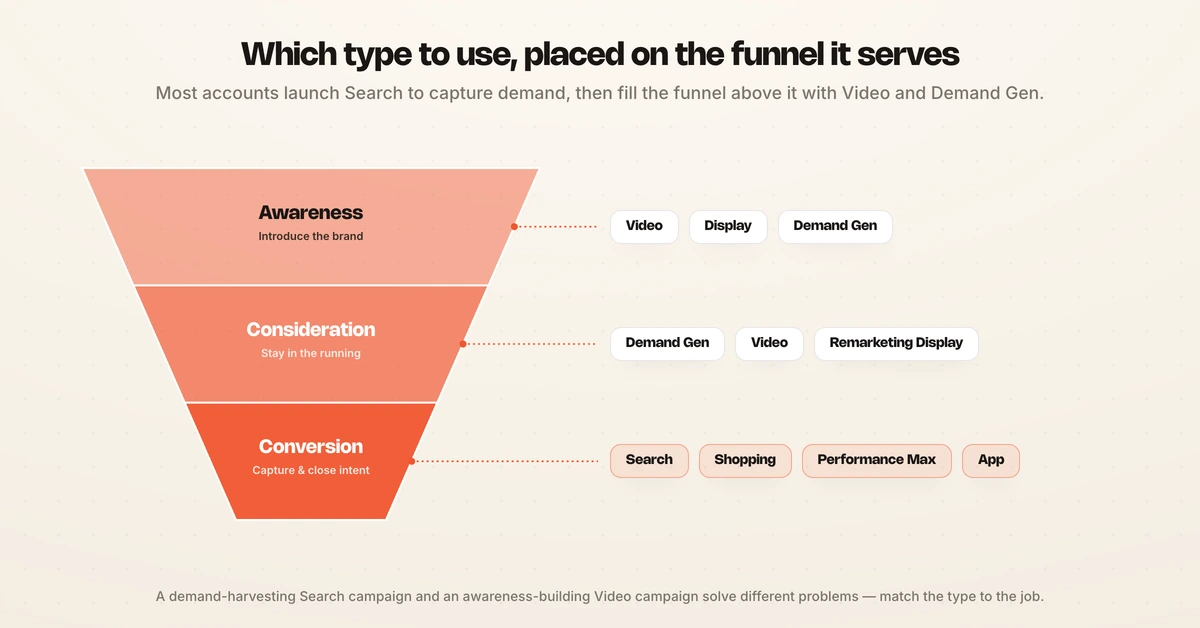
A simple way to decide is to place each type on the funnel it serves.
- Awareness (top of funnel): Video, Display, and Demand Gen introduce your brand to people who are not searching yet.
- Consideration (middle of funnel): Demand Gen, Video, and remarketing Display keep you in front of people weighing options.
- Conversion (bottom of funnel): Search, Shopping, Performance Max, and App capture and close intent.
For a starting point, most businesses launch a Search campaign to capture existing demand, add Shopping if they sell products, then expand into Performance Max once there is conversion history for the model to learn from. Awareness types like Video and Demand Gen come in when there is budget to fill the funnel above search demand. For a full setup walkthrough, see Hawky's guide on how to run Google Ads, and check what changed this year in the Google Ads updates for 2026.
Budget matters too, because campaign type drives cost as much as competition does. If you are pricing a plan, Hawky's breakdown of Google Ads cost shows how CPCs differ across types. New terms along the way are defined in the Hawky glossary.
How campaign types fit an autonomous, KPI-locked workflow
Choosing a campaign type is only the first move, because the real work is testing, watching, and reallocating budget across types as results come in. That ongoing job is where most teams lose hours and where automation earns its place, provided the automation stays accountable to a human.
Hawky's Performance Agent runs that loop as an autonomous operator with guardrails, so it plans, launches, and optimizes across Search, Performance Max, Shopping, and the rest against your KPI, 24/7. Every move it makes is logged with the trigger data and a confidence score, and every change is one-click reversible, so autonomy never means losing the audit trail. Spend caps and shadow mode keep humans in command while the labor moves to the agent.
The point is not to replace the decision you just learned to make. It is to hold that decision to a KPI and act on the data faster than a manual review cycle allows, which you can watch from a single Command Center. For the wider view of what automation now handles inside an account, see Hawky's guide to Google Ads automation.
Before building any of these, the free Google ad mockup generator renders each format in its real placement so the copy can be reviewed and signed off without creating a campaign.
Frequently asked questions
What are the different types of Google Ads campaigns?
The seven Google Ads campaign types in 2026 are Search, Performance Max, Shopping, Display, Demand Gen, Video, and App. Each serves ads on different Google surfaces and optimizes toward a specific goal, from high-intent Search to awareness-focused Video. Older types like Discovery, Smart Shopping, Local, and Video Action Campaigns have been folded into Demand Gen and Performance Max.
What is a Performance Max campaign?
A Performance Max campaign is Google's AI-driven campaign type that runs ads across all Google inventory (Search, Shopping, YouTube, Display, Discover, Gmail, and Maps) from one setup, using Smart Bidding to hit a conversion goal. You supply assets, audience signals, and a target, and Google's model handles placement and bidding. It performs best on accounts that already have conversion history to learn from.
Which Google Ads campaign type is best?
No single campaign type is best, because each fits a different goal and funnel stage. Search is best for capturing high-intent demand, Shopping for ecommerce sales, Performance Max for cross-channel conversions on data-rich accounts, and Video or Demand Gen for building awareness. The best choice matches your objective, funnel position, and how much conversion data your account has.
Should beginners start with Search or Performance Max?
Beginners should usually start with a Search campaign. Search gives the most control over keywords and targeting, reaches people with clear purchase intent, and produces the fast, measurable conversions a new account needs. Performance Max relies on conversion history to optimize, so it tends to work better once a Search campaign has generated that data.
What is the difference between Search and Display campaigns?
The difference is intent and format. Search campaigns show text ads to people actively searching for a keyword, sitting at the bottom of the funnel with high conversion rates. Display campaigns show image ads to people browsing sites and apps, sitting at the top of the funnel for awareness and remarketing at a lower cost per impression.
If choosing and then continuously rebalancing your Google Ads campaign types against a hard KPI is eating your team's week, Hawky's Performance Agent is built for that job.
Ready to hire your first AI performance team? Book Demo