Introducing Hawky's AdOps Agent: Less Ads Manager, More Marketing
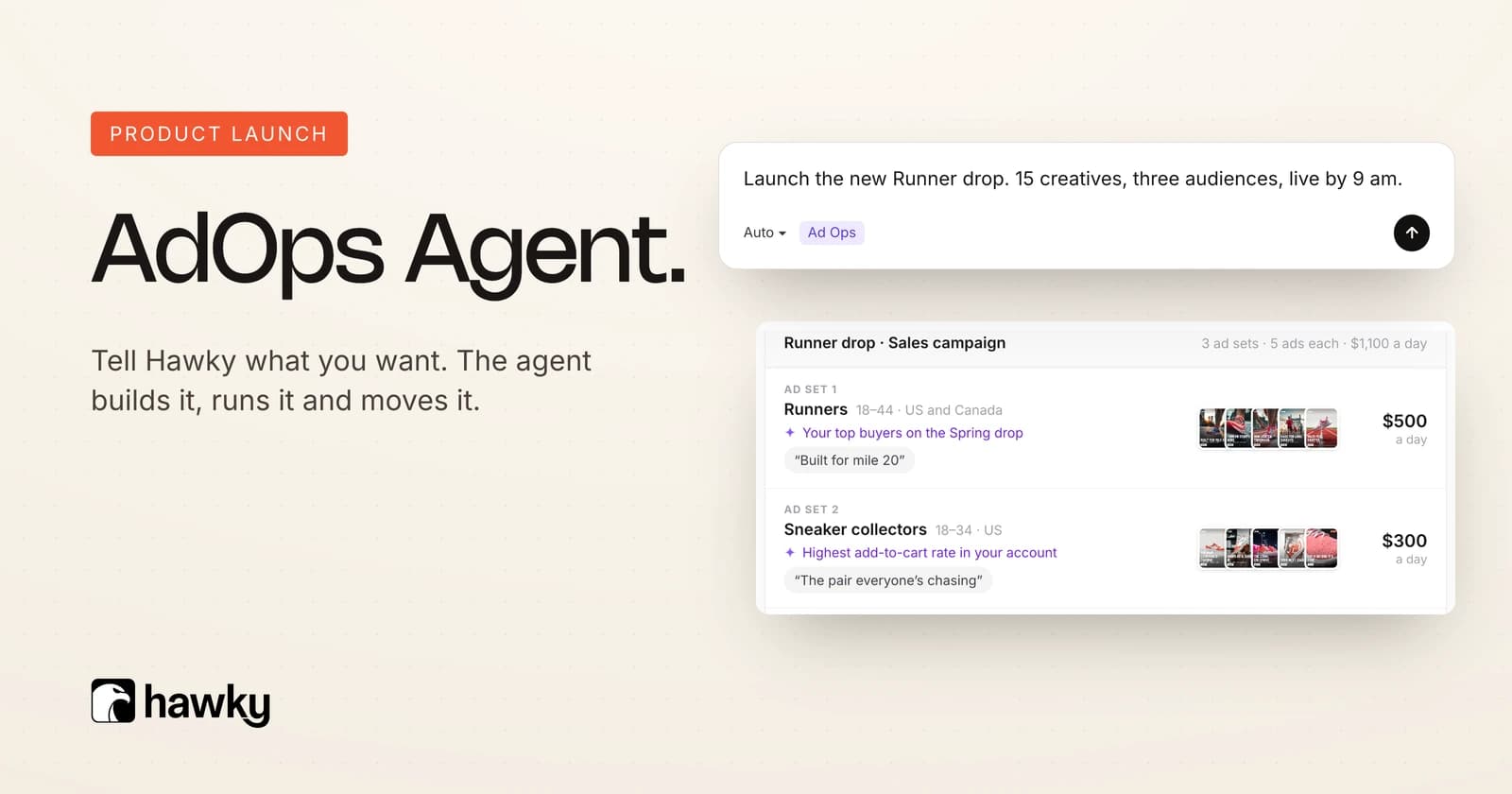
Hawky's AdOps Agent is available now. It takes over the routine ops of running Meta and Google ads, from bulk launching hundreds of ads to graduating winners and moving whole campaigns between ad accounts. Less Ads Manager. More marketing.
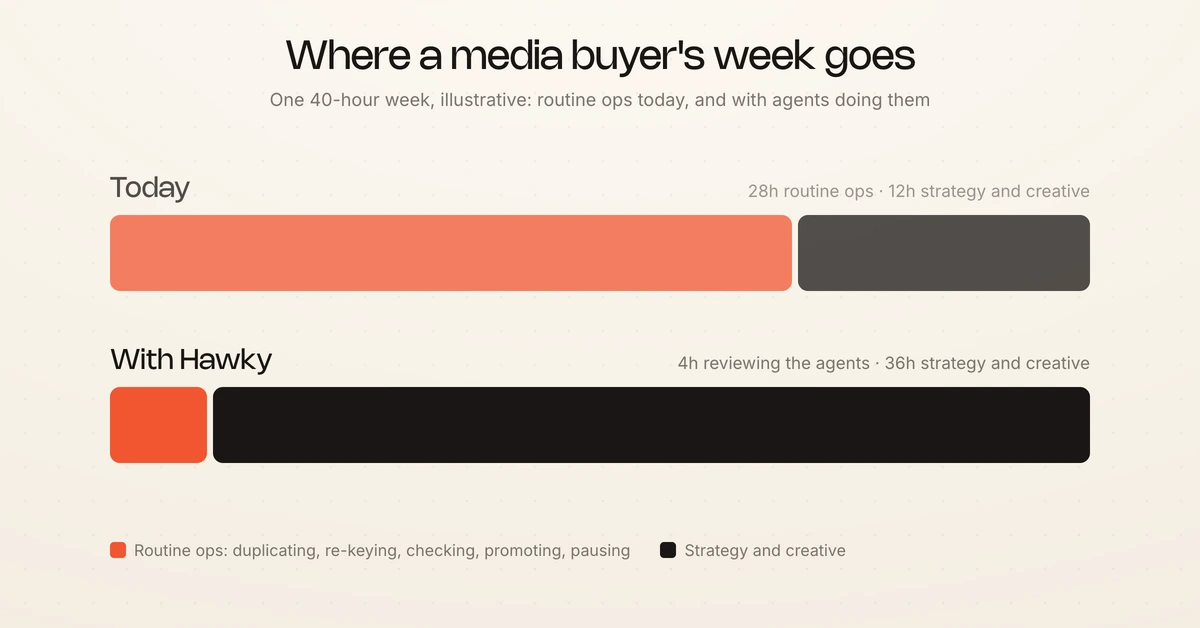
About 70% of a media buyer's week goes to routine ops. Duplicating ad sets, re-keying URLs, checking every ad against the numbers, rebuilding winners in the scaling campaign, pausing what lost. None of it is the reason anyone hired a media buyer.
The AdOps Agent takes those jobs. It works inside the guardrails you set, through official platform APIs, with every move logged and reversible. Hawky has launched over 100,000 ads with its beta customers so far.
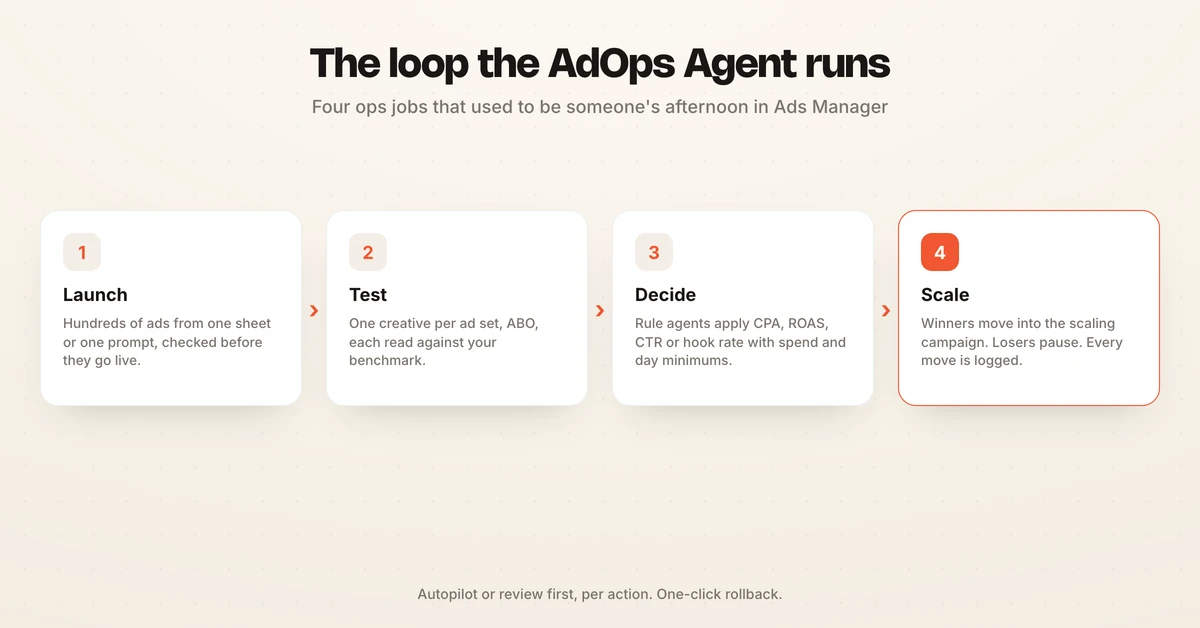
The launch is organised the way the work actually runs: Launch, Run and Move. Each section below covers what shipped, how it works and what stays in your hands.
What is Hawky's AdOps Agent?
Hawky's AdOps Agent is the agent that launches, runs and moves paid campaigns on Meta and Google, so your team stops doing ops by hand. Launch gets ads live in bulk from a sheet or a prompt. Run tests every ad against your benchmark and promotes the winners.
Move rebuilds a whole campaign in another ad account. The AdOps Agent launched as Hawky Campaign Management, and it works alongside the Performance Agent, the agent that operates paid media against your KPI. The full tour is on the AdOps Agent page.
| Stage | The ops job it removes | What Hawky does | What you keep |
|---|---|---|---|
| Launch | Building and duplicating ads one by one | Ad Launcher launches a sheet in one pass, Copilot builds a campaign from a prompt, and the account is checked before go-live | The creative, the offer and the final approval |
| Run | Checking every ad, promoting winners, pausing losers | Rule agents read each ad against your benchmark, then move it to scaling or pause it | The benchmark, the autonomy level and the budget caps |
| Move | Rebuilding a campaign by hand in a new account | Copies the campaign, its ad sets and its ads into another ad account | What each page, pixel and audience maps to |
If you are weighing Hawky against the wider category, the media buying tools roundup compares the options.
Why routine ops is the job worth taking away
Routine ops is the work a campaign needs in order to run, but it never decides whether the campaign wins. It scales with creative volume. Every new batch of ads brings more duplicating, more checking and more promoting with it.
Hawky's own sales and customer calls between November 2025 and September 2026 point the same way. The launch pain buyers describe is rarely the creative upload itself. The real drag is creating hundreds of near-identical ad sets, copying one reference setup across them, and keeping names and UTMs consistent so the reporting still works afterwards.
A July 2026 thread on r/advanced_ppc put the frustration plainly: most tools "give too many suggestions I still have to apply manually" (Reddit). The AdOps Agent is built to apply them, with your approval wherever you want it.
Launch: hundreds of ads live without opening Ads Manager
Launching in Hawky means building, checking and publishing ads in bulk from one place. Five capabilities ship in this part of the release, and each one removes a step your team currently does by hand.
Bulk launch from a sheet with Ad Launcher
Ad Launcher turns a CSV or a Google Sheet into live ads. Each row is an ad, each column maps to a field the ad needs, and a batch of hundreds launches in one pass. It works across Meta and Google and across the ad accounts you manage.
| Sheet column | Field it fills | Example value |
|---|---|---|
| ad_set | Ad set name | broad_sales_18-44_01-lifestyle |
| creative | Image or video for the ad | 01_static_lifestyle-track_v1 |
| primary_text | Primary text | The track jacket, reworked for every day |
| headline | Headline | Street-ready from the first wear |
| destination_url | Destination URL | Your product page |
| budget | Ad set daily budget | Your test budget per ad set |
| url_parameters | URL parameters (UTMs) | utm_campaign=in_sales_cold_abo_202610&utm_content=01_static_lifestyle-track_v1 |
Creative testing in Ad Launcher follows the ABO structure most high-volume testers already run: one creative per ad set, one ad per ad set, budget set at the ad set level. Each creative gets its own budget and its own read, so a strong ad never hides behind a weak one. Names follow your existing campaign structure, for example the campaign in_sales_cold_abo_202610, the ad set broad_sales_18-44_01-lifestyle and the ad 01_static_lifestyle-track_v1.
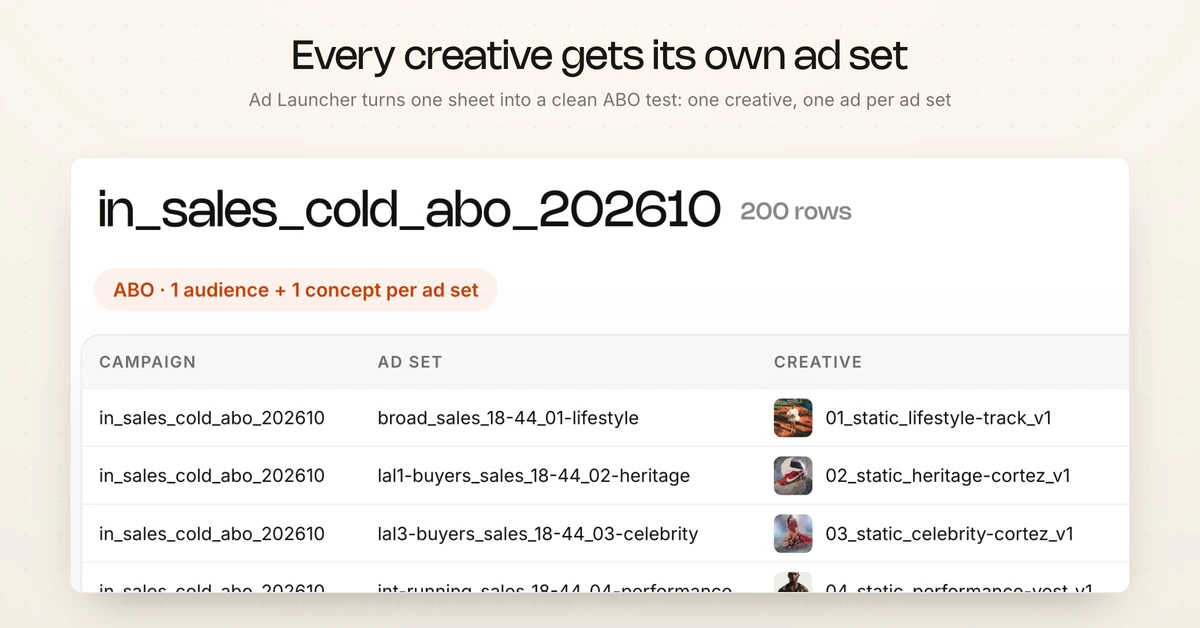
For the testing method behind that structure, the guide to ad creative testing covers sample sizes and read windows.
Build a whole campaign from a prompt in Copilot
Copilot builds a full campaign from one sentence. You type the brief the way you would say it to a colleague:
Launch the new Runner drop. 15 creatives, three audiences, live by 9 am.
Copilot reads the account's last 90 days and proposes the structure: one sales campaign with three ad sets, each matched to the creatives that suit its audience. It rewrites the headline and primary text for each audience. The result lands in Hawky as a draft, so you review and edit any ad set or line of copy before anything goes live.
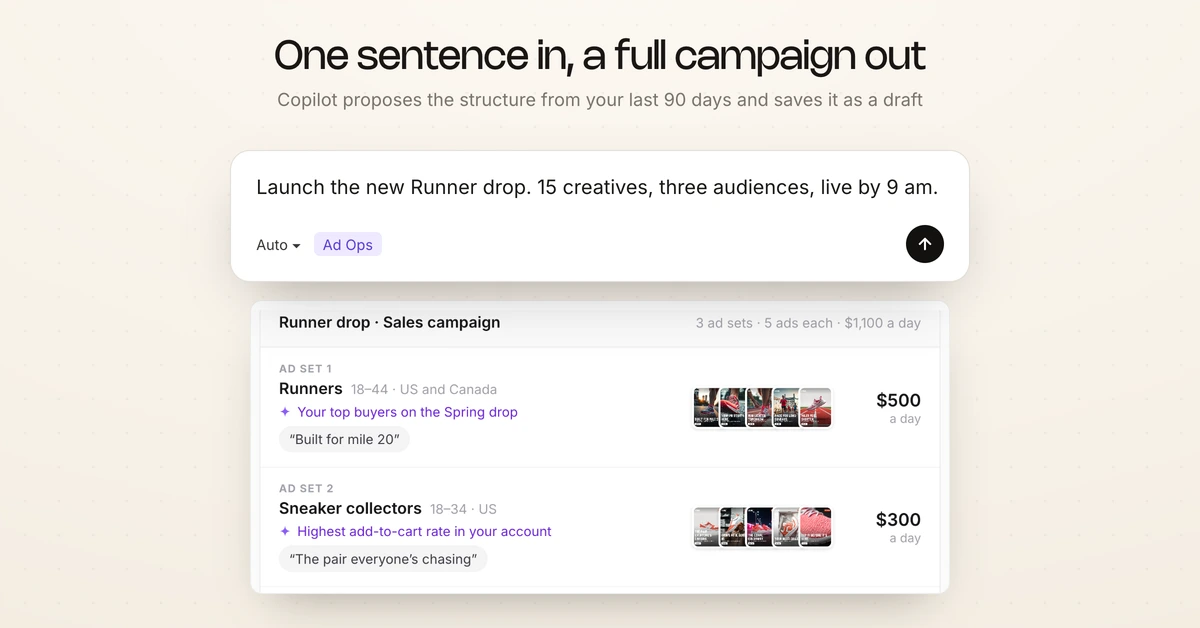
Launch from Hawky instead of Ads Manager
Publishing happens from Hawky. The batch goes into existing or new campaigns and ad sets you pick, in any ad account you manage. Your team stops switching between a sheet, a creative folder and Ads Manager tabs to get one batch out.
Check the account before anything goes live
Every launch is checked before it goes live. The Meta Pixel, the purchase event, the UTMs and the naming are all verified at the launch step. The classic error is a UTM pasted from the wrong ad, which quietly credits a week of revenue to the wrong creative. Hawky catches it before the ad spends, not in next Monday's report.
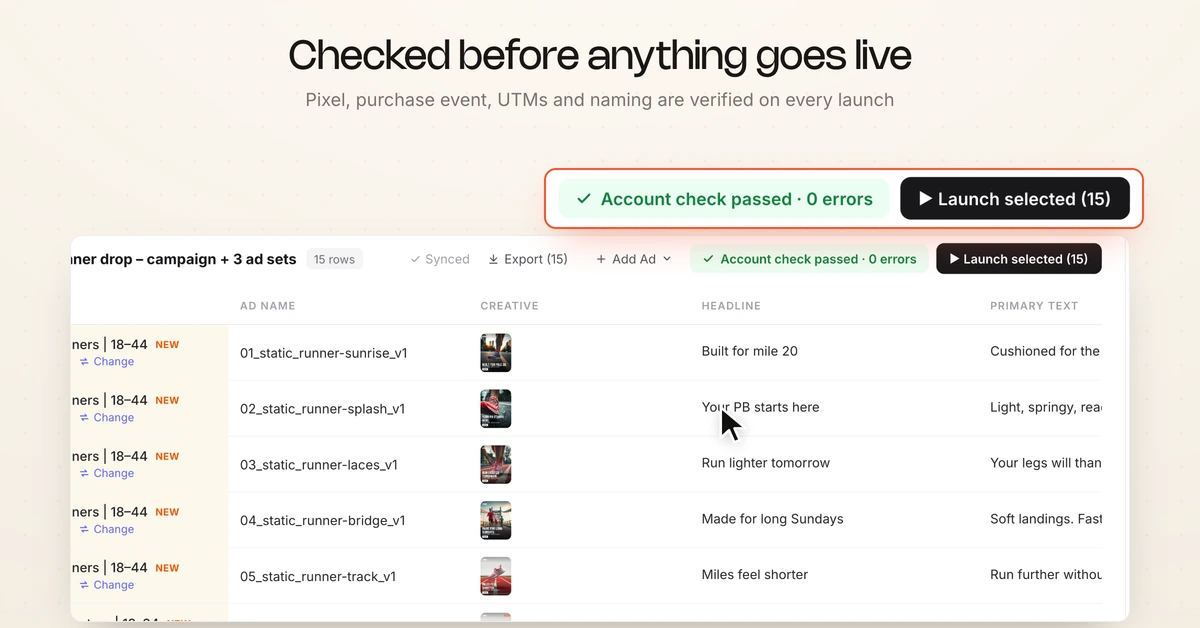
Every placement sized, every empty field filled
Each creative is resized for Feed, Stories and Reels from the master file, with the product kept clear of the Reels caption and button area. When a row is missing a headline, primary text or URL, the agent fills it, writing copy from the patterns in your winning ads and building the URL with your parameters. Hover any filled cell to see why the agent chose it.
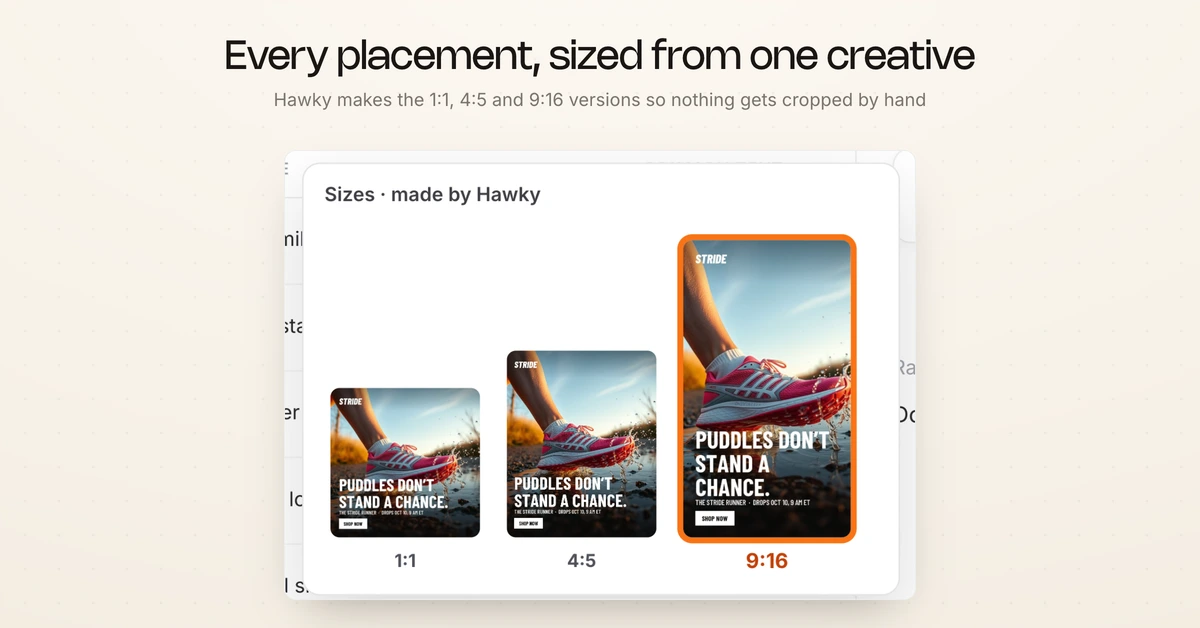
The specs it sizes to are the same ones listed in the Facebook ad sizes guide.
Run: from test to scale without the late-night calls
Running campaigns in Hawky means rule agents read every ad against your benchmark and act on the result, inside the autonomy level you set. The work that used to be a nightly check in Ads Manager becomes a rule you write once.
Graduate winners from test to scale
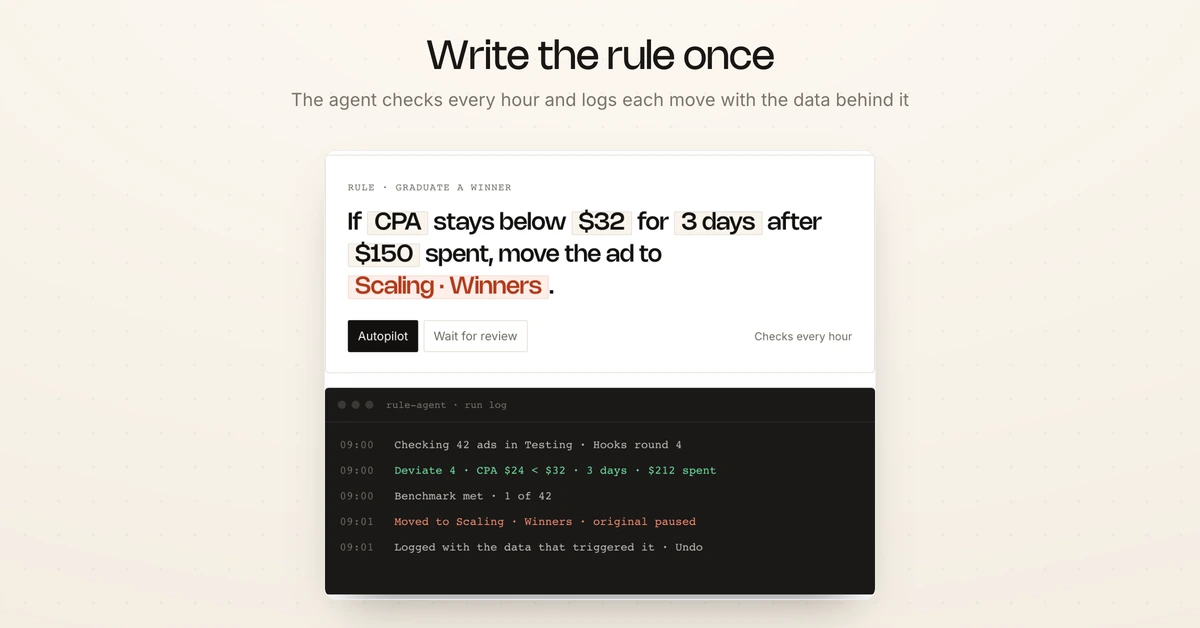
A rule agent calls a winner when an ad clears your benchmark: CPA, ROAS, CTR or hook rate, with a minimum spend and a minimum number of days so one lucky day does not count. The winner moves into the scaling campaign and ad set you chose. Ads that miss the bar are paused inside the testing campaign, so they stop spending. The agent checks every ad on the hour.
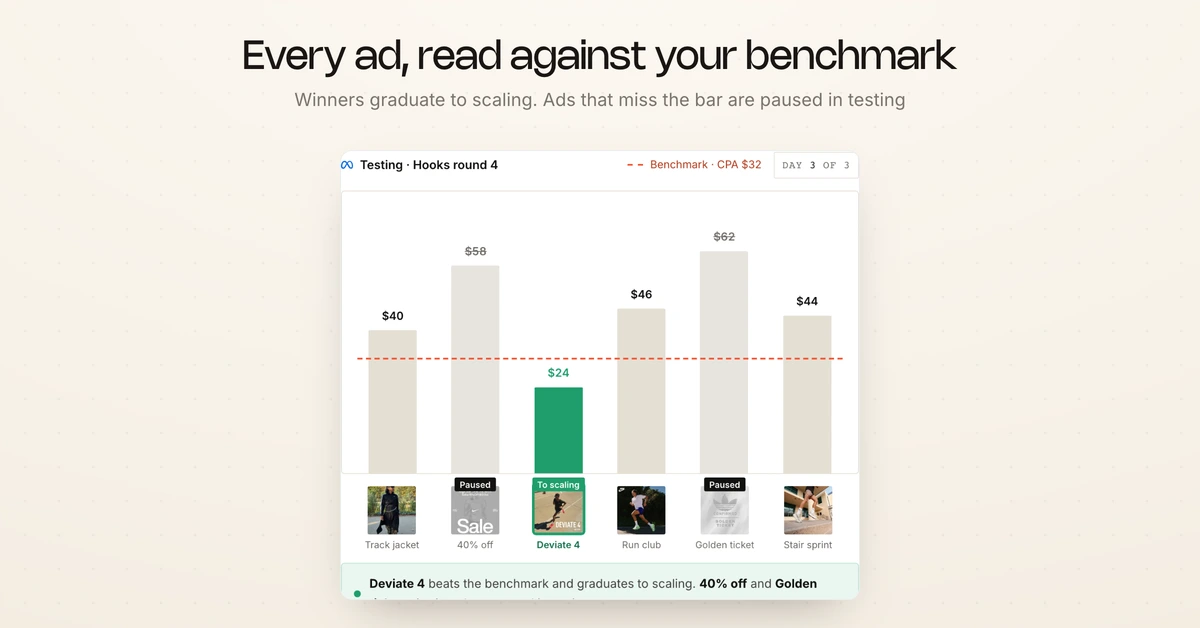
| Rule setting | What you choose | Why it matters |
|---|---|---|
| Benchmark metric | CPA, ROAS, CTR or hook rate | Judges each ad on what the campaign is bought for |
| Minimum spend | A spend floor per ad | Stops a cheap early conversion from looking like a winner |
| Minimum days | A day count per rule | A lucky day never graduates an ad |
| Action on a win | Move or Copy into the scaling ad set | Move pauses the test original, Copy keeps it running |
| Action on a miss | Pause in the testing campaign | Losers stop spending the same hour |
| Autonomy | Act on its own, or wait for review | Big budget jumps can always wait for a person |
Rules that go beyond Facebook automated rules
Rule agents read trends, consecutive days and velocity, not only a single threshold. Conditions combine with AND or OR, and a dry run over your history shows what a rule would have done before it touches a live ad. Meta's own automated rules act on metric thresholds and come with published limits, while rule agents can also move an ad between campaigns instead of only pausing it or changing its budget.
The wider picture of rules, scripts and agents on Meta is in the guide to Facebook ads automation.
Move or copy a single ad between campaigns
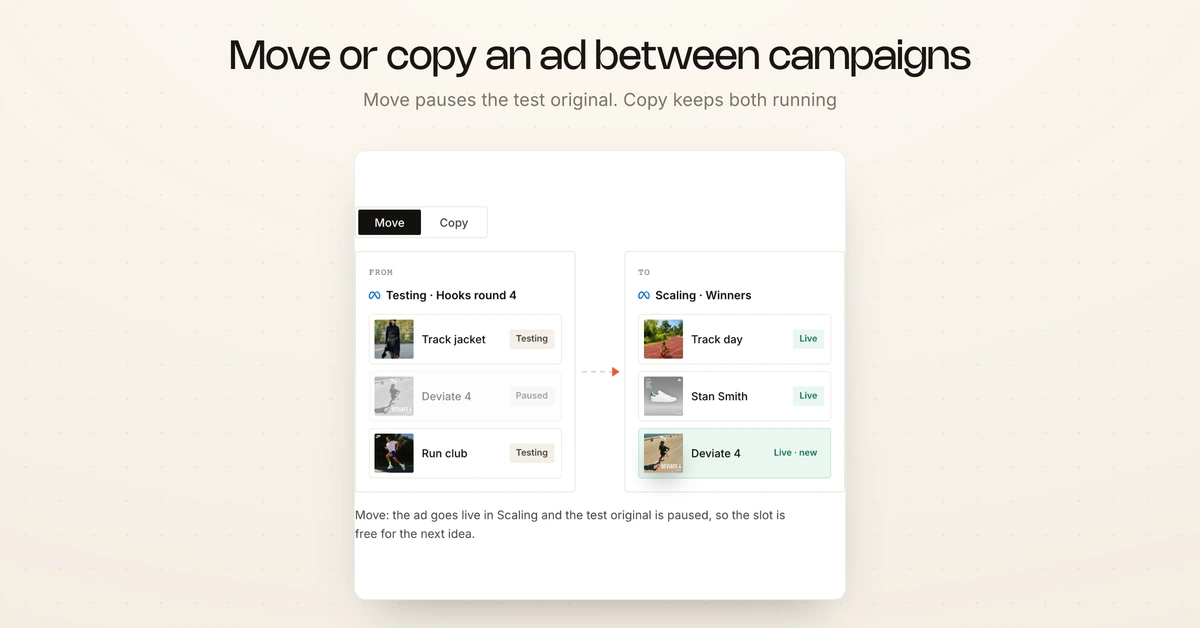
Meta has no native way to move an ad from one campaign or ad set to another. Hawky places the ad in the target campaign and ad set, then either pauses the original (Move) or leaves it running (Copy). You pick the behaviour per move or per rule, and the proven ad can go into any ad set in any account you manage.
Approval, autonomy and rollback
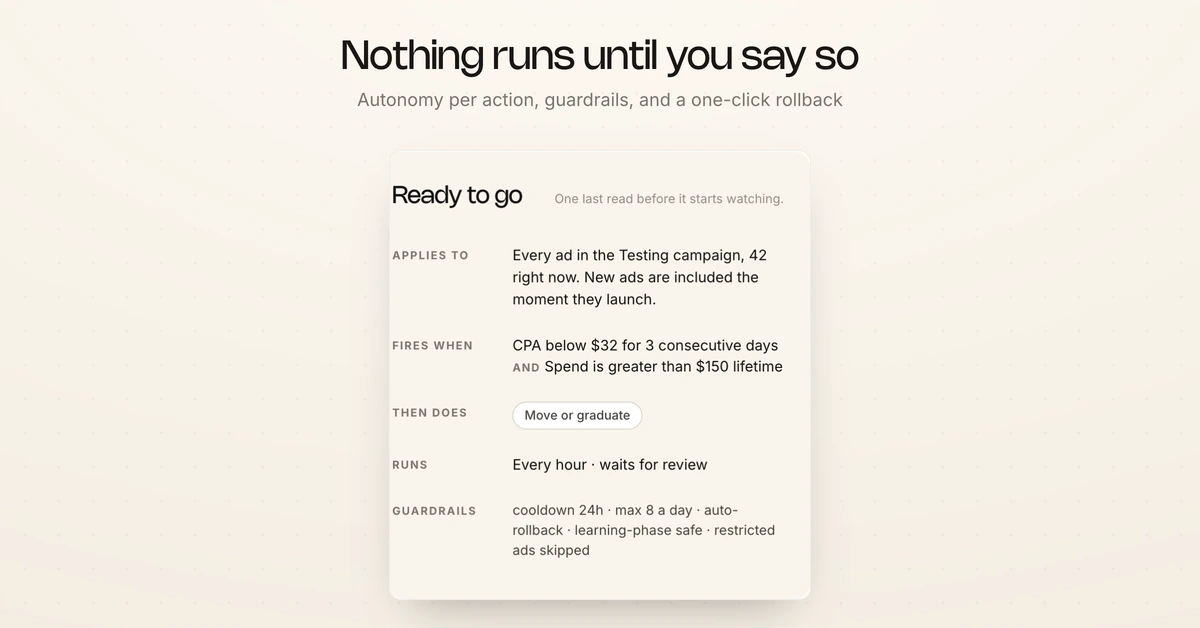
Every action the AdOps Agent takes runs at the autonomy level you choose, per action. Hawky's calls through 2026 showed why: once rules came up, review before execution was the first thing most buyers asked about, and only a couple wanted full autopilot on day one.
- Drafts first: launches and prompt-built campaigns arrive as drafts you approve.
- Autonomy per action: a rule can act on its own or wait for your review, and you loosen it as trust builds.
- Audit trail: every launch and every move is logged with the data that triggered it.
- One-click rollback: any single move can be reversed.
- Official APIs: Hawky connects through Meta's Marketing API and the Google Ads API, with no scraping.
- Rate-limit safe: a batch of hundreds is throttled to stay inside Meta's rate limits, so a launch never gets the account flagged.
Move: a whole campaign into another ad account
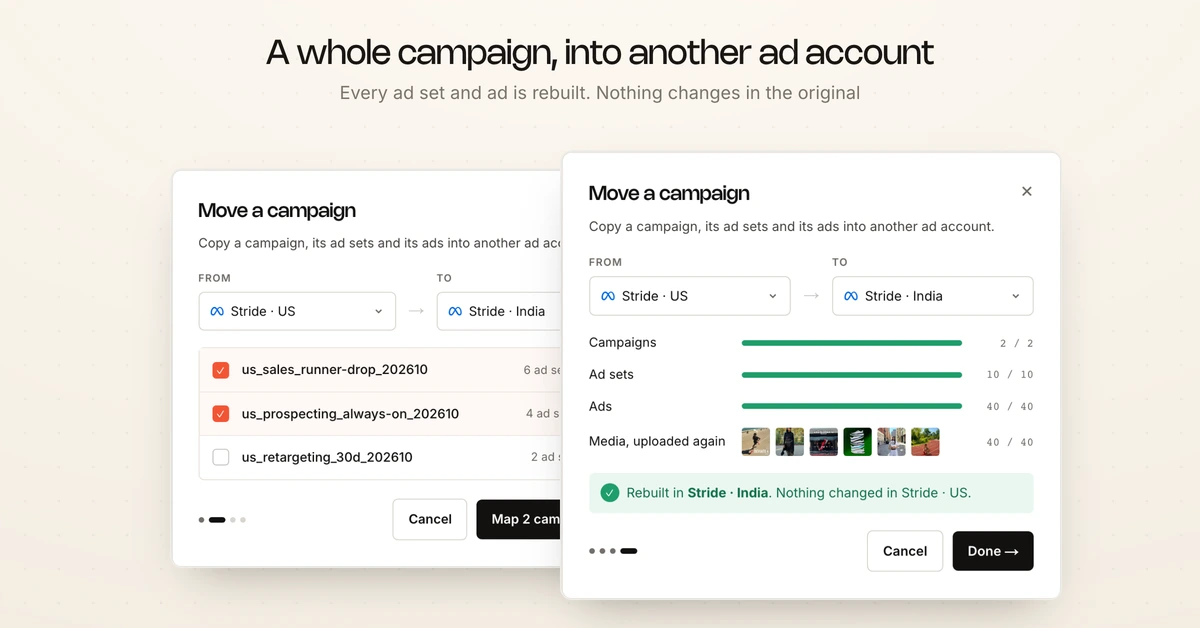
Moving a campaign in Hawky copies it, with every ad set and ad, into a different ad account, and the original stays exactly as it was. Agencies use it to hand a campaign over to a client's own account. Teams use it to restructure, to split accounts by brand or region, to open a new market, or to rebuild after an account was restricted.
You pick the From and To accounts and the campaigns, and Hawky rebuilds each one in the new account. Some assets belong to an account and cannot travel, so the move handles each type differently.
| What the campaign uses | What happens on the move |
|---|---|
| Campaign, ad sets and ads | Rebuilt in the new account with their settings |
| Pages, pixels, apps, audiences and lead forms | You choose what each one becomes in the new account |
| Images and videos | Uploaded again, because media cannot cross ad accounts |
| The original campaign | Untouched, nothing changes in the source account |
For agencies running many client accounts, Hawky for agencies covers how the rest of the platform fits that setup.
Who the AdOps Agent is for
The AdOps Agent pays off for teams whose marketers spend more time in Ads Manager than on the marketing. Three situations fit it best.
- You test new ads every week: creative volume is your main lever, and every batch brings more ops with it.
- You run separate testing and scaling campaigns: winners have to be rebuilt in scaling by hand today.
- You manage more than one account or brand: agencies and multi-brand teams repeat the same launch and promote routine on every account.
If you launch a handful of ads a month, Ads Manager is probably enough. For high-volume teams, the AdOps Agent is available now in Hawky, and it is one piece of the shift to autonomous performance marketing with guardrails and an audit trail.
Frequently asked questions
What is Hawky's AdOps Agent?
Hawky's AdOps Agent is the agent in Hawky that launches, runs and moves paid campaigns on Meta and Google. It launched as Hawky Campaign Management. Ad Launcher and Copilot get ads live in bulk, rule agents graduate winners and pause losers against your benchmark, and campaigns can be copied into another ad account. Every action is logged and reversible.
How many ads can Ad Launcher launch at once?
Ad Launcher is built for batches of hundreds. Each row of a CSV or Google Sheet becomes an ad, with columns mapped to the ad set, creative, primary text, headline, destination URL, budget and URL parameters. Creative testing follows ABO, with one creative and one ad per ad set.
Can Copilot build a campaign from a prompt?
Yes. Describe the launch in one sentence, such as the drop, the number of creatives, the audiences and the go-live time. Copilot proposes the campaign and ad set structure from the account's last 90 days, rewrites headlines and primary text per audience, and saves it as a draft for your review.
How does a rule agent decide an ad has won?
You set the benchmark: CPA, ROAS, CTR or hook rate, plus a minimum spend and a minimum number of days so a lucky day does not count. When an ad clears it, the rule moves the ad into the scaling campaign and ad set you chose. Ads that miss the bar are paused in the testing campaign.
Does Hawky change my ads without approval?
Only if you allow it. You set the autonomy level per action, so a rule can act on its own or wait for your review, and launches arrive as drafts. Every move is logged with the data that triggered it and can be rolled back in one click.
Can I move a campaign to another ad account?
Yes. Pick the From and To accounts and the campaigns, and Hawky rebuilds each campaign with all its ad sets and ads in the new account. You choose what each page, pixel, app, audience and lead form becomes there, images and videos are uploaded again, and nothing changes in the original account.
If your media buyers spend more of the week in Ads Manager than on the marketing, Hawky's AdOps Agent is built for that job.
Ready to hire your first AI performance team? Book Demo